


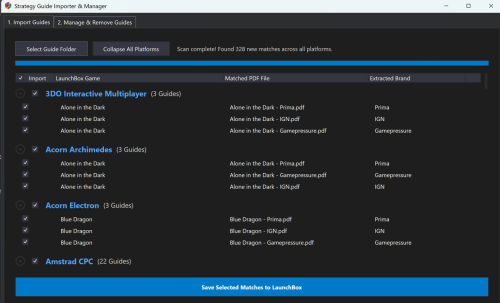
About This File
Strategy Guide Importer & Manager
A plugin to automatically batch-match and attach PDF strategy guides to your LaunchBox games, complete with a management tab to safely bulk-remove them.
⚠️ IMPORTANT: Requires LaunchBox Version 13.25 or newer.
✨ Key Features
-
Smart Matching: Ignores special characters and perfectly matches your PDFs to your LaunchBox database (e.g.,
Spider-Man Web of Fire.pdfmatchesSpider-Man: Web of Fire). -
Auto-Brand Extraction: Automatically tags the publisher in LaunchBox if formatted correctly (e.g., names it Strategy Guide (BradyGames)).
-
Built-in Deduplication: Skips PDFs that are already attached to prevent menu clutter.
-
Safe Bulk Removal: A dedicated tab to scan for and unlink attached guides. (Note: This only removes the database entry; it never deletes your actual
.pdffiles).
📥 Installation
-
Create a folder named
Strategy_Guide_Importerinside yourLaunchBox\Plugins\folder. -
Drop the plugin
.dllfile inside. -
(Optional) Right-click the
.dll, select Properties, and check Unblock if Windows blocked it. -
Restart LaunchBox.
📖 How to Use
-
Open LaunchBox, go to Tools, and select Strategy Guide Importer.
-
To Import: Use Tab 1 to select your PDF folder, review the matched platforms/games, and click Save.
-
To Remove: Use Tab 2 to scan your library for currently attached guides, check the ones you want to unlink, and click Remove.
🛠️ File Naming Best Practice
For the best automatic matching and brand extraction, name your PDFs like this: Game Title - Guide Publisher.pdf (Example: Final Fantasy VII - Prima.pdf)

