




About This File
An Old-Default-ish Launchbox theme, because I'm stubborn, and sometimes simpler is better. Not very fast on my 2020 laptop though. Regardless, I've enjoyed tweaking it to my needs over time, so I will call this theme "done" until further notice--or if there is something catastrophically wrong with the current file.
If you try it out, perhaps let me know if it's as sluggish as I think it is on other folks' systems... I am curious if it's an old-theme problem or a my-laptop-is-getting-old problem (it might also just be that I'm not versed enough in code to put together a theme that isn't riddled with errors resulting in slowdown).
In the theme folder Better Old Default I have also included optional font files (one of which is a URL to its itch.io page), as well as some backgrounds I edited and then upscaled based on Mr.RetroLust's Neon Deluxe Arcade background. The fonts can be chosen in Launchbox options after installing the font files to your system.
THEME INSTALLATION:
Better Old Default folder goes into LBThemes folder. Choose in LB Options or Themes & Media page.
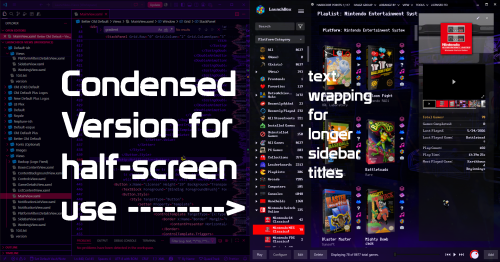
If applicable, rename MainView_Condensed.xaml to MainView.xaml to use the condensed version that will fit the top menu in one half of the screen (badge menu and notification bell are missing in this version to make room).
Optionally, install the included fonts. (Note: "Launchbox" logo on the top left may or may not look a bit off kilter with some custom fonts.
Also optionally, use one of the included wallpapers as your default LB background.
CREDITS:
Since this is more of an amalgamation of a few different themes, credit is due to those creators, such as Retrofrogg, Mr.RetroLust, and faeran.
...I'm sure I've forgotten something (゜д゜??)
Edited by d66dle
What's New in Version 1.0.0 See changelog
Released
No changelog available for this version.

