



About This File
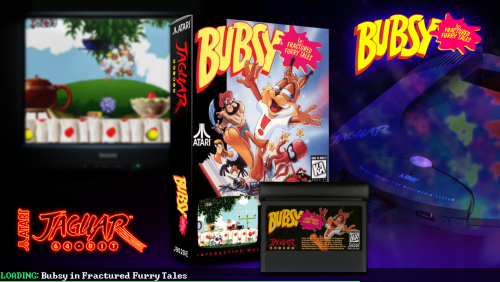
This is a modification of faeran's StageBox Startup Theme to be more Lights-Out/NeonDeluxe-ish.
I also readjusted the filling of the TV image so it's not so stretchy looking.
I kinda like how it turned out, so share it I must! (┛ಠ_ಠ)┛
CREDITS: faeren and Mr.RetroLust for both of their respective startup themes, which I have sort of mashed together here.
Changes from 1.0.6
Well, I figured out how to get per-platform backgrounds working... and platform logos. And fonts. Yee-haw I'm evolving
New version's changes are:
- custom per-platform backgrounds that I threw together to match the neon theme, plus some alternate backgrounds in the folders named 'Alts' that can be used for specific platforms, playlists, and/or your default background. Simply rename, for example, 'Arcade1' to 'Arcade' and copy/paste into the parent folder. If a platform/playlist is not present, the theme will simply fallback to the 'Default'.
- any background can now be used in place of these without having to edit in the TV thing in, because this is now an overlay on top of the background. A little easier for customization, I think.
- the theme now displays platform logos on the bottom left, as well as the game logo on the top right.
- the theme now uses 'Windows Command Prompt' font, which you may need to install from the Fonts folder.
- added XCF templates for the background, should anyone want to make their own in this style. They're pretty simple to make, since it's just overlaying the device/console on top of a blurred wallpaper image. 'BGNeon' is for the backgrounds, and 'BGTemp' is for the blurry TV overlay, which I figured I may as well toss in there.
Note: I only did backgrounds for the platforms I have in my own build, but I would (ideally) like to add as many as I can in future updates, especially as I add more platforms to my build.
Another Note: I'm not sure how to get platforms to work that have an '&' sign in them, such as Game & Watch, so I put those in a &-sign-breaks-these folder for now. (థ౪థᴖ)
Edited by d66dle
added info to description from newest 1.0.6 version
What's New in Version 1.0.0 See changelog
Released
forgot to put it in a sub-folder in the zip, so it can extract right into startupthemes folder
