

Legendizzy
-
Posts
8 -
Joined
-
Last visited
Content Type
Profiles
Forums
Articles
Downloads
Gallery
Blogs
Everything posted by Legendizzy
-
I'm super new to all of this, but I was able to piece enough together on YouTube on how to setup several Teknoparrot games on Launchbox. Some of them are a little quirky (I jumped through hoops to get Golden Gun to run on full screen), but once they're set up and everything is mapped through Teknoparrot, you'll be good to go. Also, like the post above me mentions, make sure you're using teknoparrotUI.exe and that the roms you're adding are in the teknoparrot user folder. Lastly, make sure you have the correct .xml file selected.
-
Working on My first DIY Arcade and Need Advice
Legendizzy replied to Legendizzy's topic in Collections and Builds
That makes a lot of sense. I was thinking of doing something similar. I'm thinking of mapping one to esc so that I can escape so that I can leave games, one to go to the tab button so that I can bring up the Mame menu (if needed), and one mapped to a shift key so that I can map future commands when I stumble on the ones that I'll need. Also, that wall cab is awesome! It looks super sleek. -
My Modern Arcade Machine Cabient Plans
Legendizzy replied to darrenfamicom's topic in Collections and Builds
Agreed! This would have been a Godsend for me! Plus the cab looks awesome. -
Hi everyone! I'm working on my first DIY arcade with my son and would like a bit of advice on the buttons and layout. We decided on a 4/6/6/4 layout for our buttons, a trackball, and USB ports on the sides for our Sinden light guns. However, I'm seeing lots of arcades with different admin type buttons at the top (start, menu, etc.) Of these buttons, which do I actually need? I saw this layout by Phantom Arcades that might be cool to mimic, but the buttons up top may not all be necessary. Any guess on why each set of controllers needs two buttons above it, and the three in the middle?

-
Mcfly Cabinet build - Standard and Pinball modes
Legendizzy commented on -McFly-'s gallery image in Photos of Your Builds
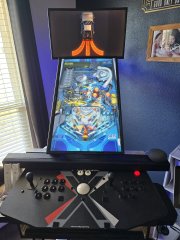 This is an amazing idea. I'm starting up a home arcade with my son, and he loves pinball games. This would make for an awesome novelty setup for a "pinball" build. Also, I agree with Zed. Pinball Timeshock was awesome.
 -
This seems to have done the trick. Thanks!
-
I see the videos folder and made a startup folder in that location. I then placed the videos in the startup folder, but am still having the same issue. It opens up directly to the colors theme.
-
Hi Everyone! I'm new to all of this, so please bare with me. I downloaded a startup video and followed the tutorial on youtube. However, there was no suggested videos folder in the location that the video showed. I made my own videos folder and placed the video there, but that didn't work. I then found a videos folder amongst the the Launcbox files and tried there, but that didn't work, either. Can anyone lend a hand?

