
About This File
Hi,
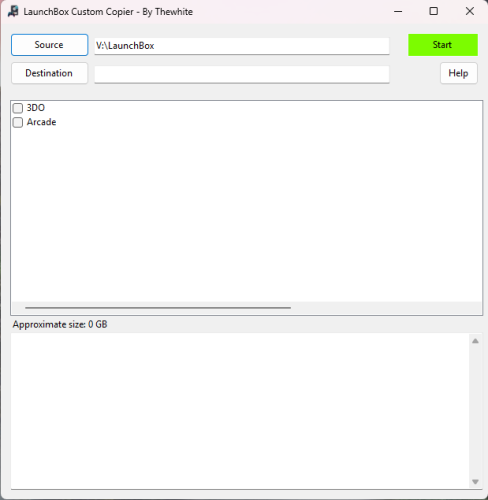
I created a small Windows tool that allows you to build a customized copy of your LaunchBox setup by selecting only the platforms you want to keep.
The goal is simple: reduce size, organize your collection, and create portable LaunchBox builds (for external drives, backups, or dedicated setups).

How it works:
-
Select your LaunchBox folder (source)
-
Choose a destination folder
-
Pick the platforms you want
-
The tool calculates the total size (games + media)
-
Start the copy process
What gets copied:
-
Games
-
Images
-
Videos
-
Manuals
-
Music
Only the selected platforms are included. Everything is reorganized automatically into a clean structure. The games are copied to the Launchbox\Games\Platform. The configuration files are modified with the new path. Optimized for emulator games with a single file or with .cue and m3u files. For other types of games (Windows and others), which contain multiple files, you will need to copy them manually.
Game handling:
-
Supports single-file formats (ISO, CHD, RVZ, etc.)
-
Supports M3U playlists (multi-disc games)
-
Supports CUE files and their referenced tracks
-
Automatically includes all required files
-
Avoids duplicates during size calculation
Additional features:
-
Estimating size before copying
-
Automatic update of ApplicationPath in platform XML files
-
Preserves all other LaunchBox data and configuration
-
Does not modify the original LaunchBox installation
The result is a fully independent LaunchBox setup containing only what you selected.
This tool is especially useful if you want a smaller, optimized LaunchBox build for emulation setups or storage-limited environments.
There is no progress bar, but the 2nd window indicates the folder being copied.