
Jump to content
LaunchBox Community Forums

3 Screenshots

About This File

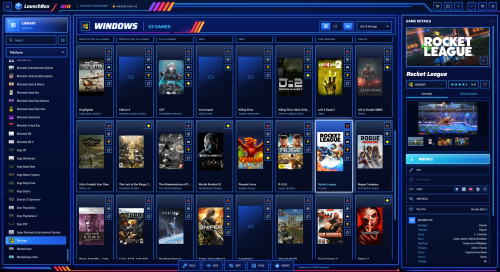
Apex Carpio channels 80s synthwave and style.


What's New in Version 1.2   See changelog

Released

*Updated - Good news and something I wanted to work originally the ImageView / ListView buttons now work live in the theme.

  • Like 8
  • Thanks 3
  • Unusual Gem 1

User Feedback

Recommended Comments

launchretrogirl2562

Posted

you are spoiling us.😊
This one is more in line with the one I have been using for years (neon deluxe arcade)
Probably I will like this one as well.

Thanks for the effort again. I am going to try it out and let you know if I have something noteworthy to mention.

  • Thanks 1
sanichi

Posted

What a great theme!!

I'm trying to make a very little change, i wont to reduce the size of the font for the game title in game detail.

Thanks for your help.

(And a little request, i dream of finding the same system than OMNI, where you can click for exemple on the developper and that leads directly to the right page)

  • Haha 1
launchretrogirl2562

Posted

2 minutes ago, sanichi said:

What a great theme!!

I'm trying to make a very little change, i wont to reduce the size of the font for the game title in game detail.

Thanks for your help.

(And a little request, i dream of finding the same system than OMNI, where you can click for exemple on the developper and that leads directly to the right page)

These are I think changes u can make in the xaml files in the views directory, but I will let Rincewind explain them to you.


  • Thanks 1
Rincewind

Posted

1 hour ago, sanichi said:

What a great theme!!

I'm trying to make a very little change, i wont to reduce the size of the font for the game title in game detail.

Thanks for your help.

(And a little request, i dream of finding the same system than OMNI, where you can click for exemple on the developper and that leads directly to the right page)

If you do a text search for "Binding Title" in the Game Details View then your see a font size change it to a smaller number and see how it looks.

As for the request I'm not sure what the right page would be.

  • Like 1
launchretrogirl2562

Posted

@Rincewind Not sure if this is caused by the type of notification, or it happens with all notifications. 
image.thumb.png.6c950fc728e4e19249e49a3bbccd11cb.png

Anyway, no matter how many times I click the 'X' or click the clear notifications...it doesn't listen. It just stays there.
So, maybe that still needs some looking into?

Rincewind

Posted

@launchretrogirl2562 Could you do a little test for me. If you go to "Tools - Downloads - Force Update Games Database Metadata..." and wait for it to finish you should get a notification after that, click the button and see if the "X" works there (it did for me). Also does the "Clear All" button work? The reason I want you to check is because i'm not sure if LB allows you to clear the Version update or not.

I am about to put a new update out for the theme but as I can't replicate your issue (as my version is up to date) I can't test to fix it.

launchretrogirl2562

Posted

@Rincewind yes, the notification could be cleared for the metadata database. The version update it seems that indeed that cannot be cleared.
Which is kind of stupid, cause it does say u can clear all notification...not just that particular one 😁 

so, maybe not something u can fix. 
At least I know the button does work (only the text it holds does not quite tick all the boxes)

  • Like 1

Join the conversation

You can post now and register later. If you have an account, sign in now to post with your account.

Guest
Unfortunately, your content contains terms that we do not allow. Please edit your content to remove the highlighted words below.
Add a comment...

×   Pasted as rich text.   Paste as plain text instead

  Only 75 emoji are allowed.

×   Your link has been automatically embedded.   Display as a link instead

×   Your previous content has been restored.   Clear editor

×   You cannot paste images directly. Upload or insert images from URL.

×
×
  • Create New...

