


About This File
Project Merger Plugin for LaunchBox
The Project Merger Plugin is a high-performance utility designed to integrate massive retro-gaming collections—including the eXo collections, C64 Dreams, and Flashpoint—directly into your LaunchBox library.
🛠 Requirements
-
LaunchBox Version: 13.26 or higher
-
If merging Flashpoint and you want the images then download the Flashpoint image archive from the flashpoint site (https://download.unstable.life/ultimate-direct/14_packed/) and extract them to your flashpoint directory. This is only required if you have Flashpoint Infinite. Flashpoint Ultimate comes with the images.
❓ Why This Plugin Exists
When you know how Launchbox works the concept of merging installs is not difficult. However, it is a pain to do and can cause issues if you mess things up. I wanted a way to automate the process and merge the projects in to an existing launchbox install in a way that would not change the users existing library, be neatly organized, have a small storage footprint, and be non destructive to the original project files.
📂 Supported Projects
The plugin is fingerprinted to recognize and process the following specific directory structures:
- eXo Collections: eXoDOS. exoDOS Lite, eXoWin3x, eXoWin9x, eXoAppleIIGS, eXoScummVM, eXoDREAMM, eXoDemoScn, and eXoIF. Can be merged in either individual projects or if you've already merged exo projects.
- C64 Dreams
- Flashpoint: Support for both Ultimate and Infinite.
📖 How to Use
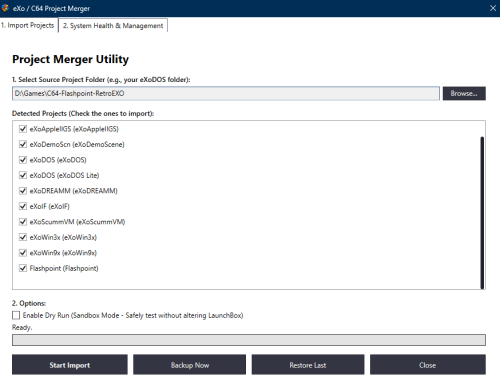
Extract the content of the archive to your /plugins/ folder. Download and follow the instructions to install/unpack your desired projects (exo, c64, and/or flashpoint). Start launchbox and go to the tools menu and select the plugin. In the plugin window browse to your source project folder. If you have multiple projects select the root folder that contains the project sub folders. The plugin will auto populate with the projects available for import. There is a "Dry Run" option enabled by default if you'd like to see get an idea of whats about to happen otherwise uncheck that option. Click start import. The plugin will create a backup of your parents and platform xml files prior to making changes. These can be found in the plugin directory. You will get a UAC prompt about half through the process. This is required to create symlinks. A full import of all the projects on a destination NVME takes about 10 minutes.
If you run in to issues or want to remove a project the second tab is for you. You can get a very basic idea of what the condition of the install is in, repair it, or uninstall one or multiple projects. Additionally, If there is ever an update you simply update the project at the source and select repair on the second tab.
💻 How does it work?
Retro Exo and C64 Dreams are simply just highly curated Launchbox libraries by themselves. They both utilize a custom project folders at the root of their Launchbox folders. With this in mind and remembering our goal of small storage footprint and wanting to keep the source intact we can move over dependencies and symlink anything else. In broard terms the games and media themselves are all still at their source while things like emulators and config files are copied over. You could technically play a game on exodos and then pick it back up where you left off on your merged launchbox folder. There are also dependent plugins for C64 Dreams and Retro Exo that get added in as well. I include these in the plugin folder because depending on which version of the project you are importing you may have an out of date version so the plugin contains the most up to date for you.
Flashpoint is a little different. It looks similar to Launchbox but it is not Launchbox thus we must convert it to something Launchbox can understand. There are over 200k titles in Flashpoint. The plugin scans the source Flashpoint directory finds the sql database and converts it in to a Flashpoint.xml. It does the same for the playlist json files converting them to xml files. Additionally, the images folder is nothing like what Launchbox needs. Thus it finds all images in the Flashpoint folder and creates symlinks of them to your destination Launchbox directory. Finally, we extract ClifP from the plugin folder to bridge Flashpoint and Launchbox and actually run the games.
To get the archive imported without conflicting with the users current library we rename the platforms to identify them as purely the project they represent, ie MS-DOS = eXoDOS, AppleIIGS = exo AppleIIGS, etc... Additionally, to keep it clean we create "master platform categories" such as "Retro Exo" and nest all the projects/platforms under the master platform category. IE: Retro Exo (Master Category)>eXo DOS (Project Category)> "exo dos platform and playlists go here". The plugin does all the xml injections and edits in the background.
⚠️ WARNING
Flashpoint Scale: Flashpoint is incredibly resource-intensive, featuring approximately 200,000 titles and nearly 500,000 images. It's recommended you use an SSD as your destination Launchbox install for best performance.
StableBit DrivePool Incompatibility: During development, it was identified that StableBit DrivePool does not handle large volumes of individual files and symbolic links effectively. Attempting to use this plugin on a pooled drive can and will cause system crashes that wont resolve after a restart. I spent about 24 hours in windows recovery and physically unplugging drives to get my system to boot again. Please ensure you are targeting a standard physical drive to maintain system stability.
A final word on compatibility. While I tested several games across all the projects during the course of development I cannot guarantee that this is truly 100% working. Thus any and all feedback is appreciated.
Eventually I plan on creating a custom media pack for this plugin so everything has, icons, clear logos, and videos.
What's New in Version 1.0.1 See changelog
Released
Fixed a small but meaningful bug where dependent Retro Exo project folders were not being copied over recursively essentially breaking all games for all projects... oops.
