
Jump to content
LaunchBox Community Forums

1 Screenshot

About This File

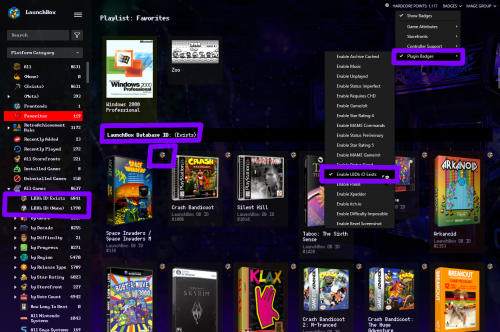
A simple custom badge I made using LBCustomBadge. Makes it easier to view at a glance which games are linked to the database without sorting by ID. I've included the badge plugin, badge image, automated playlists, and platform icons for playlist use.

Plugin .dll goes into Plugins folder.

the 2 playlists go into Data\Playlists

I put my custom badge image into Images\Media Packs\Overrides\Badges

and the playlist images in Images\Media Packs\Platform Icons\Legacy Conversion Icon Pack\Playlists (or whatever pack you're using from Tools > Manage > LB Themes & Media)

LBDbIDExists.png.a7965e4f06698be243f1c2ea92c1c2a1.png

LBDbIDNone.png.aea5d2b69089b033905e180c66bb8a8e.png

and that's all... ┏(◐‿◑)┛


Edited by d66dle
description edit

  • Like 2

User Feedback

Recommended Comments

Hanz

Posted

This is incredibly handy for me to figure out which games at a glance I need to research to add them to the database.

Join the conversation

You can post now and register later. If you have an account, sign in now to post with your account.

Guest
Unfortunately, your content contains terms that we do not allow. Please edit your content to remove the highlighted words below.
Add a comment...

×   Pasted as rich text.   Paste as plain text instead

  Only 75 emoji are allowed.

×   Your link has been automatically embedded.   Display as a link instead

×   Your previous content has been restored.   Clear editor

×   You cannot paste images directly. Upload or insert images from URL.

×
×
  • Create New...
