
Jump to content
LaunchBox Community Forums

14 Screenshots

About This File

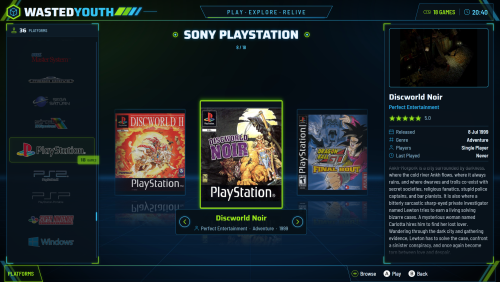
A few years back I built my own arcade cabinet and called it Wasted Youth, a nod to all the hours (and coins) I spent in arcades growing up. This theme was made for that cabinet, so it has the same colours.

The colours are neon green and cyan on a dark background. Everything is styled to match: the platform and game screens, Discover, game details, the system and options menus, the popups, four different screensavers, plus matching loading, game-over and pause screens and a sound pack.

I made it for my own cab, but it works just as well on any Big Box setup. I hope you enjoy it.

INSTALL
-------
1. Close Big Box and LaunchBox.
2. Unblock the Zip file.
3. Then copy the LaunchBox folder from the zip onto your LaunchBox folder (merge / overwrite).
4. In Big Box Options:

  • Themes ............ WastedYouth
  • Sounds ............ Sound pack: Wasted Youth   (sounds then work from start-up)
  • Game Startup ...... Startup theme: WastedYouth (startup screens switched on)
  • Game Pause ........ Pause theme: WastedYouth

  • Like 4

User Feedback

Recommended Comments

bundangdon

Posted

This is a really cool theme! Thanks a lot for sharing this. I just wish it would be possible to remove the "Wasted Youth" logo that's on the top left of the BigBox theme. (I couldn't find an image of this in the theme's folders) Also, it would be great if the text games list selected game could be centered. Aside from these small issues, however, this is an excellent BigBox theme. Keep up the good work!

Rincewind

Posted

On 10/17/2026 at 11:59 AM, bundangdon said:

I just wish it would be possible to remove the "Wasted Youth" logo

Thanks for the comments @bundangdon I understand the name of the theme might not be to everyone's taste, Simple fix just edit every view that has this code...

                    <TextBlock Margin="{Binding Converter={StaticResource Scale}, ConverterParameter='20,0,0,0'}"
                               VerticalAlignment="Center"
                               FontFamily="LAUNCHBOX_THEME_FOLDER/Fonts/Saira-ExtraBold.ttf#Saira ExtraBold"
                               FontSize="{Binding Converter={StaticResource Scale}, ConverterParameter='62'}">
                        <Run Text="WASTED" Foreground="#EAF6FF"/><Run Text="YOUTH" Foreground="#35C3F0"/>
                    </TextBlock>

either remove the whole block or edit it. As you know from the description this was made for my cabinet so any updates will only be made if I feel it needs it.

  • Thanks 1
NNEMO

Posted

I am using your theme, love it. I had the theme modified with claude AI, green to white. I edited the buttons for my arcade green and red. I had the game scroll letter change set to only once per letter change. Im still having it modified for my arcade build, it is a white cabinet, and your theme looks amazing. I uploaded a photo of it.

white theme.jpg

  • Unusual Gem 1

Join the conversation

You can post now and register later. If you have an account, sign in now to post with your account.

Guest
Unfortunately, your content contains terms that we do not allow. Please edit your content to remove the highlighted words below.
Add a comment...

×   Pasted as rich text.   Paste as plain text instead

  Only 75 emoji are allowed.

×   Your link has been automatically embedded.   Display as a link instead

×   Your previous content has been restored.   Clear editor

×   You cannot paste images directly. Upload or insert images from URL.

×
×
  • Create New...