

Tobias Widjestam
-
Posts
4 -
Joined
-
Last visited
Content Type
Profiles
Forums
Articles
Downloads
Gallery
Blogs
Everything posted by Tobias Widjestam
-
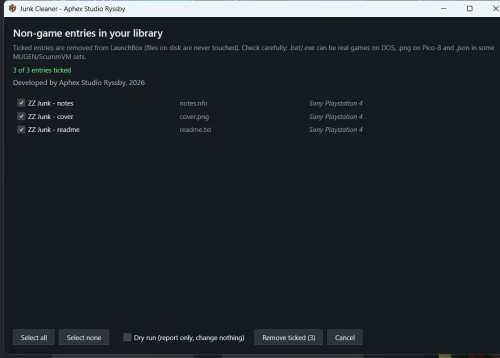
Small plugin release for a problem I kept running into: import a folder and the library fills up with entries for .dll, .txt, .md5, .nfo, .ico, .log, .bat and cover images - each one showing up as a "game" in the platform list, and each one needing five clicks to get rid of. What it does Tools -> "Junk Cleaner - remove non-game entries" opens a review window: lists every library entry whose file is not a game, with title, file name and platform one checkbox per entry - nothing goes unless you tick it Select all / Select none, and the button always shows the count ("Remove ticked (12)") "Dry run (report only, change nothing)" shows what would go before anything is touched removal uses the plugin API (IDataManager.TryRemoveGame + Save), so no XML editing and no restart - and no files on disk are ever deleted, only library entries One thing to be careful about: a few extensions in that list are real games on specific systems - .bat/.cmd on DOS and ScummVM, .png for Pico-8 carts, .json in some MUGEN/ScummVM sets. That is exactly why it is a review list instead of a silent clean-up: untick what you want to keep, and run Dry run once on a big collection. Download: Junk Cleaner 1.0.0 on the downloads page Source (MIT): github.com/tobiaswidjestam-design/launchbox-junk-cleaner Install: close LaunchBox, copy the JunkCleaner folder into LaunchBox\Plugins\, start LaunchBox. Needs LaunchBox 13.x or newer on Windows 10/11 x64. Feedback is welcome in this thread - especially file types that should be added to or removed from the list, and cases where something legit got flagged on your setup.
-
Version 1.0.1
7 downloads
Junk Cleaner by Aphex Studio Ryssby, 2026 Automatic Import pulls every file that sits next to your ROMs into the library - .dll, .bat, .ico, .log, .md5, .txt, .dat, .json, .nfo and cover images - and each one becomes a "game" in the platform list. This plugin lists them all in one window so you can review and remove them in a few clicks. WHAT IT DOES Tools -> "Junk Cleaner - remove non-game entries" - lists every entry whose ApplicationPath has a non-game extension, with title, file name and platform - one checkbox per entry, so nothing is removed without you seeing it - Select all / Select none, and the button always shows the count: "Remove ticked (12)" - "Dry run (report only, change nothing)" shows what would go before touching anything - removal uses the LaunchBox plugin API (IDataManager.TryRemoveGame + Save): no XML editing, no restart, and no files on disk are ever deleted - only library entries INSTALL Close LaunchBox, copy the JunkCleaner folder into LaunchBox\Plugins\, start LaunchBox and pick it from the Tools menu. Requires LaunchBox 13.x or newer (.NET 10), Windows 10/11 x64. PLEASE READ Some extensions in the list are real games on specific systems: .bat/.cmd on DOS and ScummVM, .png for Pico-8 carts, .json in some MUGEN/ScummVM sets. That is why the plugin shows a review list instead of deleting silently - untick what you want to keep, and use Dry run the first time on a large collection. Source: https://github.com/tobiaswidjestam-design/launchbox-junk-cleaner Release: https://github.com/tobiaswidjestam-design/launchbox-junk-cleaner/releases/tag/v1.0.1 MIT licensed. Feedback and false-positive reports welcome. -
Junk Cleaner - review and remove non-game entries from your library View File Junk Cleaner by Aphex Studio Ryssby, 2026 Automatic Import pulls every file that sits next to your ROMs into the library - .dll, .bat, .ico, .log, .md5, .txt, .dat, .json, .nfo and cover images - and each one becomes a "game" in the platform list. This plugin lists them all in one window so you can review and remove them in a few clicks. WHAT IT DOES Tools -> "Junk Cleaner - remove non-game entries" - lists every entry whose ApplicationPath has a non-game extension, with title, file name and platform - one checkbox per entry, so nothing is removed without you seeing it - Select all / Select none, and the button always shows the count: "Remove ticked (12)" - "Dry run (report only, change nothing)" shows what would go before touching anything - removal uses the LaunchBox plugin API (IDataManager.TryRemoveGame + Save): no XML editing, no restart, and no files on disk are ever deleted - only library entries INSTALL Close LaunchBox, copy the JunkCleaner folder into LaunchBox\Plugins\, start LaunchBox and pick it from the Tools menu. Requires LaunchBox 13.x or newer (.NET 10), Windows 10/11 x64. PLEASE READ Some extensions in the list are real games on specific systems: .bat/.cmd on DOS and ScummVM, .png for Pico-8 carts, .json in some MUGEN/ScummVM sets. That is why the plugin shows a review list instead of deleting silently - untick what you want to keep, and use Dry run the first time on a large collection. Source: https://github.com/tobiaswidjestam-design/launchbox-junk-cleaner Release: https://github.com/tobiaswidjestam-design/launchbox-junk-cleaner/releases/tag/v1.0.1 MIT licensed. Feedback and false-positive reports welcome. Submitter Tobias Widjestam Submitted 11/20/26 Category Third-party Apps and Plugins
-

