

Tobias Widjestam
-
Posts
4 -
Joined
-
Last visited
Content Type
Profiles
Forums
Articles
Downloads
Gallery
Blogs
Files posted by Tobias Widjestam
-
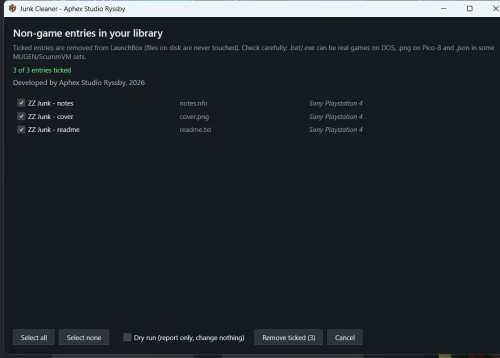
Junk Cleaner - review and remove non-game entries from your library
By Tobias Widjestam in Third-party Apps and Plugins
Junk Cleaner by Aphex Studio Ryssby, 2026
Automatic Import pulls every file that sits next to your ROMs into the library - .dll, .bat,
.ico, .log, .md5, .txt, .dat, .json, .nfo and cover images - and each one becomes a "game" in
the platform list. This plugin lists them all in one window so you can review and remove them
in a few clicks.
WHAT IT DOES
Tools -> "Junk Cleaner - remove non-game entries"
- lists every entry whose ApplicationPath has a non-game extension, with title, file name
and platform
- one checkbox per entry, so nothing is removed without you seeing it
- Select all / Select none, and the button always shows the count: "Remove ticked (12)"
- "Dry run (report only, change nothing)" shows what would go before touching anything
- removal uses the LaunchBox plugin API (IDataManager.TryRemoveGame + Save): no XML editing,
no restart, and no files on disk are ever deleted - only library entries
INSTALL
Close LaunchBox, copy the JunkCleaner folder into LaunchBox\Plugins\, start LaunchBox and pick
it from the Tools menu. Requires LaunchBox 13.x or newer (.NET 10), Windows 10/11 x64.
PLEASE READ
Some extensions in the list are real games on specific systems: .bat/.cmd on DOS and ScummVM,
.png for Pico-8 carts, .json in some MUGEN/ScummVM sets. That is why the plugin shows a review
list instead of deleting silently - untick what you want to keep, and use Dry run the first
time on a large collection.
Source: https://github.com/tobiaswidjestam-design/launchbox-junk-cleaner
Release: https://github.com/tobiaswidjestam-design/launchbox-junk-cleaner/releases/tag/v1.0.1
MIT licensed. Feedback and false-positive reports welcome.
7 downloads
(0 reviews)0 comments
Updated
