

jugsta
-
Posts
6 -
Joined
-
Last visited
Content Type
Profiles
Forums
Articles
Downloads
Gallery
Blogs
Everything posted by jugsta
-
One more thing. Regarding the numbers mentioned above.... I still have some reconciling to do but those numbers include the 150 or so for the entire Neo-Geo catalog. For those entries, I simply took the images that were uploaded by Mr. Retrolust and cropped to fit my screen resolution. Nonetheless when I get a handle on the spreadsheet, I'll share it in here.
-
Another Update! I just realized yesterday that I didn't have all of CPS covered. I somehow missed X-Men vs. Street Fighter in my initial passthrough. Here is that one. To restate the objective and update the scope- here is the plan! I currently have 476 Arcade games that have a 2560x720 Marquee and 1920x1080 "Top Plate". Of those, I would say that well over 250 are what I would deem premium files with numerous vector recreations and some form of instructions (of varying detail based on source materials). While the CPS titles vary in quality, they are in general the most detailed entries I've created. I currently have 689 arcade titles targeted so my work continues... As mentioned before I hope to create digital move lists for fighting game titles that are generated with a specific stretched LCD aspect ratio that will ultimately go in my cabinet control panel. I also am building a database to keep up with this stuff. Marquee, Top Plate, Quality Rating, Indicator of an editable AI File (I lost some regrettably), Etc. Finally, the easiest part should be generating a matching Zaparoo label set to match this set for card launching. Thankfully, building that set should be fairly quick and straight forward due to the zaparoo app. Still a long way to go but really making some headway. Also Attaching Wrestlefest (forgot to add the developer logo) as a bonus!

-
Thanks man! It's a labor of love. I just redid Vampire Savior as the first one had some issues (a lot of them have issues). Ideally, I'd like to get a fourth screen integrated into my control panel that is roughly the same width and get all the move strip information there. Someday I suppose. -EDIT- Woops. Didn't finish the chain combo section.
-
I'm feeling pretty good about this "Pink Sweets" one I just finished. Some of these cave ones have been difficult. I'm also trying to figure out a way to package this stuff up so I can share it once I've reached my limit (which is soon).
-
Hey guys and gals. I'm fairly certain that this is my first post on the boards. I just wanted to run a personal project by you that I've been working on in my free time. Having been modifying a Vewlix I purchased nearly 2 years ago, I have found myself with a 2560x720 monitor mounted to black plexiglass in the header plate location (where the vewlix logo is). I've also affixed a 22in 1080p monitor to the top of the housing (this is typically where a "marquee" or instruction set would go). What I've kept telling myself is that the people who will find themselves playing this cabinet will find the content pretty obscure and that they may need some help getting started. Because of this I have begun to build a library of native 1920x1080p instruction sets that will be displayed on the upper screen during gameplay. Strangely, I can't seem to find a picture to share of it (probably because I'm always working on it and there often isn't an opportunity for a photo op). Anyways, I thought I'd run some of these by you and see if you find the endeavor worthwhile. DISCLAIMER: I am not a purist- I've taken many liberties and shortcuts just to expedite this project. As it's personal project, I don't mind the imperfections and inaccuracies that may be found within the project. I have used AI for both translations and image generation (only once so far!). As I am not creative or artistic enough to generate content, I have reused modified and manipulated a lot of content to keep things moving along. Using Adobe illustrator- some things have been simply stitched together and trimmed for fit while others have been completely rebuilt in attempt to be as accurate to the source material as possible. There really is no rhyme or reason to it. MISSION: To supplement my arcade specific library with a dedicated, pixel perfect marquee image and instruction set which will be displayed during gameplay. SPECIAL THANKS: I really appreciate anyone who has dug up some old original arcade literature/artwork and got it posted to the GamesDB. I've used countless items from it. I am also thankful for the third screen plugin created by Superrob3000. Without both this wouldn't be possible. EXAMPLES: Carrier Air Wing - Image stitching from the database. I also found an original instruction page set on another board. It was a bit tattered and the style was easy enough to regenerate in illustrator. Life Force - Took some artistic liberties with the source material; recreated the original ship upgrade section X-Men - I'm pretty proud of this one. I had to work pretty hard to get all the information on the screen and found a nice way to tie it all together with the diamond plating and Magneto. Vectorized and translated the original instruction materials. Triggerheart Excelica - This is a classic example of not having much to work with. I used a generic template for the controls and tried to put something together artistically. Guilty Gear Strive - As with most modern games, GGST doesn't have a whole lot of reusable material for instruction generation. The solution was to make a generic template that matches the backlit move strip on the control panel. The plus side of this is you can generate instruction pages very quickly. *Movestrip for reference; printed on transparency paper and looks pretty good in person. I have nearly completed the Capcom CPS set and have been pecking away at some of my other favorites. Anyways- let me know what you think! I'll post a picture of my setup when I get a chance.
-
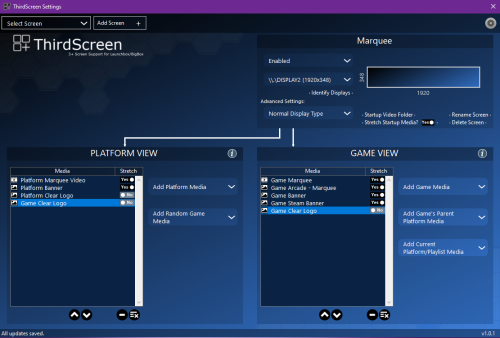 This has been one of the best things about Launchbox! It is easy to use and really upgrades the attractiveness of my cabinet. If I were to wish for one feature to be added it would be to have my stream deck (via a button press) be able to cycle through images I have in the meta data slots for the two screens it utilizes. As I have some games with more custom created images than others, it would allow me on-the-fly adjustments while actually gaming. Thank you so much for the contribution!
- 218 comments
-
- 1
-

-
- third screen
- platform marquee videos
- (and 3 more)


.png.72848786929571a3adbbffb2ddebe8cd.png)




