

sansa
-
Posts
16 -
Joined
-
Last visited
Content Type
Profiles
Forums
Articles
Downloads
Gallery
Blogs
Everything posted by sansa
-
 I'm sure your solution will be just as good! I'd love to compare notes with you too whenever you feel like giving it a try!
-
Tentei baixar novamente e não tive nenhum problema. Tenta baixar de novo, acabei de disponibilizar uma nova versão, se quiser.
-
I'm glad you find it interesting! 😁 Sure, it's definitely possible! Feel free to add me on Discord, my username is sansa90. That way, you can explain exactly what you need, and we can try to implement it! 😉
-
Version 2.8.1
26 downloads
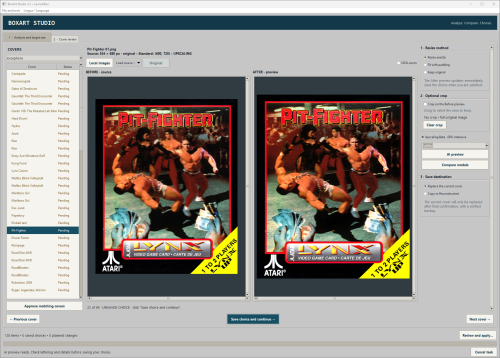
# BoxArt Studio — a portable cover-art tool for LaunchBox (English / Italian) Hi everyone, I’d like to share a small tool I’ve wanted for a long time: BoxArt Studio. While organizing my LaunchBox collection, I kept running into covers with different sizes, awkward borders, very low resolutions, and inconsistent proportions. Arcade was particularly tricky: sometimes the image displayed by LaunchBox was a flyer or fanart, while an actual front cover was missing. Getting everything ready could mean a lot of repetitive work, one game at a time. I’m not a programmer. I developed this application with the help of AI, starting from a practical idea and refining it through tests on my own collection. My aim was to make organizing cover art in LaunchBox simpler, with a clear preview and control over every change. ## What it does - Reads your LaunchBox platforms and scans Box - Front and Box - Front - Reconstructed, including regional subfolders and custom folder paths. - Offers a sequential multiple-cover review: view all variants, explicitly mark one KEEP, then move the others to backup or permanently delete them after confirmation. You can also keep all variants and skip the game. At least one valid cover must remain. - Counts exact image dimensions and suggests the most common size as a target. You can also enter your own dimensions. - Lets you review covers with Before / After previews, crop unwanted borders, resize exactly, or preserve proportions using padding with blurred, solid-color, or transparent fill. - Shows games without a recognized front cover and lets you create a Reconstructed cover from their local images, with a thumbnail gallery showing image categories and dimensions. - Lets you load a better source from your PC, a direct image URL, or a manually selected Google Images result in the integrated browser. - Includes optional local AI upscaling with Faithful and Detailed models, plus a comparison preview. It runs locally and is marked as a GPU-intensive beta feature. - Supports English and Italian, selectable from Lingua / Language, and remembers your preference. ## Keeping control of the changes Saving a resize choice records it in the review; resizing is applied after the final summary is confirmed. Multiple-cover cleanup is separate: its clearly labeled buttons act immediately. Backup copies preserve the original relative paths and can be restored manually; permanent deletion creates no backup and cannot be undone. Close LaunchBox and Big Box before removing covers. If you move to another cover with unsaved changes, the app asks whether to save, discard, or stay on the current item. Existing covers can be replaced with verified backups or saved as copies in Reconstructed. Newly created covers go to Reconstructed, leaving their source images untouched. You can save and reopen review sessions, and restore completed backup sessions using their logs. ## Getting started Download the attached ZIP, extract the whole folder, and run BoxArtStudio.exe. It’s a portable Windows 64-bit application and does not need a Python installation. The English and Italian READMEs explain the workflow, requirements, backups, and limitations. Normal resizing does not require AI. Optional upscaling needs compatible Vulkan GPU drivers, and the integrated browser uses Microsoft Edge WebView2. AI can introduce artifacts, especially in faces and lettering, so the previews are there to help you decide whether a result is worth keeping. I’m sharing this as a community project. It is not an official LaunchBox application. The upscaling engines and models are existing third-party projects, with their licenses included in the package. I’d love feedback from people with different collections, particularly on the workflow, image matching, and anything that feels confusing or repetitive. My hope is that this makes the cover-cleanup process a little easier for someone else too. Thanks for taking a look! -
BoxArt Studio View File # BoxArt Studio — a portable cover-art tool for LaunchBox (English / Italian) Hi everyone, I’d like to share a small tool I’ve wanted for a long time: BoxArt Studio. While organizing my LaunchBox collection, I kept running into covers with different sizes, awkward borders, very low resolutions, and inconsistent proportions. Arcade was particularly tricky: sometimes the image displayed by LaunchBox was a flyer or fanart, while an actual front cover was missing. Getting everything ready could mean a lot of repetitive work, one game at a time. I’m not a programmer. I developed this application with the help of AI, starting from a practical idea and refining it through tests on my own collection. My aim was to make organizing cover art in LaunchBox simpler, with a clear preview and control over every change. ## What it does - Reads your LaunchBox platforms and scans Box - Front and Box - Front - Reconstructed, including regional subfolders and custom folder paths. - Offers a sequential multiple-cover review: view all variants, explicitly mark one KEEP, then move the others to backup or permanently delete them after confirmation. You can also keep all variants and skip the game. At least one valid cover must remain. - Counts exact image dimensions and suggests the most common size as a target. You can also enter your own dimensions. - Lets you review covers with Before / After previews, crop unwanted borders, resize exactly, or preserve proportions using padding with blurred, solid-color, or transparent fill. - Shows games without a recognized front cover and lets you create a Reconstructed cover from their local images, with a thumbnail gallery showing image categories and dimensions. - Lets you load a better source from your PC, a direct image URL, or a manually selected Google Images result in the integrated browser. - Includes optional local AI upscaling with Faithful and Detailed models, plus a comparison preview. It runs locally and is marked as a GPU-intensive beta feature. - Supports English and Italian, selectable from Lingua / Language, and remembers your preference. ## Keeping control of the changes Saving a resize choice records it in the review; resizing is applied after the final summary is confirmed. Multiple-cover cleanup is separate: its clearly labeled buttons act immediately. Backup copies preserve the original relative paths and can be restored manually; permanent deletion creates no backup and cannot be undone. Close LaunchBox and Big Box before removing covers. If you move to another cover with unsaved changes, the app asks whether to save, discard, or stay on the current item. Existing covers can be replaced with verified backups or saved as copies in Reconstructed. Newly created covers go to Reconstructed, leaving their source images untouched. You can save and reopen review sessions, and restore completed backup sessions using their logs. ## Getting started Download the attached ZIP, extract the whole folder, and run BoxArtStudio.exe. It’s a portable Windows 64-bit application and does not need a Python installation. The English and Italian READMEs explain the workflow, requirements, backups, and limitations. Normal resizing does not require AI. Optional upscaling needs compatible Vulkan GPU drivers, and the integrated browser uses Microsoft Edge WebView2. AI can introduce artifacts, especially in faces and lettering, so the previews are there to help you decide whether a result is worth keeping. I’m sharing this as a community project. It is not an official LaunchBox application. The upscaling engines and models are existing third-party projects, with their licenses included in the package. I’d love feedback from people with different collections, particularly on the workflow, image matching, and anything that feels confusing or repetitive. My hope is that this makes the cover-cleanup process a little easier for someone else too. Thanks for taking a look! Submitter sansa Submitted 11/01/26 Category Third-party Apps and Plugins
-
@DOS76 thank you very much
-
Hi, i started a support request but i didn't received any response. I bought launchbox September 24, 2015. when I bought the license to the site they were guaranteed all the updates that would come out from that point in the future. Now I'm back to visit the site and noticed that now the license from $ 20 only includes one year of updates. I wanted to know if the license that I bought almost a year ago, he was part of the new policy. Honestly I am very happy to have purchased launchbox to support you, but I decided to do it just because the price was competitive and guaranteed me all updates. Forgive me for my bad English, I'm Italian and I do not speak it very well.
-
yes, but doesen't work
-
yes i add it to the launchbox folder, with command line mame it's work like a charm but with mameui64 no :(
-
Hi, i try to add some mame roms on my launchbox, but when i start the game the emulator can't find the roms...if i start it from the emulator instead the game would load correctly :( Any help? Sorry for my bad english :(
-
thank you very much jason :D
-
Hi, in big box mode it is possible to show a specific video when the front end can't find one?
-
i've search for that all the day, but i can't find anything :( I love your program, especially because unlike all the other front end is simple, clean and essential , if you can include this functionality for decompression on the fly , you will always be my hero , for years I was looking for a front end like that You have created and this feature would make it more perfect .
-
Unfortunately, the size of my hard drives are very low and are forced to keep individual images in a compressed format, you know by any chance if there is already a script that I can use?
-
excuse maybe I explained badly. I'm Italian and my English is bad. In hyperspin there is a way to ensure that when a game is launched the system automatically extract the iso from .rar or .zip and then mount automatically with daemon tools to start it correctly, there is a method to do so in launchbox?
-
Hi, yesterday I bought launchbox and I have a little problem , my whole archive of ps1-ps2 consists of images compressed in .zip and .rar, to be launched with hyperspin, it is possible to make them functional even on launchbox without extract them manually one by one?