
.jpeg.d4005897305c31e6384f187a4c940111.jpeg)
Henstra1989
-
Posts
11 -
Joined
-
Last visited
Henstra1989's Achievements

8-Bit Processor (3/7)
1
Reputation
-
application path: = "G:\Windows\NoClient\Launchers\A Way Out.lnk this" Ink path target: "G:\Windows\NoClient\Games\A Way Out\Haze1\Binaries\Win64\AWayOut.exe" Ink path start in: "G:\Windows\NoClient\Games\A Way Out\Haze1\Binaries\Win64\" This black screen and goes back to bigbox wheel happends everytime and not all games are effected most games that are affected with for me that is are .Ink linking to exe files Yes this was also a problem in 14:01 I was to lazy to report it back than. dont know if it was a problem at 14:0 / I cannot remember last time it worked correctly it could be a me problem with wrong configs.
-
I feel what u mean I had this problem also what u describe with 1 game named "A way out" there is maybe some more games having this problem.
-
I tryed both after upgrading to the newer beta first normal after that reopened launchbox the second time as admin becaus the first time already gave does problems yea your right Sorry AzgoRAth for the log files I putted them inside a archive
-
Yes I was logged into epic games during my test this is what I found I have 53 games installed on Epic games launcher inside their own library. startup Launchbox 14.01 navigate Menu - Tools - manage - Storefronts connect epic games account navigate into Menu - Tools - import - Epic games. inside Wizard, next - platform Epic games - scrap as windows - next - next - next - next - next - wait parsing to epic games - Checked installed - 53 games are marked - Finish Everything goes how it needs to go The games entries automatically are marked as installed the redirect to epic games Library works when trying to launch the games Install a new game inside Epic Games Storefront library than on launchbox navigate into Menu - Tools - import - Epic games inside next - platform Epic games - scrap as windows - next - next - next - next - next - wait parsing to epic games - Checked installed - 55 games are marked - Finish so everything works perfect Navigate Menu - Help -Check for updates New update is found u want to install version-14.1-beta-3? yes after Installation start the new Launchbox 14.1 beta 3 (doesn't matter if u use admin or not the problem is the same on both ends) All epic games Entries are now marked automatically as "not installed" u can still launch the games inside Launchbox and it redirect correctly to Epic games Storefront but it seems it says Inside Launchbox that its not installed. edit metadata from a laucnhbox game entrie and change the launchpath directly to game application exe file. game entrie inside launchbox still marked as "not installed" now if u try to add new games on the epic games storefront library launchbox automatic imports wont kick in so I did this next. navigate Menu - Tools - manage - Storefronts reconnect to epic games account navigate into Menu - Tools - import - Epic games. inside Wizard, next - platform Epic games - scrap as windows - next - next - next - next - next - wait parsing to epic games - Checked installed - 0 games are marked - Finish installed 2 more new games inside Epic games storefront library so I have now 57 games on Launchbox navigate into Menu - Tools - import - Epic games. inside Wizard, next - platform Epic games - scrap as windows - next - next - next - next - next - wait parsing to epic games - Checked installed - 0 games are marked - Finish still no new entries delete all games inside launchbox that has to do with epic games now manual ad games to Launchbox game entrie and inside launchbox its still marked as "not installed" also if now try to launch from launchbox a manual added game it redirect the launchpath to Epic games storefront trying to install the game even if the game already is installed on the storefront library launchbox game that are linked to the epic games storefront has a loop on trying to install....... than cancels itself out. doesnt matter if the game is installed on epic games storefront library itself or not What I tried on this Launchbox version-14.1-beta-3 I reinstalled Plugins for epic games Reinstall Epic games storefront. make sure "C:\ProgramData\EpicGames\Launcher\data\Manifests" are all there and file has corresponding rights. that C:\ProgramData\Epic\UnrealEngineLauncher\LauncherInstalled.dat has correct entries and file has corresponding rights Stil nothing how to fix this problem? I downgrade my Launchbox back to 14.0 and from there update up to LaunchBox-14.0.1 all seems to work as intended. How do I break it again? just upgrade to the newer beta version-14.1-beta-3 I hope this helps ^^ Logs.zip
-
When I update Launchbox to version-14.1-beta-3 I cannot import newly installed games from Epic games storefront they seem not be able to detect any games anymore. If I downgrade my Launchbox back to 14.0 and from there update up to LaunchBox-14.0.1 all seems fine again and can import my games from the storefront just fine.
-
I dont know what happend but reinstalled the newest beta from launchbox and it magicaly fixed itself its a me problem more than a launchbox problem I geuss ^^ thank you for helping me out
-
I already tryed Uncheck " Extract ROM archives before running " I searched like different forums with AI for solutions this solution came also with the search but no luck I think this bug returned on this beta build I didnt had it on stable build.
-
This problem I have only accure to retroarch not other emulators or shortcuts What I try to do is with BB start up game with retroarch and get a game startup screen first before entering the game What I get now is BB start up game with retroarch and the game startup screen shows and than its stays stuck on a black screen Retroarch is functioning I have full controll over it also but its just a black screen when alt+tab its the startup from bigbox in the way. What not works to get focus back on retroarch = alt+tab 2 times, disable extract rom on launch, changing or resetting retroarch settings to default or something else changing Retroarch Hiding other than exclussives or agressive hide the startup screen. what I can do to get focus from retroarch but its a workaround and not a perma fix = disable Startup screen or alt+enter 2 times to get the retroarch back in front is there a way to get retroarch focus back after the startup launch screen? I am on BB 13.28 beta-6 Win 11 with basic startboot services only
-
.thumb.jpeg.2075437340b1c5cc3b06e43e490c2325.jpeg)
Coverbox Style BigBox theme for XBOX 360
Henstra1989 commented on FILIPINOY79's file in Custom Themes
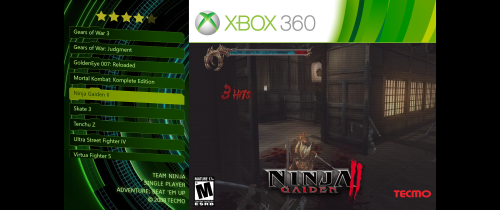 its prety good and thank you for helping out only thing I found is that the folder Structure aint right on /Views/TextListView u got /Views/Text List Views so when I tryed to install I couldnt select other views inside the theme could u remove does spaces there reupload?
 -
Henstra1989 changed their profile photo
-
 Very Good nice and sleek with high quality Icons the menu makes it easy for switching views on the game to images videos or get detailed information without getting it all at ones so it stays very clean and organized
.thumb.jpeg.2075437340b1c5cc3b06e43e490c2325.jpeg)

