Jump to content
LaunchBox Community Forums

1 Screenshot

About This File

Hi everyone,

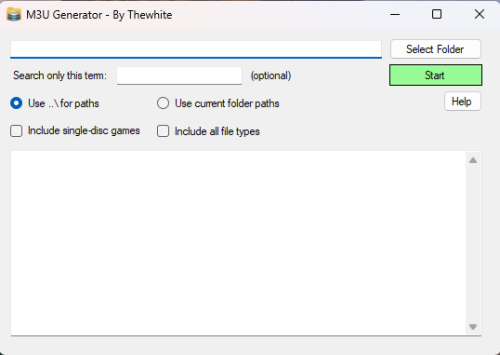
I’d like to share a small utility I created called M3U Generator. It’s designed to automatically generate .m3u files for multi-disc games, commonly used with emulators like RetroArch and others that support playlist-style disc switching.

1.thumb.png.1b2c75b21e23c88d569a62a402fabdb8.png


💡 What it does:

  • Scans a selected folder for game files (.cue, .iso, .img, .bin).

  • Groups discs belonging to the same game (based on filenames).

  • Creates .m3u playlist files in a subfolder named m3u.

  • Optionally includes single-disc games as well.


📦 Features:

  • Supports subfolder-style or flat playlist paths (..\\ or current folder).

  • 🔍 Filter results based on a keyword (e.g., "Disc" or "CD") to process only relevant files.

  • 📝 Displays a log of the generated .m3u content directly in the software.

  • 🧠 Automatically names playlists based on the first disc.


🕹 Example use case:

Let’s say you have these files:

Game Title (Disc 1).cue
Game Title (Disc 2).cue 

The software will create:
m3u/Game Title (Disc 1).m3u

With content:
..\Game Title (Disc 1).cue
..\Game
Title (Disc 2).cue


📥 How to use it:

  1. Launch the application.

  2. Click "Select Folder" and choose the directory where your ROMs are located.

  3. Optionally enter a filter term like Disc to process only multi-disc games.

  4. Choose path mode (relative or current folder).

  5. Check the "Include single-disc games" option if needed.

  6. Click "Start" – the .m3u files will be generated in a m3u subfolder.

  7. The output will be shown in the result textbox and also saved to 1-m3u_results.txt.

Edited by thewhite


What's New in Version 1.0.5   See changelog

Released

Correction of names generated by the previous version.

  • Like 7
  • Thanks 4

User Feedback

Recommended Comments

C-Beats

Posted

Noting that this would be used primarily for ROM management outside of LB since LB already does this for you be simply checking the option in Edit Emulator's Associated Platform tab.

  • Like 1
  • Game On 1
alissongamer

Posted

Could you get a version for .dim files? I wanted to generate one for the Sharp X68000 ROMs🤨

thewhite

Posted

Added support for .dim files, i didn't test it, but it should works.

  • Like 2
adummy832

Posted

Nice work here bud! 🍻
Can you add support for .chd files? Thanks.

thewhite

Posted

Support added of chd, mds, mdf, gdi.
Checkbox added; Include all file types

alcoatjez

Posted (edited)

Thank you very much for this!

The only request I have is that you remove the (Disc 1) from the m3u filename for multi-disc games. It's not a big deal, but would be nice if it would be done automatically.

*Edit: I see now that if you select cue to select only this is done automatically. Great!

Edited by alcoatjez
thewhite

Posted

2 hours ago, alcoatjez said:

Thank you very much for this!

The only request I have is that you remove the (Disc 1) from the m3u filename for multi-disc games. It's not a big deal, but would be nice if it would be done automatically.

*Edit: I see now that if you select cue to select only this is done automatically. Great!

It's done, I haven't tested it intensively, but it seems to work well.

  • Thanks 1
alcoatjez

Posted

That was fast! Thank you very much for this 👍

axlp

Posted

unless I got some setting wrong, I think the last update causes it to strip numerals from filenames, which also affects all sequels, or games with numerals in the title!

thewhite

Posted

5 hours ago, axlp said:

unless I got some setting wrong, I think the last update causes it to strip numerals from filenames, which also affects all sequels, or games with numerals in the title!

I was able to test it and saw a few problems. Could you try again with the new version? If you're still having problems, could you give me the file names so I can test them?

Join the conversation

You can post now and register later. If you have an account, sign in now to post with your account.

Guest
Unfortunately, your content contains terms that we do not allow. Please edit your content to remove the highlighted words below.
Add a comment...

×   Pasted as rich text.   Paste as plain text instead

  Only 75 emoji are allowed.

×   Your link has been automatically embedded.   Display as a link instead

×   Your previous content has been restored.   Clear editor

×   You cannot paste images directly. Upload or insert images from URL.

×
×
  • Create New...
