Jump to content
LaunchBox Community Forums

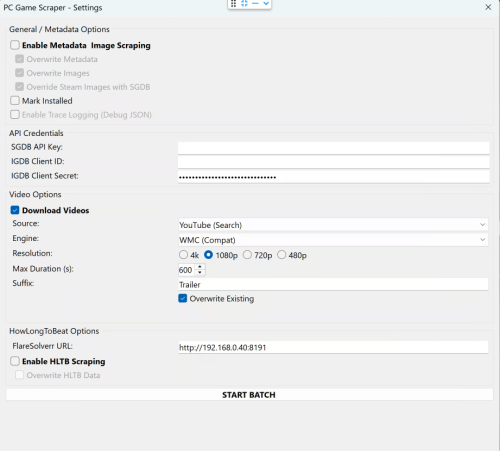
1 Screenshot

About This File

🎮 PC Game Scraper for LaunchBox

PC Game Scraper is a robust metadata and media scraping plugin for LaunchBox. It intelligently prioritizes Steam for PC game metadata and IGDB for console titles. It leverages SteamGridDB for high-quality frontend artwork and YouTube (via yt-dlp) for video trailers.

The plugin features advanced integration with HowLongToBeat (via FlareSolverr), now upgraded with a dedicated "Console Fork" to pull version-specific completion times directly from the site’s internal data.

🛠️ Dependencies & Requirements

To use all features, the following components are required or recommended. I've included everything I can for your convenience. If you are not comfortable with them or do not want to use the optional Deno.exe. You may download your own or remove Deno.exe if you don't plan on using cookies.txt or downloading age gated videos. 

Required for Core Functionality

  • yt-dlp.exe (Required for Video): The engine that downloads trailers. Must be placed in the plugin folder.

  • ffmpeg.exe (Required for Video): Handles video merging and ensures files play correctly in LaunchBox.

Recommended

  • SteamGridDB API Key (Highly Recommended): Required for fallback images not available on Steam. 
  • IGDB Client ID & Secret (Highly Recommended): Required for all console game metadata and "Gap Filling" for PC games metadata either not on Steam or difficult to extract. 

  • FlareSolverr (Required for HLTB): A local proxy service needed to bypass Cloudflare security when fetching HowLongToBeat playtimes.

  • cookies.txt and Deno.exe (Optional): Helps yt-dlp bypass age-restricted content gates on YouTube and sign in to your premium account. Deno.exe will solve captchas to bypass YouTube's bot protection. 

⚠️ Disclaimer

This plugin scrapes data from third-party sources. Please use FlareSolverr and yt-dlp responsibly and at your own discretion.


Key Features

🧠 Smart Metadata Routing

  • PC Logic: Scans Steam first. If a game is found, it then uses IGDB to "Gap Fill" fields Steam often lacks, like Series and Age Rating.

  • Console Logic: Automatically skips Steam and routes directly to IGDB based on the game's platform.

  • Manual Search: If automatic matching fails the user is prompted for a new search term, steam app id, steam store or igdb url. 

🎬 Video Downloader

  • Source Selector: Select your desired source, Steam or Youtube.

  • Smart Fallback: For PC games, if Steam source is selected it attempts to grab the official Steam Store trailer first. If unavailable allows the user to switch to Youtube, or if the game is a console title, it pivots to a YouTube search and injects the platform in to the search term for better matching. 

  • Dynamic Slicer: Automatically applies your "Max Duration" limit to YouTube downloads to save disk space. YouTube videos will be cut off at the time set.  A 10 minute gameplay video is cut down to 5 minutes. 

  • Resolution: Will attempt to download the desired resolution. If it is not available will scale down until one is found for the selected video. 

  • Suffix: Allows user to define desired youtube search term suffix, IE Trailer, Gameplay, etc...

⏱️ HowLongToBeat

The plugin now uses two distinct methods to fetch playtimes:

  • PC Logic: Pulls the general "blended average" from the HLTB search results.

  • Console Logic: Loads the game's specific detail page and extracts the exact platform data (e.g., pulling GameCube-specific times for Metroid Prime rather than the Wii Remaster times).

  • Custom Fields: Creates custom fields for dynamic playlist creation. Marathon 60h+, Long 30-60h, Extended 15-30h, Standard 5-15h, and Quick <5h, as well as the exact times provided by HLTB. 


🎮 Real-World Workflow Examples

If you select a game and run all three functions (Metadata, Images, and Video), here is how the plugin behaves:

Example A: Windows Game (Cyberpunk 2077)

  1. Identification: Finds the game on Steam via name match.

  2. Metadata: Pulls metadata from Steam, then if client id/client secret are populated and correct hits IGDB to add additional fields not available or hard to parse from steam. 

  3. Images: Grabs all available steam images. If images are missing or if SGDB override is enabled and your SGDB API is present it hits SteamGridDB.

  4. Video: Downloads the official trailer directly from the Steam Store servers or YouTube if the video source is YouTube. 

  5. HLTB: If enabled and flaresolverr is setup. saves the general PC completion times to your custom fields as well as the category times mentioned above. 

Example B: Console Game (The Legend of Zelda: Twilight Princess for GameCube)

  1. Identification: Automatically routes to IGDB after detecting the GameCube platform.

  2. Metadata: Pulls the IGDB metadata.

  3. Images: Since no Steam ID exists, it goes straight to SteamGridDB to find the community-voted best GameCube media. 

  4. Video: Recognizes it isn't a PC game and routes to YouTube to search for "The Legend of Zelda: Twilight Princess GameCube Trailer".

  5. HLTB: Triggers the Console Fork. It ignores the Wii and Wii U times and pulls only the GameCube platform data.

Edited by spiritedusual
Updated readme


What's New in Version 1.1   See changelog

Released

Lots of updates some I made a while back so can't list them all. 

A redesign of the UI to hopefully make it easier to understand and just makes more sense this way. 

Added automatic workflow and removed redundant or unnecessary settings in the ui. 

Corrected several fallbacks to improve matching.

If you add the iGDB client id/secret the plugin matches the platform of the title to the IGDB database and will either scan Steam (Windows) or IGDB for everything else. 

The Metadata, Video, and HLTB all now work independently of each other. Previously you could not disable the metadata section. 

The video section now correctly works for all platforms. Previously because the sections were interconnected downloading video from youtube for non steam games basically didn't work at all. 

The max duration setting in the video download section now works and will cut off the found file at the selected duration. 

Now when searching for non windows or arcade games the plugin will inject the platform name in to the youtube search so "title" "platform" "user defined suffix".

Due to YouTubes bot protection you could and would get blocked when using your cookies file to log in to premium due to a failure to solve a captcha. Now deno.exe is included in the archive and functions as a solver when and if you choose to use your cookies file to retrieve age gated trailers. More on this in the readme above. 

The HLTB section now impliment the same intelligent platform selection as the video section. It pulls the exact times from the HLTB section for the platform selected. (This will probably get changed to the averages later but I'm tired...)

Thank you to ronnie in the discord for getting me interested in this plugin again. 



  • Like 1
  • Thanks 4

User Feedback

Recommended Comments


spiritedusual

Posted (edited)

24 minutes ago, mrpetenorth said:

Apologies, the edit maybe made it less clear. You're right, despite the summary screen, the Steam videos and images (as well as SGDB) ARE being downloaded but in the lb default folders which i don't use. I'm carrying on with it and I'll just move what I need manually. YouTube downloading never works for me though sadly.

There is a log in the plugin folder that will detail whats happening with youtube if you post it here I can help you with that. Also let me know how you organize your videos so I can understand what you need for when I add in the custom location feature. 

Edited by spiritedusual
mrpetenorth

Posted

3 hours ago, spiritedusual said:

There is a log in the plugin folder that will detail whats happening with youtube if you post it here I can help you with that. Also let me know how you organize your videos so I can understand what you need for when I add in the custom location feature. 

Ah great thanks. I think the log is fairly self explanatory and tells me what I need to do to sort that out!

[09:02:59] [VIDEO] Starting yt-dlp download for: https://www.youtube.com/watch*******
[09:03:02] [VIDEO] yt-dlp Finished. Exit Code: 1
[09:03:02] [YT-DLP ERROR/WARNING] ERROR: [youtube] ULsF7B6bFuU: Sign in to confirm your age. This video may be inappropriate for some users. Use --cookies-from-browser or --cookies for the authentication. See https://github.com/yt-dlp/yt-dlp/wiki/FAQ#how-do-i-pass-cookies-to-yt-dlp  for how to manually pass cookies. Also see https://github.com/yt-dlp/yt-dlp/wiki/Extractors#exporting-youtube-cookies  for tips on effectively exporting YouTube cookies
 

As for my folder structure, it is

D:/Emulation

-[Platform Name]

---[Art]

-------[Box 3d]

-------------image 1

-------------Image 2

---[Videos]

-------Video 1

-------Video 2

But I'm in the middle of running through my Windows games now, all my other platforms are fully populated. Once I've moved across what I need to the right folders I'll be done and it will be one game every once in a while so it will be no hardship. I just thought that perhaps there were others out there who might also use a different folder structure and it would be a useful tool.

spiritedusual

Posted (edited)

8 minutes ago, mrpetenorth said:

Ah great thanks. I think the log is fairly self explanatory and tells me what I need to do to sort that out!

[09:02:59] [VIDEO] Starting yt-dlp download for: https://www.youtube.com/watch*******
[09:03:02] [VIDEO] yt-dlp Finished. Exit Code: 1
[09:03:02] [YT-DLP ERROR/WARNING] ERROR: [youtube] ULsF7B6bFuU: Sign in to confirm your age. This video may be inappropriate for some users. Use --cookies-from-browser or --cookies for the authentication. See https://github.com/yt-dlp/yt-dlp/wiki/FAQ#how-do-i-pass-cookies-to-yt-dlp  for how to manually pass cookies. Also see https://github.com/yt-dlp/yt-dlp/wiki/Extractors#exporting-youtube-cookies  for tips on effectively exporting YouTube cookies
 

As for my folder structure, it is

D:/Emulation

-[Platform Name]

---[Art]

-------[Box 3d]

-------------image 1

-------------Image 2

---[Videos]

-------Video 1

-------Video 2

But I'm in the middle of running through my Windows games now, all my other platforms are fully populated. Once I've moved across what I need to the right folders I'll be done and it will be one game every once in a while so it will be no hardship. I just thought that perhaps there were others out there who might also use a different folder structure and it would be a useful tool.

Great thanks. Yea there are instructions for how to deal with the youtube thing. And as for your media location, it looks like you dont keep it with the launchbox install. So the media that is downloaded is in the /launchbox/videos/ and /images/ folder though right? 

Edited by spiritedusual
mrpetenorth

Posted (edited)

8 minutes ago, spiritedusual said:

Great thanks. Yea there are instructions for how to deal with the youtube thing. And as for your media location, it looks like you dont keep it with the launchbox install. So the media is in the /launchbox/videos/ and /images/ folder though right? 

Correct. Launchbox is installed on C with all roms and media on D which is also mapped for use on another machine. eg D:\Emulation\NEC TurboGrafx-16\Videos\Air Zonk-02.mp4

Edited by mrpetenorth
spiritedusual

Posted

1 minute ago, mrpetenorth said:

Correct. Launchbox is installed on C with all roms and media on D which is also mapped for use on another machine. eg D:\Emulation\NEC TurboGrafx-16\Videos\Air Zonk-02.mp4

Got it. Well its good to hear it's working as its designed but yea right now not a way to change the default download location. It is something I will add soonish though. In the mean time you'll have to manually move your media to your designated drive. I know you've already got your system all set up, but you might want to look in to symlinks/junctions. If you don't know what they are it basically a way to make your files appear in two locations without using up any extra space. If you used this you could leave launchbox settings as they are and just move your files in to a folder and symlink/junction that location to where launchbox expects the media to be. I'm not super knowledgeable about it but it might be worth looking in to. 

mrpetenorth

Posted

6 minutes ago, spiritedusual said:

Got it. Well its good to hear it's working as its designed but yea right now not a way to change the default download location. It is something I will add soonish though. In the mean time you'll have to manually move your media to your designated drive. I know you've already got your system all set up, but you might want to look in to symlinks/junctions. If you don't know what they are it basically a way to make your files appear in two locations without using up any extra space. If you used this you could leave launchbox settings as they are and just move your files in to a folder and symlink/junction that location to where launchbox expects the media to be. I'm not super knowledgeable about it but it might be worth looking in to. 

Thanks, it's been suggested to me before and it may be something to think about. For now, it works, and Windows was the one platform that it felt too much to get to perfect, especially since it's my one library that keeps growing. This plugin has given me the tools to make it possible so thanks very much for the work that's gone into it!

spiritedusual

Posted

4 minutes ago, mrpetenorth said:

Thanks, it's been suggested to me before and it may be something to think about. For now, it works, and Windows was the one platform that it felt too much to get to perfect, especially since it's my one library that keeps growing. This plugin has given me the tools to make it possible so thanks very much for the work that's gone into it!

Glad to hear its working out for you! 

  • Like 1

Join the conversation

You can post now and register later. If you have an account, sign in now to post with your account.

Guest
Unfortunately, your content contains terms that we do not allow. Please edit your content to remove the highlighted words below.
Add a comment...

×   Pasted as rich text.   Paste as plain text instead

  Only 75 emoji are allowed.

×   Your link has been automatically embedded.   Display as a link instead

×   Your previous content has been restored.   Clear editor

×   You cannot paste images directly. Upload or insert images from URL.

×
×
  • Create New...
