


About This File
Hey everyone 👋 I built a plugin to solve a problem that's been driving me crazy, and I'm hoping it helps some of you too.
The Problem
I have 31,000 games in LaunchBox across 70+ platforms. I use custom fields heavily—tracking what I'm playing, managing a backlog, tagging award winners, marking first-party releases, organizing by era. It's a metadata system that works really well for discovery and organization.
Except for one thing: actually maintaining it is miserable.
You know the drill:
Right-click → Edit → Custom Fields tab → scroll → find field → change value → OK
That's 6+ clicks per field. Per game. If you're tagging a batch of games, it takes even more steps. When managing a play queue across thousands of titles, the friction compounds fast. I'd put off updating my metadata because it just wasn't worth the hassle.
The Solution: QuickFieldToggle
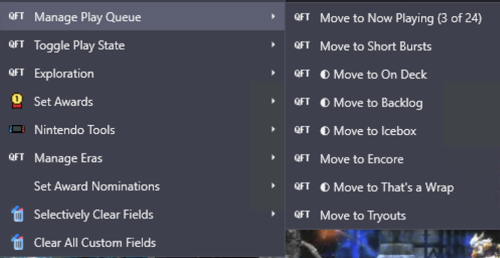
QuickFieldToggle puts your custom field actions directly in the right-click context menu.
One click. Done.

What It Does
✅ Single-click toggling — Toggle any custom field on/off instantly for a single game or multiple titles at once
✅ Create fields on-the-fly — No pre-setup needed, just define them in your config
✅ Multi-field actions — "Move to Now Playing" sets one field AND clears others
✅ Multi-value picker — For semicolon-separated fields, check/uncheck values from a submenu
✅ Conditional menus — Show "Nintendo Tools" only for Nintendo games
✅ Visual indicators — Checkmarks show current state
✅ Custom icons — Use platform icons or your own
✅ Hot reload — Edit config without restarting LaunchBox
✅ 100% JSON config — No coding required
Example Use Case
• Play Queue — "Move to Now Playing" / "Move to Backlog" / "On Deck" with mutual exclusivity
• Award Tracking — Quick-add awards from your existing values, auto-set "Any Award Won" flag
• Platform-Specific Tools — "First Party" toggle that only shows for Nintendo games
• Era Management — Set console generation, platform era, lifecycle phase
• Discovery Tags — "The Best" and "Discovery Bin" for standout titles
Download
Right here on the Launchbox Forums, or on GitHub: https://github.com/brandontravis/launchbox-quick-field-toggle
The download includes two sample configs:
• sample-simple.json — Basic play queue to get started
• sample-complex.json — My actual working config for 31k games
Installation
1. Download the latest release
2. Copy the QuickFieldToggle folder to your Plugins directory
3. Rename quickfieldtoggle.sample-simple.json to quickfieldtoggle.json
4. Restart LaunchBox
5. Right-click any game
Documentation
The GitHub repo has full documentation:
• Configuration Reference — All options, operators, and settings
• My Library Walkthrough — How I use QFT with 31k games, including my metadata philosophy and real examples
What's Next?
I'd love to hear your feedback. What custom field workflows would you like to automate? Any features you'd like to see?
If you try it out, let me know how it works for you. And if you run into issues, open a GitHub issue or reply here.
Enjoy!
Edited by idealbrandon
Clarification on functionality
What's New in Version 1.0.1 See changelog
Released
What's New in v1.0.1
Features
- Selection Indicator System: Choose between symbol mode (✓/◐) or count mode (X of Y)
- Configurable at root, group, and item levels
- Separate override for Selectively Clear Fields
- Value Sort Options: alphabetical, reverseAlphabetical, mostCommon, leastCommon, none
- Embedded delete icon for destructive features
Bug Fixes
- toggledMenuLabel now works correctly for bulk selections
- operationType: "set" items now show selection indicators
- JSON property order no longer matters (proper spec compliance)
- Fixed group-level properties incorrectly picking up item-level values
Breaking Changes
- Renamed frequency to mostCommon for value sorting
- Replaced showSelectionCounts: true with selectionIndicator: "count"


Recommended Comments
Join the conversation
You can post now and register later. If you have an account, sign in now to post with your account.