
About This File
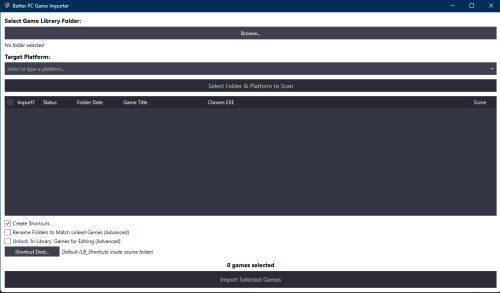
Better PC Game Importer
Better PC Game Importer is a LaunchBox plugin that makes it easier to add non-store PC games to your LaunchBox library.
Instead of importing games one at a time, the plugin scans your game folders, compares them against your existing LaunchBox library, shows you what it found, and lets you import new games or fix broken links in bulk.
Why Does This Exist?
LaunchBox works great for many platforms, but importing standalone PC games can still be tedious, especially when the games were not installed through Steam, GOG, Epic, or another storefront.
PC game folders are often messy. They may contain multiple executables, launchers, uninstallers, setup files, redistributables, or shortcuts. If games are moved, renamed, or reinstalled, LaunchBox links can also break.
Better PC Game Importer is designed to help with that. It scans your folders, finds the most likely game executable, checks whether the game is already in your LaunchBox library, and tells you what action is needed.
Key Features
-
Bulk importing — Scan and import many PC games at once.
-
Library matching — Detects when a scanned folder appears to match an existing LaunchBox game.
-
Executable detection — Helps pick the actual game executable instead of installers, uninstallers, or support tools.
-
Broken-link repair — Finds games whose LaunchBox path no longer works and helps relink them.
-
Duplicate-install warnings — Flags cases where the same game may exist in more than one location.
-
Storefront protection — Recognizes games managed by Steam, GOG Galaxy, Epic Games Store, EA App, Ubisoft Connect, or Xbox/Microsoft Store and leaves them alone.
-
Optional shortcut creation — Creates organized
.lnkshortcuts instead of pointing LaunchBox directly at scattered executables. -
Optional folder renaming — Renames game folders to match the cleaned-up LaunchBox title.
Requirements
-
LaunchBox version 13.26 or later.
-
Windows.
-
WindowsShortcutFactory, which is bundled with the plugin.
Installation
Extract the release archive directly into your root LaunchBox folder.
The plugin should be placed here:
LaunchBox\Plugins\BetterPCGameImporter\
After installation, open LaunchBox and go to:
Tools > Better PC Game Importer
Basic Usage
-
Open LaunchBox.
-
Go to Tools > Better PC Game Importer.
-
Add one or more folders that contain your installed PC games.
-
Choose the LaunchBox platform you want to import into.
-
Click Scan Folders.
-
Review the results grid.
-
Fix any incorrect titles using the dropdown in that row.
-
Choose your import options.
-
Click Import Selected Games.
Import Options
Create Shortcuts
Creates .lnk shortcuts for imported games instead of linking LaunchBox directly to each game executable.
This is useful if you want all LaunchBox PC game links organized in one central shortcut folder.
Rename Folders to Match Linked Games
Renames the actual game folder on disk to match the selected LaunchBox title.
This is optional and intended for users who want cleaner folder names. (While optional this plugin uses folder name for logic and I do this is something the user should do and its benefits should be explained)
Unlock “In Library” Games for Editing
By default, games that are already correctly linked are locked so they cannot be changed by accident.
Enable this option if you intentionally want to edit or relink games that are already in your library.
Status Meanings
| Status | What It Means |
|---|---|
| In Library (Locked) | The game is already in LaunchBox and appears to be linked correctly. No action is needed. |
| New Game | The plugin did not find a real existing LaunchBox entry for this folder. It can be imported as a new game. |
| Update Link | The game can be linked or relinked to a LaunchBox entry. |
| Update Link (via Path) | The folder matched an existing LaunchBox game by its saved path. |
| Update Link (Path Mismatch) | LaunchBox already has this game, but the saved path appears to be broken or points somewhere else. |
| Duplicate Install Found | The game may already exist in another working location. Review it manually before changing anything. |
| Storefront (Ignored) | The game appears to be managed by a storefront launcher, so the plugin leaves it alone. |
Reviewing the Results Grid
After scanning, each row represents one detected game folder.
The grid lets you review:
-
Whether the game will be imported.
-
The detected status.
-
The folder date.
-
The matched or editable game title.
-
The current LaunchBox link, if one exists.
-
The selected executable.
-
The match confidence score.
Before importing, review the rows carefully and adjust any titles that do not look right.
Storefront Games
Games managed through storefront launchers are intentionally ignored.
This includes games from:
-
Steam
-
GOG Galaxy
-
Epic Games Store
-
EA App
-
Ubisoft Connect
-
Xbox/Microsoft Store
These games are usually better left managed by their original launcher, so Better PC Game Importer locks them to avoid accidental changes.
Duplicate Installs
If the plugin finds that a game may already exist in another working location, it marks the row as Duplicate Install Found.
This prevents a good LaunchBox link from being replaced by mistake.
When this happens, review the game manually and decide which install location you want to keep.
Logging
The plugin writes scan, match, and import activity to:
ImportLog.txt
The log is saved next to the plugin and can help explain why a game was classified a certain way.
Integration: The Game Scraper
Better PC Game Importer also includes integration support for The Game Scraper plugin.
When a game folder is renamed through that workflow, Better PC Game Importer can help keep LaunchBox’s stored game path in sync.
Edited by spiritedusual
Updated Readme
What's New in Version 1.2 See changelog
Released
1.Tightened up store imported game detection so the plugin doesnt accidentally detect them as new games
2. .lnk shortcuts are not resolved to their real target before comparing
3. Now shows the real path/resolved .lnk path in parenthesis.
4. Duplicate install detection when the same game is genuinely in two different locations.
5. UNV vs. local drive letter path normalized. Plugin will treat \\<this machine>\d\games and D:\Games\ the same
and some other ui fix stuff
