.thumb.png.c9faf450e4d2b690a819048b18173f61.png)




About This File
MAME Tools - a JoeViking plugin conglomeration
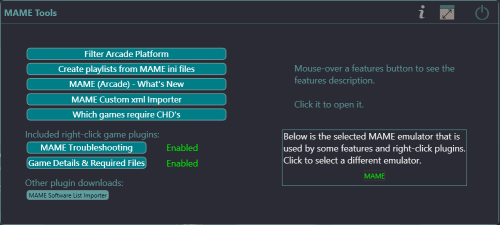
7 plugins combined into one. This is a one-stop-shop collection of several of my MAME related plugins, plus a couple that have never officially been released.
Admittedly, these are mostly one-off plugins. But they do fully serve their intended purpose when needed.
Plugins included from the main menu:
- Filter Arcade Platform - A post 'MAME Arcade Full Set Import Wizard' clean up tool
- Create Playlists from MAME ini Files
- MAME (Arcade) - What's New
- MAME Custom XML Importer (first official release)
- Which MAME Machines Require CHDs (new)
Included Right-click game plugins:
- MAME Troubleshooting
- Dependency Files and Details Viewer
- Bulk Add ADB Additional App (new v1.0.2)
Requirements:
- LaunchBox version 13.19 or newer
- mame.exe installed as an emulator
If you have previously installed any one of these individual plugins, remove them from the Plugins folder before proceeding.
Installing:
Exit LaunchBox
Download and extract the contents of the zip file to /LaunchBox/Plugins/
e.g. D:\LaunchBox\Plugins\MAMEtools\MAMEtools.dll
Using:
On first launch, the plugin will attempt to get your installed MAME emulator. If you have multiple copies/versions installed, you can change which one to use by clicking it and selecting a different one.
- Go to the Tools menu and select MAME Tools
- Mouse-over the plugin buttons for a brief description
- Click a plugin button to start that plugin
- When in a plugin, mouse-over the ? at top for more details
- For the right-click plugins, click the button to enable/disable that plugin
- When enabled, the plugin will then be available in the menu when right-clicking a game
Plugin Descriptions:
Filter Arcade Platform - A post 'MAME Arcade Full Set Import Wizard' clean up tool
(initial release: April 24, 2024)
Used the MAME Arcade Full Set Import Wizard?
Discovered that maybe you shouldn't have unchecked some of the Game Types and Filters?
Rather than deleting your Arcade platform and re-running the wizard, use this to bulk remove one or more of those types or filters from your collection.
Plugin Features:
- See the number of 'games' you have in each filter type. (unplayable, bootleg, quiz, rhythm, mahjong etc.)
- Check the boxes for the filter types you wish to remove and click Delete to remove them from your LaunchBox collection.
-
Click the number next to the filter type to show a list of the 'games' included with that filter. (shows ROM name and game Title)
- (optional) Create a text file of "the list" (for whatever reason)
- (optional) Create a playlist from "the list"
Notes:
- You don't need to have used the MAME Arcade Full Set Import Wizard to make use of this plugin.
- "Total Games" only takes into account your Main Games. Additional Apps (clones) are not accounted for in that number.
-
When clicking Delete to remove the games in the selected filter type(s), if a game being removed has Additional Apps, those will be removed too.
- No ROMs will be deleted from your system. Only the entries in your LaunchBox collection.
- It won't delete any images associated with the removed games. Most likely, they won't have any anyway. If they do, simply run Clean Up Media located in the Tools menu.
- "Remove Preliminary" refers to Emulation Status and only includes games that are marked as Preliminary AND are not included any of the other filter types.
-
Game Counts:
- Some games will fall into multiple filter types. e.g. some (but not all) Fruit games are also included in with Casino games.
- So don't try to add the numbers up and have them make sense.
Create Playlists from MAME ini Files
(initial release: February 17, 2021)
Generate Playlists in LaunchBox from MAME's .ini files. The same ones MAME uses in its UI to apply filters used to categorize viewing of your games.
This doesn't really expand much on the already available Arcade/MAME Playlist built-in feature in LaunchBox. But if there's a rare instance you come across a MAME category ini file that has a 'pre-built' "filter" list and isn't already available in LB, well here you go.
Many of these files can be found at https://www.progettosnaps.net. (Specifically, https://www.progettosnaps.net/support/) And several more at https://mameinfo.mameworld.info (Look for the “MAMEUI 0.2xx Category-, Version and Alltime inifiles” link). There’re probably other sources available out there too.
These files are typically (and should be) stored in the ../MAME/ini/folders/ folder.
Notes:
- This does not work with Additional Apps (e.g. clones). aka: It won't look in your game's Additional Apps to add to the new playlist(s).
- This adds “Arcade” to the beginning of the selected section/filter for its “Unique Name:” (to maintain consistency). The “Nested Name” will be the same as selected section/filter.
- The Playlist will be added under Arcade (Category) in the Platform Categories list.
- If you click Create Playlist and you don’t have any existing games that match, an empty Playlist will not be created.
- If a Playlist of the same name already exists, either delete your existing Playlist or edit it and change the name. It will not be overwritten nor modified.
MAME (Arcade) - What's New
(initial release: October 30, 2025)
See what new Arcade machines (games) were added to a specific MAME release.
Import some or all of those games from your updated MAME ROM set, into your LaunchBox collection.
Use this plugin to see what new Arcade machines (games) were added in the latest release of MAME.
Then, along with your updated ROM set, import those new machines into your LaunchBox collection without having to reimport the entire set or attempting to Scan for Added ROMs (which doesn't really work with the Arcade platform anyway).
Features:
-
See what new Arcade (ONLY) games were added to a specific MAME release
- No software list games.
-
When selecting a game:
- Click the Arcade Database logo to navigate to the site for information on that game
-
Shows if the game exists anywhere in your collection (including as an Additional App [clone])
- Checks across ALL games in ALL platforms (by ROM filename).
- Below it will show which platform it is in (if "existing")
- This is useful if you're checking previous releases for that hidden gem, you didn't know you were missing
- Filter games by Status (Good, Imperfect, Preliminary)
-
Import the new games (from your updated MAME ROM set)
- Only game ROMs that physically exist will be imported
-
(Optional checkbox) Force importing even if the game's ROM doesn't physically exist
- Useful if you're using a merged set
-
(Optional checkbox) Add an Additional Application direct link to the Arcade Database for the game
- This will appear as an "Arcade Database" clickable link in the Game Details panel
Note:
All data comes from the Arcade Database. When a new MAME release comes out, you may need to wait a day or so for this information to become available.
MAME Custom XML Importer
(initial implementation: November 29, 2020)
Import games from a custom xml file into any Platform (new or existing) and set the Emulator for the imported games to whatever you want, regardless of the Platforms default Emulator (if importing to an existing one).
Creating a custom xml file:
Via the MAME UI:
- Open [standalone] MAME
- In the left panel, click Category
- Select a File (these are the same ini files used in "Create Playlists from MAME ini Files")
- (optional) If available, select a Group
- Select Return to Previous Menu
- Click the yellow floppy disk at top [“Export displayed list to a file”] and double click “Export list in XML format (like –listxml, but exclude devices)”
- The custom xml file will be saved to/as \MAME\ui\exported.xml (subsequent exports will be named "exported_0000.xml", "exported_0001.xml" etc.)
Via the Arcade Database website: (https://adb.arcadeitalia.net)
- In the left panel, click Games
- Click Additional Filters in the main panel
- In the various tabs, select/add/change filters to your desired choosing and then click Search
- Now click Options - Export the Results
- Change the "Title" to something meaningful to you
- Click MAME (xml)
- Click Export
Notes:
- The xml file MUST be laid out in a standard MAME Machines format. MAME’s softlist xml files are formatted differently and WILL NOT work with this plugin. (Use the other plugin)
- Scrape As for a new Platform will be set to Arcade
- After importing, use LaunchBox's built in Download Metadata and Media Wizard to get the games metadata, images and videos
Which MAME Machines Require CHD's
(initial release: just now)
The intent is to give you an overview of all the games that require a CHD and their emulation status.
This is namely to show that of all the CHD's available, just a mere handful are considered working.
Features:
- Filter on/off by status and/or show parent games only
- Included filter options are: bad dump, no dump and Software Lists ROMs (included just for reference)
- The list of CHD games can be updated (or downgraded) to match your mame.exe revision
Right-click game plugins:
MAME Troubleshooting
(initial release: June 25, 2025)
Launch an Arcade game using stand-alone MAME, all you see is a flicker of a black screen and it goes right back to LaunchBox?
Use this plugin to help figure out why it isn't launching from LaunchBox.
This plugin gathers data about the game and your MAME and LaunchBox setup and provides you information to help determine what the issue may be.
Features:
- Shows the required dependency files (if any) required for the game to run (e.g. BIOS, Device and CHD files)
-
Launches the game and captures the command window output [that you never see]
- Potentially useful "Why the game isn't launching" data
- View the emulators Running Script. (Typically, never contains "the issue". But doesn't hurt to look.)
-
Verifies ROM and dependency (BIOS & Device) file(s) exists and are accessible to the emulator when launching**
- If found, checks and verifies the zip file contents (all inner files exist and CRC32's match)
- If a CHD is required, verifies the CHD file exists and is accessible to the emulator when launching**
** "accessible to the emulator when launching" The plugin looks for the "rompath" setting per MAME's order of prescience. This dictates which folder(s) MAME will look in for ROMs and dependency files.
This will NOT "fix it" for you. But should tell you everything you need to deduce "why" the game won't launch. Once you know why, all you need to do is fix that part of the equation.
Requirements:
- Requires the games emulator to be mame.exe
- Only works with MAME Arcade machines. No software lists
- Only works with ROMs that are .zip (Not .7z)
Dependency Files and Details Viewer
(initial release: June 17, 2025)
The intent of this plugin is to show what files (other than the game's ROM) are required for the game to run and to give some details about the original Arcade machine.
Features:
-
Shows all files needed required to run the game.
- BIOS, Device and CHD and [optional - not required] Sample
-
Shows the games' Overall and Emulation status. (Good, Imperfect, Preliminary)
-
If it's not "Good", see why. e.g.
- "sound - unemulated"
- "graphics - imperfect"
-
If it's not "Good", see why. e.g.
-
Details shown about the machine:
ROM Genre
Title Players
Short Title nPlayers
Clone of Language
Manufacturer Input Controls
Series Input Buttons
Year Screen Orientation
Status Screen Resolution
- Provides a direct link to the machine on the Arcade Database website to see even more date about the game/machine
-
Also works for games whose ROMs are MAME, but the emulator is not.
- e.g. Demul, SuperModel, FBNeo, Model2 etc.
Bulk Add ADB Additional App
(1st release 6/17/2026)
Adds an Additional App to the selected game(s) that is a direct link to the machine on the Arcade Database website.
The link will appear in the Game Details panel near the icon link(s) to the Games Database, Wikipedia, YouTube etc.


Enable it in MAME Tools settings.
Select one or more games that use MAME ROMs. Right-click and select Bulk Add ADB Additional App.
Special Thanks:
The MAME Development Team for... well... MAME! https://www.mamedev.org/
motoschifo and his Arcade Database (ADB) website and API https://adb.arcadeitalia.net
As always, all thoughts, views, suggestions, comments and accolades are welcome.
What's New in Version 1.0.2 See changelog
Released
v1.0.1
Which MAME Machines Require CHD's
New Feature: Added Export to file button. Save-to options include:
- comma delimited .csv file
- .txt file with ROM - Game Title
- .txt file with ROM - Game Title - Parent ROM - Status
File will be saved to the plugins' folder as CHD-list.csv (or CHD-list.txt)
v1.0.2
New right-click game plugin: Bulk Add ADB Additional App
- Adds an Additional App to the selected game(s) that is a direct link to the game on the Arcade Database.
- The link will appear in the Game Details panel near the icon link(s) to the Games Database, Wikipedia, YouTube etc.
Enable in MAME Tools settings. Select one or more games using MAME ROMs, right-click and select this menu item.
