




About This File

This package installs the GuideVault LaunchBox Connector plugin using a LaunchBox-root folder structure. Extract or drag the contents into the folder that contains LaunchBox.exe, and the included files will land in the correct LaunchBox plugin, third-party, and media asset folders.
The connector links LaunchBox games with GuideVault manuals, strategy guides, and magazines. It supports library sync, scoped manual/strategy guide/magazine sync, match review, badge support, and opening matched GuideVault content directly from LaunchBox.
Requires a running GuideVault server. GuideVault server v0.9.260 or newer is recommended.
More info located here:
https://guidevault.net
https://buymeacoffee.com/andrewbuilds
My other website:
https://shreddergaming.com


Edited by Shredder_guitar
What's New in Version 0.4.28 See changelog
Released
GuideVault LaunchBox Connector 0.4.28
Features and updates since 0.4.27
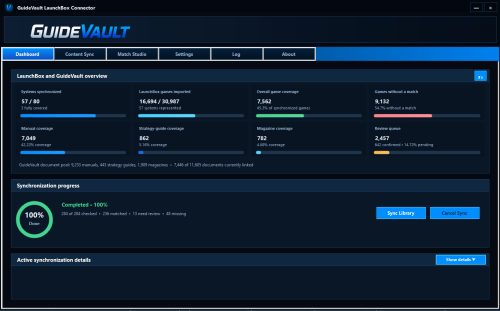
Reimagined connector interface
- Rebuilt the connector as a full desktop companion interface instead of a log-driven utility.
-
Added dedicated pages for:
- Dashboard
- Content Sync
- Match Studio
- Settings
- Log
- About
- Increased the default window size and improved high-DPI scaling and responsive layouts.
- Connector now opens to the Dashboard by default.
- Removed the visible command-prompt-style workflow from normal use.
Dashboard
-
Added visual overview statistics for:
- Synchronized systems
- Imported LaunchBox games
- Matched games
- Missing games
- Manual coverage
- Strategy-guide coverage
- Magazine coverage
- Items requiring review
- Added graphical coverage and progress bars.
- Added a synchronization progress card with a doughnut-style progress indicator.
- Added collapsible synchronization details.
-
Added live metrics for:
- Current game
- Games checked
- Matches
- Ambiguous results
- Missing items
- Errors
- Added styled synchronization activity output using a modern monospaced font.
- Moved Dashboard refresh to a compact header control.
- Removed the old Quick Actions panel and redundant Open GuideVault button.
- Relocated Sync Library and Cancel Sync controls into the synchronization progress area.
Unified Content Sync
- Consolidated Manuals, Strategy Guides, and Magazines into one Content Sync workspace.
- Added a medium selector for choosing the content type being synchronized.
-
Added a platform checklist with:
- Select All
- Uncheck All
- Sync Selected Systems
- Platform selections are remembered separately for each content medium.
- Platform coverage refreshes automatically after connection, synchronization, or medium changes.
- Removed the manual Refresh Platforms button.
- Fixed cases where switching content medium could become stuck or show stale results.
- Added cancellation of obsolete platform requests so older responses cannot overwrite the current selection.
Platform Games review
- Added an in-app Platform Games page rather than opening a separate popup window.
- Added Back navigation to return to the platform list.
-
Added per-game status visibility for:
- Matched
- Suggested match
- Needs review
- Unmatched
- Unknown
- Added search and status filtering.
- Added LaunchBox game cover thumbnails.
- Added GuideVault matched-document cover thumbnails.
- Added larger cover previews when hovering over thumbnails.
-
Added per-game actions:
- Match
- Review suggestion
- Change match
- Unlink
- Platform results automatically refresh after a match is confirmed, changed, rejected, undone, or unlinked.
- Suggested matches are now distinguished from confirmed links.
- Games only show as reviewable when GuideVault actually returned candidate documents.
- Added candidate counts and candidate artwork for suggested matches.
Bulk suggestion unlinking
- Added an optional Bulk Unlink mode.
- Added multi-selection checkboxes for suggested matches.
- Added Unlink Selected with a live selected-item count.
- Confirmed links are excluded from bulk suggestion unlinking.
- Added themed confirmation and completion dialogs.
-
Added a dedicated modal progress window showing:
- Current game
- Completed item count
- Progress bar
- Platform refresh status
- Added partial-failure reporting for individual games.
- Platform Games automatically refreshes after the operation completes.
Match Studio
- Added a side-by-side comparison between the LaunchBox game and GuideVault document candidates.
-
Added ranked recommended-match cards showing:
- Document cover
- Game title
- Platform/system
- Content type
- Release year
- Publisher
- Match status
- Confidence score
- Match explanation
- Added visual confidence labels for strong, moderate, and weak matches.
-
Added actions for:
- Confirm
- Reject
- Undo
- Preview
- Manual search
- Direct matching
- Added manual GuideVault search from inside Match Studio.
- Search now runs only when the user presses Search or Enter.
- Added a visible loading animation while results are being retrieved.
- Added support for using the game currently selected in LaunchBox.
- The LaunchBox selection is read live when the button is pressed rather than relying on stale state.
- Added automatic return to Platform Games after matching workflows.
- Improved card sizing and responsive button layouts.
- Reduced clipping of game metadata and recommended-result details.
Matching improvements
-
Improved ranked candidate quality using:
- Exact normalized titles
- Similar title matching
- Platform agreement
- Release-year agreement
- Publisher agreement
- Added penalties for platform and year conflicts.
-
Added Roman numeral normalization, such as
IVmatching4. - Added supplemental searching only when the server’s initial candidates are weak or incomplete.
- Added caching for LaunchBox game data, match details, and document images.
- Added cancellation of obsolete image and match requests.
- Improved matching speed by showing server-ranked results immediately while supplemental work continues.
- Added clearer separation between confirmed links and unconfirmed suggestions.
Cover and preview improvements
- Added multiple authenticated GuideVault cover and first-page fallback endpoints.
- Added local image caching and parallel cover loading.
- Removed misleading LaunchBox game-art fallback images from recommended document matches.
-
Match Studio now displays either:
- Genuine GuideVault document artwork, or
- An empty cover state when no valid document image is available
- Added stale item-ID recovery by searching GuideVault for the current document.
- Added hover previews positioned beside the mouse cursor.
- Added separate previews for LaunchBox game artwork and GuideVault document artwork.
Settings and connection health
- Moved Connection Health from the Dashboard into Settings.
- Made Connection Health collapsible and collapsed by default.
-
Added independent health indicators for:
- GuideVault server reachability
- Authentication
- API compatibility
- Administrator permissions
- LaunchBox database access
- Synchronized server data
- Transport security
- Last diagnostic check
- Added automatic health refresh when Settings opens, after sign-in, and after sign-out.
- Improved Settings spacing, field alignment, and panel sizing.
-
Renamed the embedded reader option to:
Borderless fullscreen (Embedded WebView2)
Authentication
- Added username sign-in support in addition to email sign-in.
- Added compatibility aliases for older and newer GuideVault login request formats.
- Improved encrypted credential and session reuse.
- Added better authentication recovery and clearer connection diagnostics.
- Kept stored credentials encrypted locally.
Reader launching
-
Improved discovery of
GuideVaultReaderLauncher.exe. - Added fallback browser launching when the reader helper cannot be found or started.
- Added guarded startup handling so reader-launch failures display useful errors.
- Ensured the reader helper launches without a console window.
- Improved authentication reuse when opening manuals, strategy guides, and magazines.
Reliability and packaging
- Added compile-check projects for Match Studio and the main connector window.
- Expanded smoke-test coverage.
- Added startup guards to prevent one failed panel from crashing the entire connector.
- Improved null handling and asynchronous request management.
-
Added package verification for:
- Connector version
- Duplicate DLLs
- Required assets
- Reader launcher presence
- Private runtime files
-
Added privacy-safe distribution packaging that excludes:
- Settings
- Authentication sessions
- WebView2 profiles
- Debug symbols
- Local LaunchBox paths
- Source-control metadata
- Updated the connector version to 0.4.28.
