
Jump to content
LaunchBox Community Forums

5 Screenshots

About This File

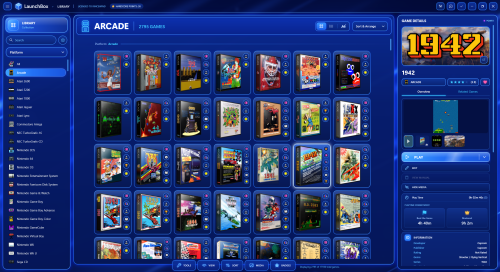
NeonArcade — a bright electric-blue neon theme for LaunchBox. Glowing glass panels, framed game tiles and an arcade-style. Based from the default theme so it has the most up to date features. I have tried to make sure every part of the theme has been styled or changed so it feels like a completely new version of LaunchBox. 


What's New in Version 1.3   See changelog

Released

*Fixed - A minor cosmetic change to the Total Games alignment. 

  • Like 6

User Feedback

Recommended Comments

launchretrogirl2562

Posted

Looks nice! I'm gonna try it out.
I'm using the Neon Deluxe theme now, it also has an arcade feel to it.
I'm gonna see how this compares to that.
Thanks for making this.☺️

rexryan

Posted

i like it easy to manage at the top where system name is when you have longer named system you lose the sort arrange column.

Rincewind

Posted (edited)

1 hour ago, rexryan said:

i like it easy to manage at the top where system name is when you have longer named system you lose the sort arrange column.

Sorry about that I've been making it on a 1440p monitor it's been a long time since I made a theme and forgot to test it on 1080p,  thanks for the heads up.

*I have just put out a fix for this 

Edited by Rincewind
launchretrogirl2562

Posted (edited)

After using it for a short while, overall very nice looking theme!!!

One point I'd like to mention:

I think I'm missing some information buttons in the games detail view.
I can't seem to locate the link to the gamesDB button, the wiki button, the youtube,....
for instance, GALAGA for Atari had a youtube and ofcourse always a gamesDB link

image.thumb.png.34a2f11197471a6049346398a5b364fb.png

Can u add those?

Else, maybe they are in your theme, but I can't find it so quickly.
If it's hidden in some of the menu's, then the same...it should be visible in the games details view.

I added them back in myself
image.thumb.png.d55d70411de70594d430c241f9edace8.png

Edited by launchretrogirl2562
Rincewind

Posted

7 hours ago, launchretrogirl2562 said:

I think I'm missing some information buttons in the games detail view.
I can't seem to locate the link to the gamesDB button, the wiki button, the youtube,....
for instance, GALAGA for Atari had a youtube and ofcourse always a gamesDB link


Can u add those?

Else, maybe they are in your theme, but I can't find it so quickly.
If it's hidden in some of the menu's, then the same...it should be visible in the games details view.
 

Thank you, your right I totally forgot to add them back in. I will do this later and put an update out but I might try a slightly different location. Thanks again for letting me know I missed it.

  • Like 1
Rincewind

Posted

Just put out a new update. v1.2

*Added - I have now added a links bar for the GamesDB, Wiki and Youtube, and if there is no Youtube link then the button will search for the game name instead.

image.png.9332915f5a8728890f8ed48d632bd189.png

  • Like 1
  • Thanks 1
MQ2000

Posted

The addition of a button to adjust the theme’s hue and saturation would render this a perfect new theme; the current color scheme appears overly intense to me.

  • Haha 1
Rincewind

Posted (edited)

9 hours ago, MQ2000 said:

The addition of a button to adjust the theme’s hue and saturation would render this a perfect new theme; the current color scheme appears overly intense to me.

😁That's what I liked about it, you can always adjust your monitor settings HAHA. Stay tuned for my next theme, I've gone a bit less saturated more 80s than 90s 🤣. I will look into adding something like that but i'm really not sure it's possible, maybe with a plugin.

Edited by Rincewind
  • Like 1

Join the conversation

You can post now and register later. If you have an account, sign in now to post with your account.

Guest
Unfortunately, your content contains terms that we do not allow. Please edit your content to remove the highlighted words below.
Add a comment...

×   Pasted as rich text.   Paste as plain text instead

  Only 75 emoji are allowed.

×   Your link has been automatically embedded.   Display as a link instead

×   Your previous content has been restored.   Clear editor

×   You cannot paste images directly. Upload or insert images from URL.

×
×
  • Create New...