




About This File
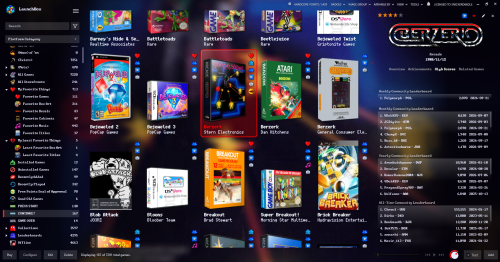
Yet another Better Old Default, but even more cinematic, because the black rectangles are GONE, and the Background View has been further tweaked to emphasize the use of game fanarts and fancy wallpapers (mostly adjusted the vignette effect). This theme also exclusively utilizes fast box and list views.
I figured it would be less confusing to go ahead and give this its own theme entry, rather than adding another version of Better Old Default Plus. I hope this is an aesthetic improvement, but it may not be for everyone, depending on your setup and visual settings. Text may also be harder to read at times, so take this into account.
I've included screenshots of some of my settings to get the desired effect, such as setting background blur to 5 (10 also works, just less details visible). The blurring can help to obfuscate lower quality images. Additionally, the 'Dark Background' is meant to give a purple-ish hue to the background images, provided you have 'Colorize Background Fade' turned ON in LB Options > Features. You can also just use black to darken all backgrounds that way.
TL;DR Notes on Installation
- Extract the theme zip into LBThemes, as the theme folder should be in its own sub-folder.
Optionally
- Install any fonts included or linked in the Fonts (Optional) folder. I'd also recommend any pixel-style fonts available on sites like DaFont and itch.io.
- In LB Options, choose a custom background from the Images\Backgrounds (Optional) folder to configure as your 'Custom Image' Background. (these were edited in GIMP and upscaled using ChaiNNer).
CREDITS: Many elements from different themes have been sort of mashed together and tweaked over time in order to make this theme. Some of those theme creators include @Retrofrogg, @Mr. RetroLust, @Rincewind, and @faeran.
┬┴┤•_•)ノ├┬┴┬
Changes from 1.0.1
- drop shadows were added in various places (particularly under text) to potentially improve visibility a bit, but mostly for the subtle depth effect.
- the last played/most played/random buttons in Platform Details were recolored a bit to look less out of place.
- alternate versions of the GameDetailsView & PlatformFiltersDetailsView have been added as separate downloads:
_TextColorful is used by default in this theme, so it has the rainbow look. But it may have some visibility issues with game backgrounds.
_TextForeground uses only the foreground color you specify in LB Options > Visuals > Main Window Theme > Colors.
_TextGreenOnly also uses the foreground color specified in LB, but still uses the green text for a couple of fields to match the green play button (a middle ground option, more similar to Retrofrogg's Game Details).
Edited by d66dle
added changes from 1.0.1
What's New in Version 1.0.2 See changelog
Released
- fixed a clipping issue in game details (thanks to @zyute for the second pair of eyes)
- fixed custom fields in the 'alternate text colors' not showing correctly


Recommended Comments
Join the conversation
You can post now and register later. If you have an account, sign in now to post with your account.