

Robert Grey
-
Posts
3 -
Joined
-
Last visited
Content Type
Profiles
Forums
Articles
Downloads
Gallery
Blogs
Everything posted by Robert Grey
-
This feels more like a system balance issue than a pure LaunchBox problem. With a game already using around 6 GB of RAM, Chrome running video streams, and LaunchBox keeping media and metadata cached in the background, a 16 GB system can hit memory pressure pretty quickly. Memory “optimizers” do not really reduce usage. They mostly push inactive data into the page file, which can move the bottleneck from RAM to disk I/O. That can explain why things look better in Task Manager but do not always improve real performance. Using list view, lighter themes, or Big Box helps reduce background memory, but if this workflow is common, upgrading to 32 GB RAM gives the OS enough headroom to manage caching properly. In this case the issue is overall hardware balance, not just one application using too much memory. You can check the bottleneck of your system first.
-

Sega Model 3 | Supermodel Git - EVERYTHING Pre Configured inc Controls. For PC, Controller, Mouse & Light Guns. Test Menu's Configured. Free Play. All Games in English. 2 Player Mouse Support. Audio Adjusted. Layout Images...The Whole 9 Yards
Robert Grey commented on Warped Polygon's file in Sega Model 3
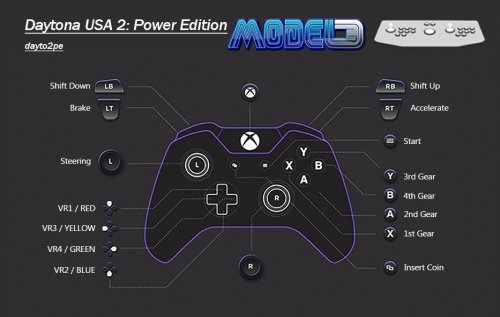 I was trying this setup and after following the config, the controller was clearly being picked up, but inputs weren’t doing anything in Supermodel. I checked the controller separately using https://gamepad-tester.com/ as you mentioned and found all buttons and axes were responding correctly there. That confirmed that the problem wasn’t the controller itself but how the emulator was handling the inputs. In my case it ended up being an emulator-side config issue rather than anything with the controller or Windows. Thanks a lot.
 -
Sega Model 3 | Supermodel Git - EVERYTHING Pre Configured inc Controls. For PC, Controller, Mouse & Light Guns. Test Menu's Configured. Free Play. All Games in English. 2 Player Mouse Support. Audio Adjusted. Layout Images...The Whole 9 Yards
Robert Grey commented on Warped Polygon's file in Sega Model 3
Thank you so much for this update.
