

vanilli
-
Posts
21 -
Joined
-
Last visited
vanilli's Achievements

8-Bit Processor (3/7)
3
Reputation
-
Hello! I'm starting this thread to see if anyone can help me, as I can't figure out what's wrong with my LaunchBox installation. The problem is that when I use LaunchBox, the DAS I use with 4 HDDs disconnects and reconnects on its own. Let me explain. The DAS works correctly as long as LaunchBox isn’t running. No problems. However, if I run LaunchBox, the DAS randomly disconnects and reconnects. The DAS disconnects and stops detecting the HDDs inside it. After about five seconds, it detects them again as if it were performing a reset that lasts approximately five to ten seconds. I know this is complicated to explain, but I’ve run many tests over a long period of time and come to this conclusion. I’d like to know if anyone else is experiencing anything similar, or if it's just me. I’ve reinstalled LaunchBox several times from scratch, and the result is still the same. I should mention that I have the application on an SSD and the ROMs on the DAS's HDDs. If anyone has any ideas, I’d appreciate your help. I don’t want to be forced to switch from Launchbox to a different front end. Apologies for my English. Edit: I'm attaching the log from the exact moment my DAS disconnected on its own again... just in case it's helpful. Thanks. 2026-06-14T21:07:08.1822971+02:00 DataManager.SaveInternal started. 2026-06-14T21:07:08.1837618+02:00 Saving InputBindings.xml... 2026-06-14T21:07:08.3219160+02:00 Saving GameControllers.xml... 2026-06-14T21:07:08.4465057+02:00 Saving ListCache.xml... 2026-06-14T21:07:08.5713638+02:00 Saving Settings.xml... 2026-06-14T21:07:08.7126491+02:00 Saving BigBoxSettings.xml... 2026-06-14T21:07:08.8554748+02:00 DataManager.SaveInternal completed successfully. 2026-06-14T21:07:12.5638711+02:00 DataManager.SaveInternal started. 2026-06-14T21:07:12.5650614+02:00 Saving InputBindings.xml... 2026-06-14T21:07:12.7020644+02:00 Saving GameControllers.xml... 2026-06-14T21:07:12.8258669+02:00 Saving ListCache.xml... 2026-06-14T21:07:12.9675119+02:00 Saving Settings.xml... 2026-06-14T21:07:13.1236297+02:00 Saving BigBoxSettings.xml... 2026-06-14T21:07:13.2799654+02:00 DataManager.SaveInternal completed successfully. Best regards.
-
LaunchBox Notes Translator (Spanish)
vanilli commented on Daliant's file in Third-party Apps and Plugins
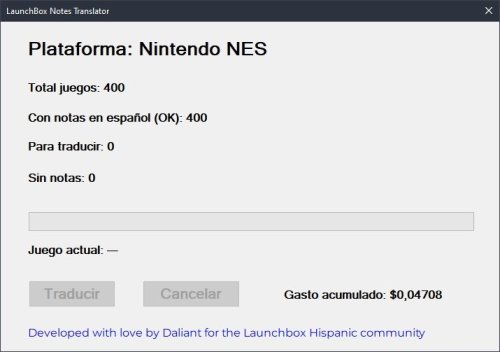 Probado y funciona perfectamente. ¿En un futuro podrías agregar la opción de compactar el texto, sin saltos de línea? Gracias por el plugin.
 -
LaunchBox Notes Translator (Spanish)
vanilli commented on Daliant's file in Third-party Apps and Plugins
No lo he probado aun, pero doy por hecho de que funciona. Cuestión de agregar crédito. Si no funcionara, lo hablamos. Gracias. -
LaunchBox Notes Translator (Spanish)
vanilli commented on Daliant's file in Third-party Apps and Plugins
Muchísimas gracias por la info y por el fantástico plugin, que a mi, me ha ahorrado miles de horas, ya que estaba traduciendo juego por juego para tenerlo todo en castellano. De nuevo, mil gracias. -
LaunchBox Notes Translator (Spanish)
vanilli commented on Daliant's file in Third-party Apps and Plugins
Ok. Así lo he hecho, y me sigue dando error. Te paso una copia del log. Gracias errors.log -
LaunchBox Notes Translator (Spanish)
vanilli commented on Daliant's file in Third-party Apps and Plugins
Exacto. Su ubicación es correcta, y si, empieza por "sk-proj-" y una fila larga de números y letras. Cuando ejecuto el plugin, funciona correctamente, pero me dice que todos los juegos de la plataforma ha obtenido un error, y por lógica no ha traducido nada. Si necesitas alguna captura o cualquier cosa, sin problema. Un saludo y gracias. -
LaunchBox Notes Translator (Spanish)
vanilli commented on Daliant's file in Third-party Apps and Plugins
Muy buenas. Acabo de probarlo. Me da error en todos los juegos de una misma plataforma. He introducido la "Key Secret" de OpenAI en el "config.txt", pero algo hay que no funciona o algo se me escapa. Procesa todas las roms de una plataforma, pero me da error en todos los juegos y no traduce nada. Alguna idea? Muchas gracias por la iniciativa. Saludos. -
LaunchBox Notes Translator (Spanish)
vanilli commented on Daliant's file in Third-party Apps and Plugins
¡Te quiero! -
No list with Retroarch cores?
-
Retro Console - BB Theme - Startup Theme - Pause Theme and more
vanilli commented on cemfundog's file in Custom Themes
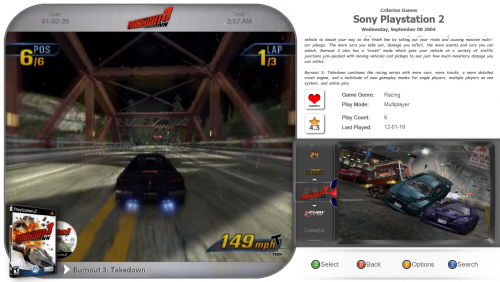 I can see the platform wheel and I can hear the background music of the videos, but they are not seen. I attach an image. Nor can I see anything but the wheel, nothing about the platform or the game. If you need to check something else, tell me. Thank you.
 -
Retro Console - BB Theme - Startup Theme - Pause Theme and more
vanilli commented on cemfundog's file in Custom Themes
Ok, it doesn't work for me. Attached image. Thanks for your help. -
Retro Console - BB Theme - Startup Theme - Pause Theme and more
vanilli commented on cemfundog's file in Custom Themes
OK, when I get home I check. Thanks -
Retro Console - BB Theme - Startup Theme - Pause Theme and more
vanilli commented on cemfundog's file in Custom Themes
yes i am willing -
Retro Console - BB Theme - Startup Theme - Pause Theme and more
vanilli commented on cemfundog's file in Custom Themes
I've tried it, but I get the same result. In my case, I use the spanish language. Thanks for the help. -
Retro Console - BB Theme - Startup Theme - Pause Theme and more
vanilli commented on cemfundog's file in Custom Themes
10.10

