

jpcheat
-
Posts
11 -
Joined
-
Last visited
Content Type
Profiles
Forums
Articles
Downloads
Gallery
Blogs
Files posted by jpcheat
-
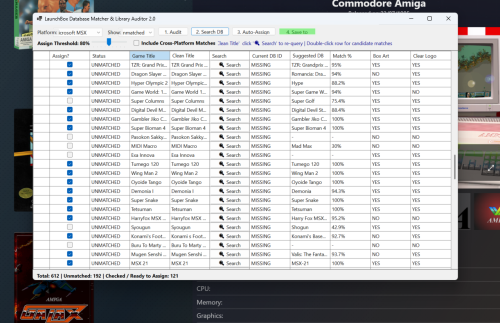
LaunchBox Database Matcher 2
By jpcheat in Third-party Apps and Plugins
🕹️ Database Matcher & Auditor 2.0 for LaunchBox
Database Matcher & Auditor 2. is an automated library auditing and database matching plugin for LaunchBox. It scans your game library for unmatched titles (games missing a LaunchBox Database ID) and uses a multi-threaded fuzzy matching engine to accurately find and assign their official LaunchBox DB IDs. Based on slipsystem's Launchbox Games Database Matcher idea but taken it a bit further.
Once DB IDs are assigned, you can instantly scrape missing box art, clear logos, fan art, and trailers using LaunchBox's native metadata download tools.
✨ Key Features
📊 Full Library Auditor: Instantly scans your library or specific platforms to identify unmatched games, missing box art, missing logos, and missing video snaps.
⚡ Fast Indexing & Multi-Threading: Uses an in-memory inverted word index to search the launchbox database records.
🧠 Smart Title Normalization:
Strips bracket tags (USA), disc tags (Disc 1), version strings (v1.02), and punctuation.
Automatically splits CamelCase & PascalCase titles without spaces (e.g., converts SuperMarioBros
→→ Super Mario Bros).
🎯 Fuzzy Matching Engine:
Consecutive Word Sequence Scoring: Prioritizes titles with 2 or more exact sequential matching words (e.g., matches "The Empire Strikes Back" to "Star Wars Episode IV: The Empire Strikes Back").
Sub-phrase & Sliding Window Detection: Handles titles embedded within series prefixes or subtitles.
Phonetic Penalty: Heavily penalizes false phonetic matches that lack actual word overlap.
🌐 Optional Cross-Platform Matching: Toggle cross-platform searching to find matches across alternate console/arcade releases . Only use this if your not fussed about accuracy. This gives many more results and more accurate title hit rate at the cost of having other platforms art work. I figured any artwork for the game is better than none. this is off by default though.
🔍 Interactive Match Resolution:
You can edit cleaned titles directly in the grid and click 🔍 Search to re-query instantly for that title.
Double-click any game row to view up to 20 top candidate matches (top 10 current platform + top 10 cross-platform matches if enabled).
Assign confidence threshold slider (default: 80%) for safe bulk auto-matching. High the slider the less results but more accurate.
Installation : Extract the LaunchBox.DatabaseMatcher folder to the launchbox\plugin\ folder and Restart Launchbox
Currently WIndows only as far as i know.
🎯 Primary Use Cases
Fixing Unmatched Imported ROM Sets: Quickly assign DB IDs to imported MAME, homebrew, custom ROMs, or Japanese/European collections.
Much higher accuracy/ hitrate on malformed file titles.
Metadata & Media Scraping: Fixes many more grey placeholder boxes than the standard launchbox search, by preparing unmatched games for LaunchBox's built-in media downloader and looser word scoring engine.
Cross-Platform Media Fallbacks: Match obscure ports or arcade titles to console database entries when a specific platform entry is missing media.
💡 Tips for Best Results
Step-by-Step Workflow:
Select a platform (or All Platforms) and click 1. Audit Library.
Choose whether to turn on search all platforms for other game ports/versions. Warning this will give potentially inaccurate artwork, purists stay away! if in doubt leave it off.
Click Search DB Matches to run fuzzy matching.
Adjust the Assign Threshold Slider (80% is recommended for safe bulk auto-assignment).
Click 3. Auto-Assign Matches.
Click 4. Save to LaunchBox to commit changes permanently.
Scan for Media/Artwork in the normal way
Manual Override: If a game doesn't match correctly automatically, before "Auto assign matches" edit the text in the Clean Title (Editable) column and click 🔍 Search next to that row.
Inspect Candidates: Double-click any row to open the candidate selection dialog and manually pick the exact DB entry you want. Non platform results will be at the bottom if enabled
Download Media: After saving your matches, go to LaunchBox's top menu: Tools
→→ Download →→ Update Metadata and Media for Selected Games to fetch missing artwork!
If your collection is large i would suggest doing one platform at a time as searching can take a while.122 downloads
