

jpcheat
-
Posts
11 -
Joined
-
Last visited
Content Type
Profiles
Forums
Articles
Downloads
Gallery
Blogs
Everything posted by jpcheat
-
 Should be ok now, try the new 1.0.5
 -
It most likely is dpi scaling yes. Try the new version, should be fixed for large screens now.
-
@Hanz Added the sort by checkbox column. Let me know if its working ok your end.
-
@Hanz Currently you can order it by match percentage so all of the ones that are checked in the auto search are all at the top. but it doesn't do it for custom checked items. ill implement the checkbox sort in the next version though, seems like a good idea.
-
@espidie79 you say you've unblocked the archive? Do you mean you've extracted the zip archive into the correct folder and unblocked the dll in properties? Wondering if it's a windows 10 thing. Will look into it. I'm only running windows 11 so that's the only other thing I can think of as to why it's not showing up for you. Try adding the entire launchbox folder as an exception in windows defender. Update: the latest beta of Launchbox runs on .net 10, so this plugin is written for Launchbox 13.28 (.net 10.0). Launchbox 13.27 is still running .net 9.0. So I've now built it in .net 9 for compatibility. with the latest stable version. I think that was the issue. Windows 11 installs .net 10 with windows update so guessing that was why it worked on other peoples. So try v1.02 now and see if it now works for you.
-
@Hanz Turns out because of the (OR) condition, if a game's confidence score was above the threshold (e.g. 85%), it evaluated to true. As a result, even if you manually unchecked the box , it ignored the checkbox state and assigned the match anyway. The Checkbox is now the Single Source of Truth and overrides the initial search match. So should be fixed now. let me now.
-
Assuming your running the latest launchbox version and on windows? As long as you place the plugin folder in the correct folder: launchbox\plugins\LaunchBox.DatabaseMatcher\LaunchBox.DatabaseMatcher.dll it should appear. If not you may have got a security warning. If so, right click on the plugin.dll in the folder and choose properties. then check the little "unblock" box. then restart launchbox. check windows defender isn't interfering also. In launchbox check Tools/Manage/Plugins. See if it appears there and is enabled. It should appear here:
-
Thanks I'll take a look. Just to confirm, does it show the new title if you go to that particular game right click/edit metadata? If it's unchecked. It shouldn't apply any that aren't checked, even though it shows the new matched title in the plugin. So might be a bug if so.
-
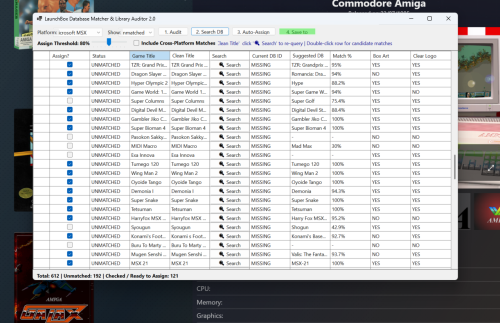
LaunchBox Database Matcher 2 View File 🕹️ Database Matcher & Auditor 2.0 for LaunchBox Database Matcher & Auditor 2. is an automated library auditing and database matching plugin for LaunchBox. It scans your game library for unmatched titles (games missing a LaunchBox Database ID) and uses a multi-threaded fuzzy matching engine to accurately find and assign their official LaunchBox DB IDs. Based on slipsystem's Launchbox Games Database Matcher idea but taken it a bit further. Once DB IDs are assigned, you can instantly scrape missing box art, clear logos, fan art, and trailers using LaunchBox's native metadata download tools. ✨ Key Features 📊 Full Library Auditor: Instantly scans your library or specific platforms to identify unmatched games, missing box art, missing logos, and missing video snaps. ⚡ Fast Indexing & Multi-Threading: Uses an in-memory inverted word index to search the launchbox database records. 🧠 Smart Title Normalization: Strips bracket tags (USA), disc tags (Disc 1), version strings (v1.02), and punctuation. Automatically splits CamelCase & PascalCase titles without spaces (e.g., converts SuperMarioBros →→ Super Mario Bros). 🎯 Fuzzy Matching Engine: Consecutive Word Sequence Scoring: Prioritizes titles with 2 or more exact sequential matching words (e.g., matches "The Empire Strikes Back" to "Star Wars Episode IV: The Empire Strikes Back"). Sub-phrase & Sliding Window Detection: Handles titles embedded within series prefixes or subtitles. Phonetic Penalty: Heavily penalizes false phonetic matches that lack actual word overlap. 🌐 Optional Cross-Platform Matching: Toggle cross-platform searching to find matches across alternate console/arcade releases . Only use this if your not fussed about accuracy. This gives many more results and more accurate title hit rate at the cost of having other platforms art work. I figured any artwork for the game is better than none. this is off by default though. 🔍 Interactive Match Resolution: You can edit cleaned titles directly in the grid and click 🔍 Search to re-query instantly for that title. Double-click any game row to view up to 20 top candidate matches (top 10 current platform + top 10 cross-platform matches if enabled). Assign confidence threshold slider (default: 80%) for safe bulk auto-matching. High the slider the less results but more accurate. Installation : Extract the LaunchBox.DatabaseMatcher folder to the launchbox\plugin\ folder and Restart Launchbox Currently WIndows only as far as i know. 🎯 Primary Use Cases Fixing Unmatched Imported ROM Sets: Quickly assign DB IDs to imported MAME, homebrew, custom ROMs, or Japanese/European collections. Much higher accuracy/ hitrate on malformed file titles. Metadata & Media Scraping: Fixes many more grey placeholder boxes than the standard launchbox search, by preparing unmatched games for LaunchBox's built-in media downloader and looser word scoring engine. Cross-Platform Media Fallbacks: Match obscure ports or arcade titles to console database entries when a specific platform entry is missing media. 💡 Tips for Best Results Step-by-Step Workflow: Select a platform (or All Platforms) and click 1. Audit Library. Choose whether to turn on search all platforms for other game ports/versions. Warning this will give potentially inaccurate artwork, purists stay away! if in doubt leave it off. Click Search DB Matches to run fuzzy matching. Adjust the Assign Threshold Slider (80% is recommended for safe bulk auto-assignment). Click 3. Auto-Assign Matches. Click 4. Save to LaunchBox to commit changes permanently. Scan for Media/Artwork in the normal way Manual Override: If a game doesn't match correctly automatically, before "Auto assign matches" edit the text in the Clean Title (Editable) column and click 🔍 Search next to that row. Inspect Candidates: Double-click any row to open the candidate selection dialog and manually pick the exact DB entry you want. Non platform results will be at the bottom if enabled Download Media: After saving your matches, go to LaunchBox's top menu: Tools →→ Download →→ Update Metadata and Media for Selected Games to fetch missing artwork! If your collection is large i would suggest doing one platform at a time as searching can take a while. Submitter jpcheat Submitted 07/30/2026 Category Third-party Apps and Plugins
-
Version 1.0.5
122 downloads
🕹️ Database Matcher & Auditor 2.0 for LaunchBox Database Matcher & Auditor 2. is an automated library auditing and database matching plugin for LaunchBox. It scans your game library for unmatched titles (games missing a LaunchBox Database ID) and uses a multi-threaded fuzzy matching engine to accurately find and assign their official LaunchBox DB IDs. Based on slipsystem's Launchbox Games Database Matcher idea but taken it a bit further. Once DB IDs are assigned, you can instantly scrape missing box art, clear logos, fan art, and trailers using LaunchBox's native metadata download tools. ✨ Key Features 📊 Full Library Auditor: Instantly scans your library or specific platforms to identify unmatched games, missing box art, missing logos, and missing video snaps. ⚡ Fast Indexing & Multi-Threading: Uses an in-memory inverted word index to search the launchbox database records. 🧠 Smart Title Normalization: Strips bracket tags (USA), disc tags (Disc 1), version strings (v1.02), and punctuation. Automatically splits CamelCase & PascalCase titles without spaces (e.g., converts SuperMarioBros →→ Super Mario Bros). 🎯 Fuzzy Matching Engine: Consecutive Word Sequence Scoring: Prioritizes titles with 2 or more exact sequential matching words (e.g., matches "The Empire Strikes Back" to "Star Wars Episode IV: The Empire Strikes Back"). Sub-phrase & Sliding Window Detection: Handles titles embedded within series prefixes or subtitles. Phonetic Penalty: Heavily penalizes false phonetic matches that lack actual word overlap. 🌐 Optional Cross-Platform Matching: Toggle cross-platform searching to find matches across alternate console/arcade releases . Only use this if your not fussed about accuracy. This gives many more results and more accurate title hit rate at the cost of having other platforms art work. I figured any artwork for the game is better than none. this is off by default though. 🔍 Interactive Match Resolution: You can edit cleaned titles directly in the grid and click 🔍 Search to re-query instantly for that title. Double-click any game row to view up to 20 top candidate matches (top 10 current platform + top 10 cross-platform matches if enabled). Assign confidence threshold slider (default: 80%) for safe bulk auto-matching. High the slider the less results but more accurate. Installation : Extract the LaunchBox.DatabaseMatcher folder to the launchbox\plugin\ folder and Restart Launchbox Currently WIndows only as far as i know. 🎯 Primary Use Cases Fixing Unmatched Imported ROM Sets: Quickly assign DB IDs to imported MAME, homebrew, custom ROMs, or Japanese/European collections. Much higher accuracy/ hitrate on malformed file titles. Metadata & Media Scraping: Fixes many more grey placeholder boxes than the standard launchbox search, by preparing unmatched games for LaunchBox's built-in media downloader and looser word scoring engine. Cross-Platform Media Fallbacks: Match obscure ports or arcade titles to console database entries when a specific platform entry is missing media. 💡 Tips for Best Results Step-by-Step Workflow: Select a platform (or All Platforms) and click 1. Audit Library. Choose whether to turn on search all platforms for other game ports/versions. Warning this will give potentially inaccurate artwork, purists stay away! if in doubt leave it off. Click Search DB Matches to run fuzzy matching. Adjust the Assign Threshold Slider (80% is recommended for safe bulk auto-assignment). Click 3. Auto-Assign Matches. Click 4. Save to LaunchBox to commit changes permanently. Scan for Media/Artwork in the normal way Manual Override: If a game doesn't match correctly automatically, before "Auto assign matches" edit the text in the Clean Title (Editable) column and click 🔍 Search next to that row. Inspect Candidates: Double-click any row to open the candidate selection dialog and manually pick the exact DB entry you want. Non platform results will be at the bottom if enabled Download Media: After saving your matches, go to LaunchBox's top menu: Tools →→ Download →→ Update Metadata and Media for Selected Games to fetch missing artwork! If your collection is large i would suggest doing one platform at a time as searching can take a while. -
Acorn Archimedes not working in Launchbox for me
jpcheat replied to Dave S Cramer's topic in Troubleshooting
I finally managed to get full screen working on Arculator v2 using actual autohotkey v2 and mouse commands. its hacky but it works great. You may need to tweak the mouse values depending on your screen resolution etc. You can trigger the script using additional apps in launchbox. I couldn't get it to work directly using the built in ahk script in launchbox, someone may be able to figure that out though but someone may find this a useful alternative. #Requires AutoHotkey v2.0 SetTitleMatchMode 2 CoordMode "Mouse", "Window" ; --- Wait for Arculator window to exist --- if !WinWait("Arculator", , 15) ; waits up to 15 seconds { MsgBox "Arculator window not found!" ExitApp } ; --- Activate it --- WinActivate "Arculator" WinWaitActive "Arculator" ; --- Extra delay (10 seconds) --- Sleep 10000 ; --- CLICK VIDEO MENU --- MouseMove 145, 51 ; adjust if needed Click Sleep 200 ; --- CLICK FULLSCREEN --- MouseMove 166, 93 ; adjust Click ExitApp


