.thumb.png.f238d0c9587f24b7c504a0ad449f515b.png)


About This File
# AchievementHUD_V6.6.1 Display Plugin
### Core Features
**Live Achievement Tracking**
- Shows all achievements for the current game with unlock status
- Displays achievement icons, descriptions, and point values
- Shows how rare each achievement is (percentage of players who've unlocked it)
- Instant detection when you unlock achievements (<100ms via RetroArch log monitoring)
**Dynamic Achievement Celebrations**
- Full-screen gold celebrations when you unlock achievements
- Text-to-speech announcements (optional, fully configurable)
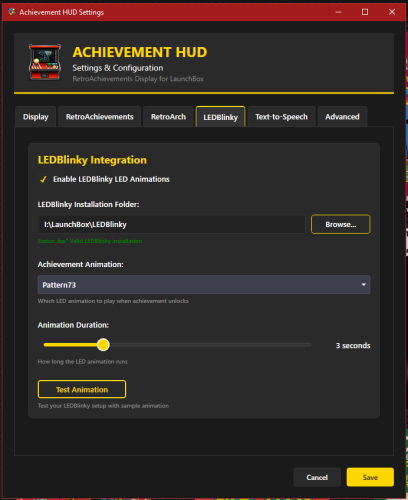
- LEDBlinky integration for RGB button/joystick animations (optional)
- Audio ducking - game audio drops during announcements so you don't miss anything
**Profile Display**
- Your RetroAchievements profile with avatar, username, and rank
- Total points and "true points" (weighted by difficulty)
- Currently playing status
- Recently played games with completion percentages
**Smart Features**
- Configurable sort modes - sort achievements by popularity, points, or alphabetically
- Auto-scroll - smoothly scrolls through long achievement lists during gameplay
- "Next achievement" suggestion - shows you the most common locked achievement
- Multi-monitor support with DPI awareness
- Home screen when no game is running
---
## Why a Second Monitor?
Checking achievements mid-game means pausing, opening menus, breaking immersion. With a second screen, you always know:
- What you just unlocked
- What achievements are available
- How close you are to completion
- Which achievement to go for next
It's like having the RetroAchievements website open next to you, but live-updated and game-aware.
---
## Technical Highlights
**Instant Detection**
- Monitors RetroArch logs for achievement unlocks in real-time
- No polling delays - detections happen the moment RetroArch records them
- Falls back to API polling for non-RetroArch emulators
**LaunchBox Integration**
- Fully integrated with LaunchBox's game launch/exit lifecycle
- Uses LaunchBox's RetroAchievements configuration (no duplicate setup)
- Pulls game metadata directly from LaunchBox's database
- Supports Clear Logos via LaunchBox's image system (handles MAME ROM name mismatches automatically)
**Customizable Display**
- Choose your target monitor
- Adjust celebration duration
- Configure TTS voice, speed, and volume
- Enable/disable individual features (LEDBlinky, TTS, audio ducking)
- Sort achievements your way
- Auto-scroll for hands-free browsing
---
## Requirements
- LaunchBox (tested with latest versions)
- RetroAchievements account configured in LaunchBox (Tools > Options > RetroAchievements)
- RetroArch for instant achievement detection (optional - API polling works with any emulator)
- .NET 9.0 runtime
- Second monitor recommended (works on single monitor but best experience is dual-screen)
**Optional Integrations:**
- LEDBlinky for RGB lighting effects
- Text-to-Speech (built into Windows)
---
## How It Works
1. **Launch a game** through LaunchBox
2. **Display appears** on your configured second monitor showing:
- Game's Clear Logo or title
- Your achievement progress
- Full achievement list with icons and descriptions
3. **Unlock achievements** - instant celebration on screen
4. **Track your progress** without ever pausing the game
5. **Game exits** - display returns to home screen showing your profile and recent games
---
## Installation
1. Download the plugin
2. Extract to `LaunchBox\Plugins\AchievementHUD\`
3. Restart LaunchBox
4. Configure in Tools > Options > Achievement HUD
5. Set your target monitor and preferences
6. Launch a game and enjoy!
---
## Credits
by: TrailerVert
Built with love for the LaunchBox and RetroAchievements communities.
Special thanks to the LaunchBox plugin API and RetroAchievements for making this possible.
---
**Current Version:** 6.6.1
**Status:** Beta
**License:** Free to use
---
Edited by TrailerVert
version number update
What's New in Version 6.6 See changelog
Released
In the v6.6 the plugin was creating a plugin folder named "Trailervert.display.plugin" to store cache and setting. I changed it to "AchievementHUD" in the plugin folder.

