.thumb.png.c9faf450e4d2b690a819048b18173f61.png)


About This File
Automatically start DemulShooter when launching a game.
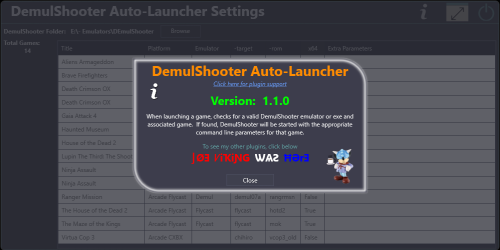
When launching a game, this plugin will check for a valid DemulShooter emulator or exe and associated game. If found, DemulShooter will be started with the appropriate command line parameters for that game.
This reduces the need for customized Additional Apps, batch files or AutoHotkey scripts to run DemulShooter. (See Notes)
NEW: v1.1.0 Self launching exe's (e.g. 'Windows' games) are now supported.
If you don't have a lightgun or have never setup DemulShooter, there's really nothing more to see here.
New in v1.3.1
Added DemulShooter Ready badge. 
Indicates if DemulShooter will be started when the game is launched.
To enable: View < Badges < Plugin Badges < Enable DemulShooter Ready
Requirements:
- LaunchBox v13.19 or newer
- DemulShooter installed and setup**
- The plugin file (RunDemulShooter.dll)
- "settings.txt" in the plugin's folder and edited/saved (see below)
**See DemulShooter documentation for setting it up and its supported emulators & ROMs.
https://github.com/argonlefou/DemulShooter/wiki
Installing and Using:
-
Extract the contents of the zip file to the /Plugins/ folder
- e.g. D:\LaunchBox\Plugins\RunDemulShooter\RunDemulShooter.dll
-
In that plugins folder, create a new "settings.txt" file.
-
In the file, add "demulshooter = full/path/to/DemulShooterFolder" (without quotes)
- e.g. demulshooter = E:\My LightGun Files\DemulShooter
- The path can be a relative path to LaunchBox.
-
In the file, add "demulshooter = full/path/to/DemulShooterFolder" (without quotes)
- Start LaunchBox
- (optional: Start QMamehook or MAME Hooker or your alternative Hook flavor of choice)
- Launch a valid DemulShooter emulator/game.
Adding Custom Command-line Parameters per-game: (new v1.1.0)
To add custom parameters per-game, go to the Tools Menu and select "DemulShooter Auto-Launcher Settings"
This will load all supported games found in your collection.
Here you can set the folder for your DemulShooter.
The folder value will be saved to an xml file [RDSsettings.xml] (along with any game-specific custom command-line parameters).
The folder path will be saved as a relative path (to LaunchBox) to keep things portable.
Double-click on a game to view and modify the command-line parameters passed to DemulShooter for that game.
Make your changes and click Save to save them.
Default Parameters:
- If the game's emulator is TeknoParrotUI, -noinput will be added to the parameters
- System 357 games will also have -pname=rpcs3.exe added to the parameters
How it works - What it does
When a game is launched, the plugin will...
-
(A) Check if the game is an exe (no emulator)
- The games Title will be checked against "the list"
-
(B) Check the game's emulator against a list of supported emulators
- Check the game's ROM file against a list of supported games for that emulator
- Check if DemulShooter.exe (or DemulShooterX64.exe) is inadvertently already running and then kill the process
- Check for custom command-line parameters
- Start DemulShooter.exe (or DemulShooterX64.exe) with the corresponding parameters
Examples:
Game: Silent Hill: The Arcade
ROM file: SilentHill.xml
Emulator: TeknoParrot
Launches: DemulShooter.exe -target=ttx -rom=sha -noinput
Game: Ninja Assault (US)
ROM file: ninjasltu.zip
Emulator: Flycast
Launches: DemulShooterX64.exe -target=flycast -rom=ninjasltu
Game: Manic Panic Ghosts
ROM file: manicpnc.zip
Emulator: Demul
Launches: DemulShooter.exe -target=demul07a -rom=manicpnc
Game: Razing Storm
ROM file: RazingStorm.xml
Emulator: TeknoParrot
Launches: DemulShooterX64.exe -target=rpcs3 -rom=razstorm -pname=rpcs3.exe -noinput
Support emulators:
- Demul (Demul 07a or newer)
-
Model2 Emulator
- emulator.exe
- emulator_multicpu.exe
- Flycast
- TeknoParrot
- Linux Loader (new v1.2.0)
Notes:
-
TeknoParrot games must use TP as the emulator (TeknoParrotUI.exe) and the ROM must point to the game's xml file.
- The xml file must be named for the games ROM (as TP names them).
- e.g. for Luigi's Mansion Arcade, "LuigisMansion.xml"
-
Games that are standalone executables are not recognized by this plugin. - (v1.1.0) Checks for all games DemulShooter supports.
- When launching a game, a check is done to see if DemulShooter is already running (e.g. if it didn't shut itself down from a previous launch). If it is, it will kill the existing process. This avoids the "Dude! You can't start DemulShoorter because it's already running".
Big special thanks to @magicray1028!! Without Ray's support, guidance and testing, I most likely would have never created this.
As always, all thoughts, views, suggestions, comments are welcome.
What's New in Version 1.3.2 See changelog
Released
New Feature: Add New Games. Now you don't have to wait for me when DemulShooter add new games. You can add them yourselves
Right-click the game and select Add game to RunDemulShooter
New: Game specific parameters are now saved to an external file (AllGamesMastertList.xml) allowing for the above feature
Improvement: Before launching DemulShooter, it now looks for and kills any existing DemulShooter.exe and DemulShooterX64.exe processes
Added Arcade PC games:
v17.7 (DemulShooter)
Skull of Shadow
v17.8
Hot Shots Fire Rescue
Mecha Tornado Arcade
Mechanical Dinosaur
v17.9
Dino Invasion
Wisdom Zombies



