



About This File
TL;DR Notes on Installation
- Extract the theme zip (whatever your version of choice) into LBThemes, as the theme folder should be in its own sub-folder.
Optionally
- Install any fonts included or linked in the Fonts (Optional) folder. I'd also recommend any pixel-style fonts available on sites like DaFont and itch.io.
- In LB Options, choose a custom background from the Backgrounds (Optional) folder to configure as your Launchbox default Background. (edited in GIMP and upscaled using ChaiNNer)
- If using alternate/old files included separately (such as Box views - Alternate Alignments), be sure to rename files accordingly, if applicable, after extracting into the Views folder.
ex. BoxContentView_Bottom.xaml >> rename to >> BoxContentView.xaml
Description
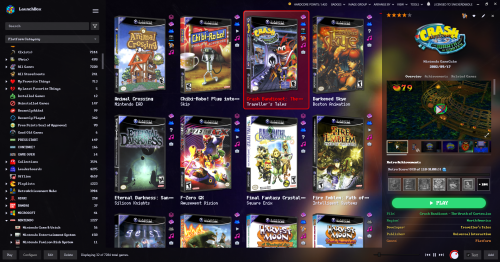
So, very similar to my other Better Old Default... With the following changes:
Platform/Game Details:
- less margins in details!
- new clickable custom links! (Based on Retrofrogg's GameDetailsView with the manual button)
- more simplistic subtitle format under clear logo titles
- RetroAchievements have been moved above the play button for more convenient viewing.
Box View:
- now based faeran's Default Plus version with the toggleable text button...
NOTE: it may or may not be slightly faster than the old (legacy) box view? And this way it doesn't require specific box spacing with the badges being further to the right. Previous box view is also included separately, if you prefer the old one without the text toggle.
- added optional bottom aligned box view
NOTE: this apparently only looks as intended with Dynamic Box Sizing turned OFF
Changes from 1.0.1
Platform Details:
- added last played / most played / random buttons from the default theme
- added Default Emulator and Games Beaten/Mastered fields (checkable fields in LB Options)
- colors and field order better mirror those of the game details
Game Details:
- play button now uses whatever your Game Details Large Font is (configurable in LB Options)
- High Scores and Related Games tabs now use larger font size for easier reading (with the WCP font I use, it was ultra tiny by default)
- added Playtime Commitment from the default theme
Box View:
- added a few more alt box alignment choices in downloads
NOTE: Fast Box view is soon to be added to this theme, so box alignment change will be possible with "Configure Layout"
Changes from 1.0.2
Box/List Views:
- now with fast box/list views!
Thanks to Rincewind's recent NeonArcade theme utilizing vertical badges (I simply cannot stand the tiny bottom-sitting horizontal badges, but to each their own), I finally managed to tweak the box and list views so they reasonably fit the oldie default look.
I couldn't decide on the list view, whether to keep the background layer completely transparent or not, so I included both versions in a separate file. The "BG" version may be easier to see, depending on your choice of visuals in LB options (comparison images in screenshots).
If the fast box view is not to your liking, simply remove or rename "FastBoxesContentView" in the Views folder, and the old "BoxContentView" will be used instead.
Known Issues Thus Far:
- there seems to be a limit of 6 badges viewable at a time, rather than all active badges being visible. Unsure if that's an LB quirk or something editable in the theme itself.
CREDITS:
Since this is more of an amalgamation of existing themes, credit is due to those creators, such as @Retrofrogg, @Mr. RetroLust, @Rincewind, and @faeran.
✺◟(•‿•)◞✺
Edited by d66dle
a correction
What's New in Version 1.0.2 See changelog
Released
- now with fast box/list views!
Thanks to Rincewind's recent NeonArcade theme utilizing vertical badges (I simply cannot stand the tiny bottom-sitting horizontal badges, but to each their own), I finally managed to tweak the box and list views so they reasonably fit the oldie default look.
I couldn't decide on the list view, whether to keep the background layer completely transparent or not, so I included both versions in a separate file. The "BG" version may be easier to see, depending on your choice of visuals in LB options (comparison images in screenshots).
If the fast box view is not to your liking, simply remove or rename "FastBoxesContentView" in the Views folder, and the old "BoxContentView" will be used instead.
Known Issues Thus Far:
- there seems to be a limit of 6 badges viewable at a time, which is not ideal, functionally. Unsure if that's an LB quirk or something editable in the theme itself.
- it's 1am and I can't remember the rest

