

PolybiusExtreme
-
Posts
18 -
Joined
-
Last visited
Content Type
Profiles
Forums
Articles
Downloads
Gallery
Blogs
Everything posted by PolybiusExtreme
-

OutputHooker
PolybiusExtreme replied to PolybiusExtreme's topic in Third-Party Applications and Plugins (Released)
Hi, thank you for the feedback and sorry for the late response. mhs scripts are and will not be supported by OutputHooker. You can try to use the MSOP plugin (https://github.com/djGLiTCH/MAME-LUA-SCRIPT-STATE-OUTPUTS) for games with funny output states. I know that "Alien 3 - The Gun" is one of the games with strange outputs and it is fixed with the MSOP plugin. -
OutputHooker
PolybiusExtreme replied to PolybiusExtreme's topic in Third-Party Applications and Plugins (Released)
OutputHooker v1.7.0 released! New Settings: - Start OutputHooker Minimized - Autostart with System - Output Processing Method (Exclusive / Priority / Concurrent) - Preferred Output Source (Windows / Network) Fixes: - Game-start commands no longer fire twice on a game's first run - Network output reconnects after a settings change instead of staying dead until the app is restarted - The apc close-app command no longer blocks output processing for up to 30 seconds while taskkill runs - COM port placeholders resolved once when the INI loads, not on every command of every output - A repeating error shows one dialog with a live count instead of stacking identical dialogs BIG THANKS to DJ GLiTCH for his fixes and new features! https://github.com/PolybiusExtreme/OutputHooker/releases/tag/v1.7.0 -
OutputHooker
PolybiusExtreme replied to PolybiusExtreme's topic in Third-Party Applications and Plugins (Released)
OutputHooker v1.6.0 released! - Fixed HTTP POST request function - UI changes for better performance https://github.com/PolybiusExtreme/OutputHooker/releases/tag/v1.6.0 -
OutputHooker
PolybiusExtreme replied to PolybiusExtreme's topic in Third-Party Applications and Plugins (Released)
OutputHooker v1.5.0 released! - Added support for HTTP POST request (WLED JSON API works now!) - Fixed default.ini usage (The default.ini works now like in MAMEHooker!) https://github.com/PolybiusExtreme/OutputHooker/releases/tag/v1.5.0 -
OutputHooker A modern reimagining of MAMEHooker, built for the latest Windows environments. This tool acts as the essential bridge between emulators and your arcade hardware (Lightguns, LEDs,...) Features Windows Support: Fully optimized for Windows 10 and 11, eliminating the stability and compatibility issues of MAMEHooker Output Support: Network - Receive output data over network connections for modern setups Windows Messages - Full backward compatibility with the "old" Windows messaging system This means that any emulator, launcher, or tool works with OutputHooker! Output Processing Method - If an application sends outputs over both Network and Windows Messages, *Settings* decides what happens. **Priority** uses the preferred output source and falls back to the other one if it stays quiet, **Exclusive** uses only the preferred source, and **Concurrent** processes both. The preferred source defaults to Network, and the method defaults to Priority, so no command is sent to your hardware twice. Hardware Support: Lightguns with COM Port support (Blamcon, Fusion, GUN4IR, OpenFIRE, RS MX24, RS Reaper, X-Gunner) Lightguns with TCP support (Sinden) Positional Guns with USB HID support (Alien,...) LEDWiz boards (Original, Clone, Pinscape) Ultimarc LED boards WLED boards (JSON API) Gamecontrollers with SDL3 support (Force Feedback) Any hardware that receives TCP/UDP commands INI Support: MAMEHooker INI files and KeyStates are supported OutputHooker features a built-in editor inspired by the original MAMEHooker workflow, allowing you to configure hardware triggers without leaving the app MAME State Output Project Support: MAME State Output Plugin by djGLiTCH is supported Getting Started 1. Download the latest build from the GitHub Release page 2. Configure your emulator (e.g. MAME) to broadcast outputs via TCP or Windows Messages 3. Launch the application, start a game and use the INI Editor to define your hardware mappings Watch your cabinet come to life! Support See the GitHub Wiki for detailed instructions. Due to time constraints, I cannot offer any support. I am just one man that wanted to build a modern MAMEHooker alternative for my selfmade Arcade machine. Contribution If you have suggestions, bug reports, or want to contribute to the code, feel free to open an issue or submit a pull request. Credits Howard Casto (MAMEHooker & MAME Interop SDK developer) Ben Baker (MAME Interop SDK & Ultimarc SDK developer) Aaron Giles (MAME output code developer) djGLiTCH (MAME State Output Project (MSOP) developer) 6Bolt (Hook of the Reaper developer)

-

Version 1.0.0
69 downloads
Sega Nu / Nu 1.1 / Nu 2 / NuSX - Clear Logo Pack: Sega Nu: Sega Nu 1.1: Sega Nu 2: Sega NuSX (two versions): -
Sega Nu / Nu 1.1 / Nu 2 / NuSX - Clear Logo Pack View File Sega Nu / Nu 1.1 / Nu 2 / NuSX - Clear Logo Pack: Sega Nu: Sega Nu 1.1: Sega Nu 2: Sega NuSX (two versions): Submitter PolybiusExtreme Submitted 04/24/2023 Category Platform Clear Logos
-
thanks i will write him
-
hi, i am happy you like my theme i know you developers are busy and i also know that good work needs some time maybe you can look at the german translation in bigbox too... there are few issues... if you want i can write it to you happy holidays
-
thank you for the fast answer ok, so i have to wait a few more days
-
How long does it take to check a theme? I uploaded my theme and pause-theme (PolybiusExtreme) a week ago and it still has the status "pending approval".
-
Version 1.0.0
111 downloads
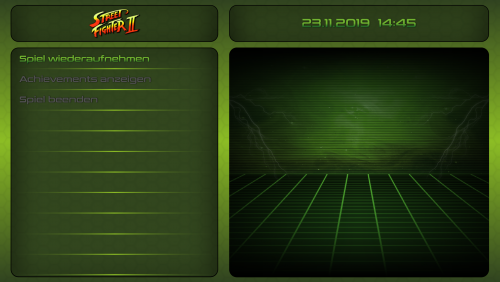
This is a simple Pause Theme for my PolybiusExtreme Theme. It displays the time, game logo and device image (if you have one). Installation: Download the zip and extract the content to LaunchBox/PauseThemes/PolybiusExtreme -------------------------------------------------------------------------------------------------------------------------------------- Link to my Theme: Special Thanks to: @Jason Carr for LaunchBox & BigBox -
PolybiusExtreme - Pause Theme View File This is a simple Pause Theme for my PolybiusExtreme Theme. It displays the time, game logo and device image (if you have one). Installation: Download the zip and extract the content to LaunchBox/PauseThemes/PolybiusExtreme -------------------------------------------------------------------------------------------------------------------------------------- Link to my Theme: Special Thanks to: @Jason Carr for LaunchBox & BigBox Submitter PolybiusExtreme Submitted 11/23/2019 Category Pause Themes
-
- 1
-

-
PolybiusExtreme View File PolybiusExtreme is the name of my first selfmade arcade cabinet. I wanted a theme that matched the design of my cab, so I had to make one that fits... ... and here it is! Video: Features: "Pandoras Box"-Style (selfmade graphics, no copy) HD only (Resolution 1920x1080, 16:9) (I only tested it with HD resolution. Please tell me if it works on other resolutions) Views: SystemView OptionsView (and OptionsPage) TextFiltersView TextGamesView PlattformWheelFiltersView ... Installation: Download the zip and extract the content to LaunchBox/Themes/PolybiusExtreme You might need to unblock the dll's in the plugin folder for them to work properly Tips: You can change the "PolybiusExtreme" logo to another logo, just change the path to your logo in the xaml-scripts Special Thanks to: @Jason Carr for LaunchBox & BigBox @eatkinola for the Ao.Bigbox.Themer The community and all others that i forgot (OPTIONAL:) Pause Theme Submitter PolybiusExtreme Submitted 11/23/2019 Category Big Box Custom Themes
-
 the theme is perfect, the only thing i miss is a platform video for the sega naomi 2. anyone have a good platform video?



