

izzishor
-
Posts
50 -
Joined
-
Last visited
Content Type
Profiles
Forums
Articles
Downloads
Gallery
Blogs
Files posted by izzishor
-
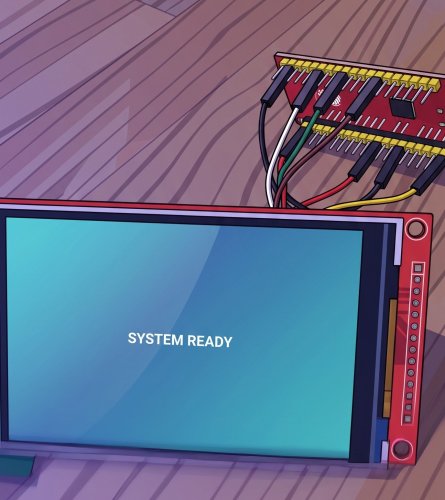
Pixel Arcade Display | ILI9488 + ESP32 = Cheap Clear Logo Marquee
By izzishor in Third-party Apps and Plugins
# Pixel Arcade Display
Who said it was impossible?!
Shows the Clear Logo and Platform you select in LaunchBox on a small
ILI9488 screen driven by an ESP32.
Updates instantly.
The plugin hands the logo's file path to a tiny local proxy, which reads it off disk and streams it to the ESP32.
LaunchBox plugin ──> arcade-imgproxy.exe ──> ESP32 + ILI9488 screen
(sends logo path) (reads file, RGB565) (displays it)
1. Wiring (ILI9488 → ESP32 NodeMCU-32S)
Display | ESP32 - W I R I N G
-----------------------------
VCC | 3.3V
GND | GND
CS | GPIO21
RESET | GPIO4
DC | GPIO27
MOSI | GPIO23
CLK | GPIO18
LED/BL | GPIO32 and
---
2. PC side (LaunchBox)
Everything lives in one folder: `LaunchBox\Plugins\PixelArcade\`
Put PixelArcade folder from LaunchBox Plugin in the Plugins folder of LaunchBox:
- `PixelArcade.dll` (the plugin)
- `arcade-imgproxy.exe` (the image proxy)
- `config.ini` (shared settings)
- `default.png` (shown when nothing is selected — drop in any 480x320 image)
- `install-service.bat` / `uninstall-service.bat` (optional auto-start)
**Edit `config.ini`** if needed. Defaults work when the proxy runs on the
same PC as LaunchBox.
Run `arcade-imgproxy.exe` — or right-click `install-service.bat` →
**Run as administrator** to auto-start it hidden at every boot.
Restart LaunchBox so it loads the plugin.
---
3. ESP32 side (ESPHome)
Put `pixel-arcade.yaml` and `arcade_image.h` in the same ESPHome folder.
Edit the **`substitutions`** block at the top of `pixel-arcade.yaml`:
- `wifi_ssid`, `wifi_password` — your WiFi
- `device_ip`, `gateway_ip` — the static IP you want + your router IP
- `proxy_host` — the **IP:port of the PC** running the proxy
(e.g. `192.168.1.60:8090`)
---
Done
Select a game in LaunchBox → its logo appears. Deselect / exit → default image.
Sources included (`arcade-imgproxy.go`, `PixelArcadePlugin.cs`). Do whatever
you want with it.
12 downloads
(0 reviews)0 comments
Updated
-

Auto Play N' Quit - AHK Script by IzzIsHOr
By izzishor in Third-party Apps and Plugins
🎯 ATTRACT MODE for BigBox: Auto Play N' Quit (No Plugins, No Hassle!)
Sick of staring at a frozen BigBox playlist? Wanna transform your arcade setup into a living, breathing arcade cabinet that automatically cycles through games like a pro?
Look no further. This lean AutoHotkey script brings ATTRACT MODE to BigBox, no complicated setups, no bloat.
What does it do?
🚀 Launches a game from any BigBox playlist or platform (The one that's opened)
⏳ Waits a solid 5 minutes letting the game’s demo/attract mode run
🛑 Closes the emulator cleanly (using Alt+F4 + forced process kill if needed)
🎯 Brings BigBox back to the front, then scrolls randomly down 2 to 8 games in your list
🔄 Launches the next game and repeats forever, hands-free, stress-free
🎮 Supports all vertical scrolling themes only (vertical = essential for proper down-arrow navigation)
🛑 Exit anytime by pressing Joy8 (Start button) or the ESC key
Why is this awesome?
You get a ATTRACT MODE, cycling games without lifting a finger
Works out of the box with your existing BigBox setup, zero complicated plugins
Customizable ProcessList.txt lets you kill any stubborn emulators or apps that refuse to close
Perfect for cabinets, game rooms, shows, or that “cool factor” when your rig is idle
⚠️ Note:
Your BigBox theme must be vertically scrolling. If you're using a horizontal wheel or grid layout, the Down-arrow navigation won’t behave properly.
You MUST download either the ZIP or the two loose files, the AHK and the TXT, and they can be placed anywhere, but MUST BE in the same folder.
🔧 ProcessList.txt
Just add any emulator or game launcher that needs force-closing to ProcessList.txt separated by pipes, like so:
retroarch|mame|duckstation|pcsx2
Buy me a Coffee ☕: IzzIsHOr
142 downloads
- bigbox autoplay game
- bigbox ahk script
- (and 3 more)
