

izzishor
-
Posts
50 -
Joined
-
Last visited
Content Type
Profiles
Forums
Articles
Downloads
Gallery
Blogs
Everything posted by izzishor
-
I'm blown away by this level of support and new features pumping out 🙏🏻 Still have the B button bug where game loses focus, with SJ@X controller boards made into XBOX360 controllers via XOUTPUT, but goes away if we turn off STARTUP SCREENS for games in BigBox. Otherwise it's the smoothest is ever been, I'm running 3 monitors all 3 play videos, and videos are very smooth, and loading fast, same as clear logo wheel, new cache system made it snappier.

-
Yes, it's the Bug i was referring too, when holding B and pressing A, it launches another instance, or invokes your instance of LB, or BB, for some reason. So if I close BB or LB and I hold B and A, it will relaunch it, and if it's minimized, it will call it to foreground and place it above my emulator. Couldn't fix it by changing controls so I had to revert to Beta 1.
-
Exactly, reverted to Beta1, it's ok now. So hopefully it will be fixed as well 🫶
-
Beta 3 is Very snappy, and nice, only problem I'm having is when I press A+B at the same time it brings BB over my Retroarch, and I have no idea why, with Beta 1 and 2 I didn't have this issue? Will downgrade, test and see, but it's weird. Otherwise thanks for all the work.
-
Thank you for the answer, but you just explained exactly the UX issue I asked to be fixed. The notification says 'New Beta Version', not 'Version xxx Available' to download. You never KNOW what version you're downloading untill the install screen, which is set to AUTOINSTALL, as well, so no way of cancelling it. Meaning, if I download the beta version and it's still Beta 2 in this case, it will be broken again, and I will have to remove plugin, reinstall beta 1 manually from the update folder. Which I've done 4-5 times so far. What I was asking for was a VERSION NUMBER before you download, to actually understand what it is you're downloading so you can ignore it if it's a bad version. The fix should be very easy to implement, since you only need to show the download filename before you download it, which has the version number before the file extension. That's all, ty for taking the time to answer, and big up on all the updates and optimizations 👑
-
Any way to get a notification when Beta 3 drops? Because there's no way of knowing if you're updating to Beta 2 or Beta 3, atm. Thank you for the development, looking forward to the release.
-
Hi, thanks for all the updates! Best front end. However I've been having same issue as everyone, controller issues while navigating trough the menus with beta 2. But I don't have a way to know what version we're updating to, so I rolled back, deleted the LaunchBox Reader plugin, that doesn't work with the rollback, and now i click update, and IDK what version it updates too... it should say "NEW BETA VERSION FOUND VXX", if possible. Thank you, and keep them comming, I'll keep rebuying licenses 🏅
-
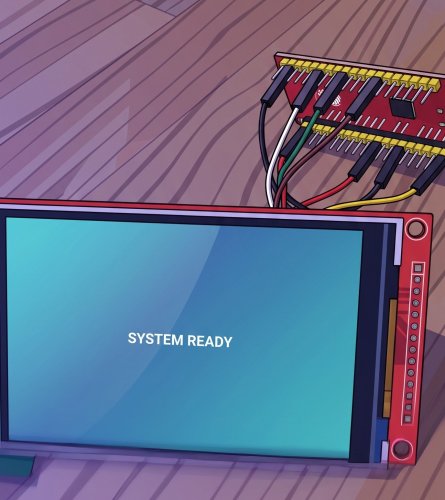
 Pixel Arcade Display | ILI9488 + ESP32 = Cheap Clear Logo Marquee View File # Pixel Arcade Display Who said it was impossible?! Shows the Clear Logo and Platform you select in LaunchBox on a small ILI9488 screen driven by an ESP32. Updates instantly. The plugin hands the logo's file path to a tiny local proxy, which reads it off disk and streams it to the ESP32. LaunchBox plugin ──> arcade-imgproxy.exe ──> ESP32 + ILI9488 screen (sends logo path) (reads file, RGB565) (displays it) 1. Wiring (ILI9488 → ESP32 NodeMCU-32S) Display | ESP32 - W I R I N G ----------------------------- VCC | 3.3V GND | GND CS | GPIO21 RESET | GPIO4 DC | GPIO27 MOSI | GPIO23 CLK | GPIO18 LED/BL | GPIO32 and --- 2. PC side (LaunchBox) Everything lives in one folder: `LaunchBox\Plugins\PixelArcade\` Put PixelArcade folder from LaunchBox Plugin in the Plugins folder of LaunchBox: - `PixelArcade.dll` (the plugin) - `arcade-imgproxy.exe` (the image proxy) - `config.ini` (shared settings) - `default.png` (shown when nothing is selected — drop in any 480x320 image) - `install-service.bat` / `uninstall-service.bat` (optional auto-start) **Edit `config.ini`** if needed. Defaults work when the proxy runs on the same PC as LaunchBox. Run `arcade-imgproxy.exe` — or right-click `install-service.bat` → **Run as administrator** to auto-start it hidden at every boot. Restart LaunchBox so it loads the plugin. --- 3. ESP32 side (ESPHome) Put `pixel-arcade.yaml` and `arcade_image.h` in the same ESPHome folder. Edit the **`substitutions`** block at the top of `pixel-arcade.yaml`: - `wifi_ssid`, `wifi_password` — your WiFi - `device_ip`, `gateway_ip` — the static IP you want + your router IP - `proxy_host` — the **IP:port of the PC** running the proxy (e.g. `192.168.1.60:8090`) --- Done Select a game in LaunchBox → its logo appears. Deselect / exit → default image. Sources included (`arcade-imgproxy.go`, `PixelArcadePlugin.cs`). Do whatever you want with it. Submitter izzishor Submitted 06/11/2026 Category Third-party Apps and Plugins
 -
Version 1.0.3
12 downloads
# Pixel Arcade Display Who said it was impossible?! Shows the Clear Logo and Platform you select in LaunchBox on a small ILI9488 screen driven by an ESP32. Updates instantly. The plugin hands the logo's file path to a tiny local proxy, which reads it off disk and streams it to the ESP32. LaunchBox plugin ──> arcade-imgproxy.exe ──> ESP32 + ILI9488 screen (sends logo path) (reads file, RGB565) (displays it) 1. Wiring (ILI9488 → ESP32 NodeMCU-32S) Display | ESP32 - W I R I N G ----------------------------- VCC | 3.3V GND | GND CS | GPIO21 RESET | GPIO4 DC | GPIO27 MOSI | GPIO23 CLK | GPIO18 LED/BL | GPIO32 and --- 2. PC side (LaunchBox) Everything lives in one folder: `LaunchBox\Plugins\PixelArcade\` Put PixelArcade folder from LaunchBox Plugin in the Plugins folder of LaunchBox: - `PixelArcade.dll` (the plugin) - `arcade-imgproxy.exe` (the image proxy) - `config.ini` (shared settings) - `default.png` (shown when nothing is selected — drop in any 480x320 image) - `install-service.bat` / `uninstall-service.bat` (optional auto-start) **Edit `config.ini`** if needed. Defaults work when the proxy runs on the same PC as LaunchBox. Run `arcade-imgproxy.exe` — or right-click `install-service.bat` → **Run as administrator** to auto-start it hidden at every boot. Restart LaunchBox so it loads the plugin. --- 3. ESP32 side (ESPHome) Put `pixel-arcade.yaml` and `arcade_image.h` in the same ESPHome folder. Edit the **`substitutions`** block at the top of `pixel-arcade.yaml`: - `wifi_ssid`, `wifi_password` — your WiFi - `device_ip`, `gateway_ip` — the static IP you want + your router IP - `proxy_host` — the **IP:port of the PC** running the proxy (e.g. `192.168.1.60:8090`) --- Done Select a game in LaunchBox → its logo appears. Deselect / exit → default image. Sources included (`arcade-imgproxy.go`, `PixelArcadePlugin.cs`). Do whatever you want with it. -
Yessir, it's the imageserver you provided in the link, I installed it, and then configured it and it works no mistake, now I made mqtt_settings.json READ ONLY, hopefully it will not change anymore. Ye, I feel you with the time management, HECTIC... Ty, that's just the Arcade dashboard, this is the Main one, with my house, I have it on various devices, but maily use it on PC or this iPad on that white closet (sry no other pic)
- 15 comments
-
- 1
-

-
- automation
- homeassistant
- (and 1 more)
-
It's weird I can only find config.json in the PLUGINS folder, not in the main folder, and that I already marked as read only, but it does not remember settings from time to time, without any updates to anything, it just looses my configuration :(( It's kinda of sad because it actually crashes my whole Launchbox when it's not able to connect to the MQTT Hoping you can fix, or atleast tell me what to make read only, because other than that the MQTT works perfectly. Later Edit: OK so I looked around more for the file, and I found the mqtt_settings.json, they were in the CORE folder of Launchbox, marked it as read only, hopefully it holds now ✨ Ty again for a wonderful plugin!
-
Auto Play N' Quit - AHK Script by IzzIsHOr
izzishor commented on izzishor's file in Third-party Apps and Plugins
 Yes, it is, I have a shortcut made inside a game I don't play, that starts with A, that launches it when I launch that game, just add it in Additional APPS under LaunchBox. Or make another AHK script with chatGPT that runs the autorun script when you press a combo of buttons. So happy it works for you, I did this for myself in spare time, and glad it helps some peeps ❤️
 -
Auto Play N' Quit - AHK Script by IzzIsHOr
izzishor commented on izzishor's file in Third-party Apps and Plugins
It must be ran with AHK 1.0 I believe, that's why the error is, I keep the scrips hidden in C:\ so there are no folders to path, maybe that's the error you're facing, try keeping it in the root of a HDD, hidden or not it doesn't matter, see if the error is still there, and the #NO ENV is due to AHK 2.0 i think, if you're using AKH 1.0 and have that error, you can delete the #noENV line from it. -
-
Auto Play N' Quit - AHK Script by IzzIsHOr
izzishor commented on izzishor's file in Third-party Apps and Plugins
Thanks for reaching out, and for the kind words 🥹 I forgot I posted it here, I made it a bit more complex now, works with all platforms/playlists, just have to be VERTICAL SCROLLING, or you must tweak the AHK to send right arrows instead of down arrows. Try it out, tell me what you think, to make it close other emulators, just edit the ProcessList.txt and add whatever you want it to close in there. Updated the description and updated the files as well.- 11 comments
-
- 1
-

-
- bigbox autoplay game
- bigbox ahk script
- (and 3 more)
-
Sweet baby Jesus, it runs so smooth for me ❤️❤️❤️ Amazing work, a very much needed but a MONUMENTAL effort 🙌🙌🙌 Thank you so much for all the great work.
-
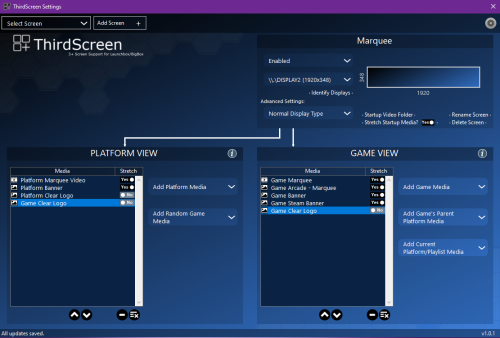 LE: Ty, I read UP, didn't see the message before, FIX works, thank yo Hi, latest LaunchBox Beta, broke it 😭 I get this error and can't see it's settings in Launchbox, and when I click it in BigBox, I get this crash error: BinaryFormatter serialization and deserialization have been removed. See https://aka.ms/binaryformatter for more information. App: Big Box Version: 13.19-beta-3 Theme: Pulse Type: System.PlatformNotSupportedException Site: System.Object Deserialize(System.IO.Stream) Source: System.Runtime.Serialization.Formatters at System.Runtime.Serialization.Formatters.Binary.BinaryFormatter.Deserialize(Stream serializationStream) at System.Resources.ResourceReader.<>c__DisplayClass7_0`1.<CreateUntypedDelegate>b__0(Object obj, Stream stream) at System.Resources.ResourceReader.DeserializeObject(Int32 typeIndex) at System.Resources.ResourceReader._LoadObjectV2(Int32 pos, ResourceTypeCode& typeCode) at System.Resources.ResourceReader.LoadObjectV2(Int32 pos, ResourceTypeCode& typeCode) at System.Resources.ResourceReader.LoadObject(Int32 pos, ResourceTypeCode& typeCode) at System.Resources.RuntimeResourceSet.GetObject(String key, Boolean ignoreCase, Boolean isString) at System.Resources.ResourceManager.GetObject(String name, CultureInfo culture, Boolean wrapUnmanagedMemStream) at ThirdScreen.SettingsForm.InitializeComponent() at ThirdScreen.SettingsForm..ctor(ThirdScreen_MenuItem _parent) at ThirdScreen.ThirdScreen_MenuItem.Unbroken.LaunchBox.Plugins.ISystemMenuItemPlugin.OnSelected() at Unbroken.LaunchBox.Windows.BigBox.MenuActions.MethodMenuAction.StopRepository(Object) at Unbroken.LaunchBox.Windows.BigBox.MenuActions.MethodMenuAction.OnEnter() at Unbroken.LaunchBox.Windows.BigBox.ViewModels.SystemViewModel.RestartProcessor(Object) at Unbroken.LaunchBox.Windows.BigBox.ViewModels.SystemViewModel.OnEnter() at Unbroken.LaunchBox.Windows.BigBox.NavigationManager.OnEnter() at EventState.ReflectCode(Object, EventState) at Unbroken.LaunchBox.Windows.BigBox.ViewModels.MainViewModel.OnEnter() at ManagerState.ReflectCode(Object, ManagerState) at Unbroken.LaunchBox.Windows.BigBox.ViewModels.MainViewModel.HandleKeyDown(KeyEventArgs e) at CodeParameter.ReflectCode(Object, KeyEventArgs e, CodeParameter) at Unbroken.LaunchBox.Windows.BigBox.Views.MainView.ConcatError(Object spec, KeyEventArgs cont) at System.Windows.RoutedEventArgs.InvokeHandler(Delegate handler, Object target) at System.Windows.EventRoute.InvokeHandlersImpl(Object source, RoutedEventArgs args, Boolean reRaised) at System.Windows.UIElement.RaiseEventImpl(DependencyObject sender, RoutedEventArgs args) at System.Windows.UIElement.RaiseTrustedEvent(RoutedEventArgs args) at System.Windows.Input.InputManager.ProcessStagingArea() at System.Windows.Interop.HwndKeyboardInputProvider.ReportInput(IntPtr hwnd, InputMode mode, Int32 timestamp, RawKeyboardActions actions, Int32 scanCode, Boolean isExtendedKey, Boolean isSystemKey, Int32 virtualKey) at System.Windows.Interop.HwndKeyboardInputProvider.ProcessKeyAction(MSG& msg, Boolean& handled) at System.Windows.Interop.HwndSource.CriticalTranslateAccelerator(MSG& msg, ModifierKeys modifiers) at System.Windows.Interop.HwndSource.OnPreprocessMessage(Object param) at System.Windows.Threading.ExceptionWrapper.InternalRealCall(Delegate callback, Object args, Int32 numArgs) at System.Windows.Threading.ExceptionWrapper.TryCatchWhen(Object source, Delegate callback, Object args, Int32 numArgs, Delegate catchHandler) Recent Log: 6:11:15 PM Exception
 -
I'm glad this discussion is still ongoing, I love BigBox and Launchbox as a platform and as a passion project for a lot of us, and for the devs, you can see how many blood, sweat and tears were put in it 🫶 However, the issues of slowness and sluggishness still remains. I've resorted to making a Raid array just to make sure I won't lose my progress with my arcade. I was trying to find solutions still, updating VLC separately worked for a while, clearing the cache would fix it for a while as well, now with the latest versions, it's a bit better, . But what I did to fix it, is to put BigBox as High Priority process, since then it's 80-90% smooth. And locking up way less.
-
 It works, it had a problem 'finding videos' before, now it worked 🫶 Thank you!
 -
I would love it if someone could fix it, I've been using it in the past, and it was a godsend... I tried peeping in the source and gpting it, but alas, I'm dumb 🤣🤣
-
Awf, this is my favorite theme, however I have issues with it lagging on my arcade... Most themes are fine, but this one is really slowing up the scrolling, hanging...
-
I press that as well, I ommited to write that. I do press it, however it starts 'loading' and then after 10-15 minutes the progress bar disappears and it doesn't seem it's caching anymore (because my CPU fans and it SSD activity becomes idle) then I turn on the script and start the scrolling :))) ty for the answers.
-
Should I move this chat in private? Or it's ok to talk here? I don't want to steal this post, but I do want to share my experience and perhaps get a bit of help. And to answer: No sir, I run nothing else than BigBox, it's database and roms from a fastish 2TB SSD I run W11 with modified services on a different SSD and I have 2 more HDD's just for PC Games Everything I don't need is turned off, I just have Fan Control, Xbox360ce and the SindenLightgun (in sleep mode) on startup, everything else (other than default win services) are off or manual. Everything is up to date and all auto-updates are off, for everything. I tried running BigBox as shell. Tried on fresh Win install ...So what I do to make it work is the following: -I delete the caches from BB and LB -I go in BB and select either Highest or High for images -Then I refresh the images from BB. Then I run an AHK script that just presses down arrow every 3 seconds, so that the images load for each game. I have to do this for all platforms, and you can feel and see the difference instantly when all games images are loaded, the second you cache the last one, it's butter smooth. And then time, or an update messes it up again...
-
Personally I have already tried the "default theme" and "old default", as well as "critical zone", and I have the same issue, regardless of settings, or system I use, if a playlist/system has more than 1000 games, it's a lagfest. Only thing that fixes it is deleting bigbox cache and then going manually trough all the systems and go through all games, then it won't lag for a few weeks or untill the next update. Oh well. Ty for the answers.
-
So, It made me sad when I saw that almost all the topics in regards to performance have been closed or barely have any answers... I have a pretty big collection (information about my arcade build, technical specifications and collection is here) And I've been having this problem for a while, LaunchBox freezes at random intervals for me and I literally have to wait for it to load back up, and unstuck itself, I could live with that because I mostly use BigBox... However BigBox has it's own problems, I'm using Pulse as my favorite theme, however it does the same with default themes or others as well, it has huge slowdowns when scrolling trough games, (I have 3 screens on the Arcade, 2 of them running video: Main Screen and Marquee Screen and a static image Poster Screen) and I've tried with both VLC and MPlayer, and it always gets stuck, like 3-10 seconds wait time to change between the game, attract mode is out of the question, it's choppy and freezes. What I've tried to do to fix it: Tried on multiple systems: Monster Work PC (W10/W11 - RTX4090/i9/128GB/GEN3SSD, etc) Main PC (W11 - Asus B550-E/32GB-DDR4/Ryzen7-5800X/RTX-4080/M2-SSD) Arcade (I7/16GB-DDR3/RX6600/SSD) Same slowdowns even though on Work PC and Main PC I only ran a single monitor. Reinstalling / Re-adding my collection Clean installed on separate computers, nope, didn't work, even with default theme, no settings done to bigbox, if I run my collection, after hours of waiting to import games, and waiting to build a cache, still starts lagging and going choppy when in attract mode, or just holding down, or left trough scroll through the games. Updating or switching Video Player I've tried both with VLC and MPlayer (same results, it's better with MPlayer for a while, then it borks down too) Updating VLC x64 from zip file overwriting the files in the ThirdParty/VLC folder works for a while as well, then it starts going choppy again I've resorted to clearing my cache every week and having a script scroll trough all games, one by one, so they can load at least once, that fixes it for a week or two... But it's so bad I've started looking for alternatives... I would love to stay to launchbox because I've set it up in a way that I like, but the performance is literally driving me insane :)) Sorry for the wall of text: TL;DR: BigBox scrolling performance is terrible, I've tried everything, pls fix/improve before adding "NEW" features not many people asked for, or i cry ------ Later Edit: I was writing this while @C-Beats wrote his reply, so I've read it after I've posted. Thank you for the reply and your work <3, it at least sheds some light on the situation, rather than straight up ignoring or saying that there aren't any performance issues. I may have a small suggestion that might fix some slowdowns, at least in cases like mine, that shouldn't require a full rewrite of the code. Maybe finding a way to delay the videos (theme videos, marquee videos, etc) make them play after 2-3 settings of the game being selected, that way it does not fill the GPU queue or clogs up the video player, basically while scrolling trough games or while in attract mode, it should not play the videos instantly.



