

blattacker
-
Posts
44 -
Joined
-
Last visited
Content Type
Profiles
Forums
Articles
Downloads
Gallery
Blogs
Everything posted by blattacker
-
Version 1.5.5
816 downloads
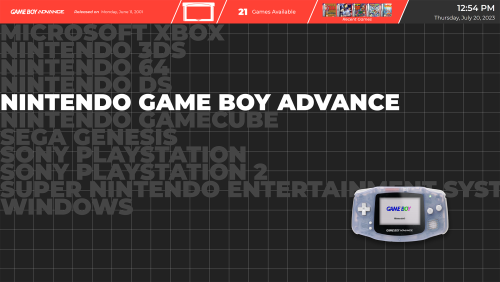
About: This theme is inspired by Pegasus Frontend's default theme. I personally really love the look of Pegasus, but vastly prefer the functionality of Big Box, so this is me doing my best to combine both worlds. Excluding those credited below, all other custom assets were created by me. As a note: This theme was designed in 4K for use on a large television. Scaling issues present in previous versions have been fixed, to my knowledge. This WIP upload is intended to get fresh eyes on the project and help to identify issues I may not be running into with my limited usage, as well as provide a better version of this theme than was currently available during a period of time where I don't have as much free time as I have previously. Credits: Genre Icons: Game Icons Platform Clear Logos: v2 Platform Logos Professionally Redrawn + Official Versions, New BigBox Defaults 2.1.0 Platform Banners (Present only in legacy versions): BannerBox 2.1 Platform Media: System Media - Stencil Platform Images 1.0. Platform Images: COLORFUL Hardware PNG media (1x1) 1.1 Finally, many thanks to @y2guru for the Community Theme Creator. While this version no longer uses the CTC, I would have never started on this journey, nor gotten nearly as far, without it.- 13 comments
-
- 12
-

-

-

Sleipnir - Theme Preview and Feedback
blattacker replied to blattacker's topic in Big Box Custom Themes
Update to show off the completed form before uploading! Changes made: Added platform media icon to top bar of Platform Views (and moved the Recent Games preview one slot over to accommodate); Completely remade default Platform View (kept original version for users who may prefer the BannerBox banners over simple text); Finished Settings view to fit in with the rest of the theme. Please let me know what you think! I'm going to leave this post up looking for thoughts/suggestions for probably a week before uploading (with any changes)! Settings View Platform View 1 Platform View 2 Wall View (Also remembered to "play" a game, and mark one as "finished" to show off progress bar) Details/Text View
-
I've been making a Big Box theme that is based on/inspired by the default theme for Pegasus Frontend. I'm calling the theme Sleipnir because I'm not that creative and it was the first mythical horse I thought of that wasn't already in use. Originally it was just meant for me (and maybe shared with a couple friends), but one of my friends I've been getting feedback from has demanded that I post it for others to see. It's still in development, there's a lot of stuff that's a bit rough (for example, I'm using the Banner Box assets for the Platform View), but I thought I'd share it here, get some feedback, and maybe get some ideas on things to change or add! Let me know what you think! Platform View: Wall Games View: Text Games View:
-
100% support the switch to a paid platform. Looking forward to playing around with the new version! The preview has already given me some ideas for my own themes! One question/feature request if those are allowed: any chance moving forward for collapsing nested objects inside their parent in the editor? I know you can collapse the overall group already, but being able to collapse individual parent objects would be great!
-
Oh, if you're going from a conditional, it looks like you've selected a UI element when you mean to select a metadata field. I believe the one you'd be looking for in that case would be "Game Platform".
-
If I'm understanding your question correctly, on the main CTC screen (not in the editor itself), you should be able to click "Default" at the bottom middle where it says "Configuration: Default" and select the platforms that you want to be different. I'd right click on the default, copy, and paste the view to the different platforms you plan on editing and only editing the scanlines just to save time.
-
There's a bit of software I use in my daily life (completely unrelated to all of this) that's called World Machine, it's a terrain generation software. I bring this up because it is (as far as I'm aware) also only developed by one person, so I feel like it's a good point of comparison. For World Machine, there are a few different tier options for purchasing the software. There's the "Community" tier which is free, the "Indie" tier which is kind of a midpoint for the prosumer, and then the "Professional" tier, which is significantly more expensive. The important thing to note is that there is no real difference in core functionality between the three versions, the main limitation on the tiers lower than Pro is output resolution. Free version has a low maximum output resolution, mid-tier has what I would call a "high enough" maximum output resolution, and the pro version does not have a maximum output resolution. I feel like this could be a good framework to go off of. I'm not sure limiting the possible output resolutions for a theme would be possible or advisable, but perhaps it could be something as simple as limiting the number of views available in a theme for different price levels. To me, that strikes a really nice balance between incentivizing people to purchase the software to build more complete themes while also not being cost prohibitive to people who maybe aren't fully invested in the process (yet).
-
Fair enough! I figured it might be something like that, but thought it wouldn't hurt to ask!
-
I don't know if this is the same error as above, but when I attempted to launch this new version, it showed the splash screen and immediately closed out. Didn't look for a log file, but on a quick suspicion, I checked the default settings file, noticed it had a default location for the Big Box installation set already, changed that location to the location on my system, and now the program launches correctly. Unrelated, and not sure if this is the correct place for feature requests, but is it at all possible to have the text scroller as an option in template items?
-
In that case, it's great! Really intuitive to use, and I appreciate that there are so many templates available to use, since it lets me accommodate the borders for platforms with different aspect ratios for their box art!
-
I'm mostly using it to create a border around the selected items in the Wall View, so I'm not doing anything too crazy or advanced, but it's working extremely well for that, now that I've got a project going where I can see it!
-
I can still send extra information if you'd like, but I think the issue had something to do with how I initially copied the theme project over, as I literally just discovered that the issue does not persist in a new theme project.
-
Just a quick question (Where I'm admittedly probably just doing or understanding something incorrectly), I can't seem to get wheel item templates to show up when editing a view. That is, I created a template in "GameWheelItem1" and changed the Wheel Item type in WallGamesView (and also in WheelGamesView to make sure it wasn't just an incompatibility with the wall view) to "Template" and selected the GameWheelItem1 in the dropdown. This caused all the items in the view to disappear both in the editor and on the main screen. Is this expected behavior?


