

spiritedusual
-
Posts
67 -
Joined
-
Last visited
spiritedusual's Achievements

16-Bit Artificial Intelligence (4/7)
17
Reputation
-
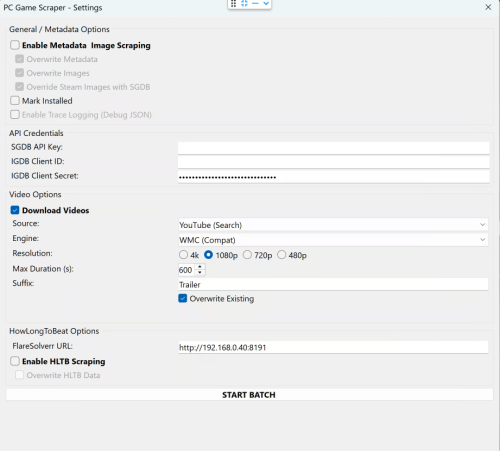 Glad to hear its working out for you!
 -
Got it. Well its good to hear it's working as its designed but yea right now not a way to change the default download location. It is something I will add soonish though. In the mean time you'll have to manually move your media to your designated drive. I know you've already got your system all set up, but you might want to look in to symlinks/junctions. If you don't know what they are it basically a way to make your files appear in two locations without using up any extra space. If you used this you could leave launchbox settings as they are and just move your files in to a folder and symlink/junction that location to where launchbox expects the media to be. I'm not super knowledgeable about it but it might be worth looking in to.
-
Great thanks. Yea there are instructions for how to deal with the youtube thing. And as for your media location, it looks like you dont keep it with the launchbox install. So the media that is downloaded is in the /launchbox/videos/ and /images/ folder though right?
-
There is a log in the plugin folder that will detail whats happening with youtube if you post it here I can help you with that. Also let me know how you organize your videos so I can understand what you need for when I add in the custom location feature.
-
So yea that summary screen at the end is not accurate and its on my to do list. Im getting some mixed messages from you here though. You're saying that it fails and you see no added media following use but then in your edit you say that the images and videos have been downloaded. Maybe you mean its saying nothing downloaded in the summary screen but they files are present and you're not seeing them because your folder structure is different? You're not the first person to ask for a way to define the download location. Its something I'll look into when I'm done with my current project. So just to confirm, the media and metadata are downloading but the media isn't in the location you want it to be in so launchbox isn't detecting it? How do you have your folders set up?
-
No everything you may need is in the archive and the log is created as soon as you click the plugin even if you cancel right away you should have something. Please send a screenshot of your plugin folder with all the files. And please still detail your exact situation as well.
-
It's in the same folder as the plugin
-
Hey I'm not at a computer right but can you tell me exactly what you did step by step from opening the plugin to when you get this error? Which game what platform etc... also the plugin has a log file it generates at each run can you post that as well?
-
PC Game Scraper
spiritedusual replied to spiritedusual's topic in Third-Party Applications and Plugins (Released)
I've thought about adding mobygames but Id need an API key to test it and like you mentioned it costs money to get an API and I'm not interested in paying for that access. -
Launchbox Second Screen Companion
spiritedusual commented on spiritedusual's file in Third-party Apps and Plugins
 It sort of sounds like you're saying the IP is not your host pc, is that correct? That IP should be the computer you're running Launchbox on. Is it not? If it's not which device is that IP assigned to?
 -
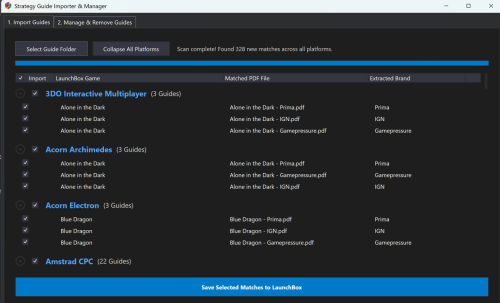
Batch Strategy Guide Importer View File Strategy Guide Importer & Manager A plugin to automatically batch-match and attach PDF strategy guides to your LaunchBox games, complete with a management tab to safely bulk-remove them. ⚠️ IMPORTANT: Requires LaunchBox Version 13.25 or newer. ✨ Key Features Smart Matching: Ignores special characters and perfectly matches your PDFs to your LaunchBox database (e.g., Spider-Man Web of Fire.pdf matches Spider-Man: Web of Fire). Auto-Brand Extraction: Automatically tags the publisher in LaunchBox if formatted correctly (e.g., names it Strategy Guide (BradyGames)). Built-in Deduplication: Skips PDFs that are already attached to prevent menu clutter. Safe Bulk Removal: A dedicated tab to scan for and unlink attached guides. (Note: This only removes the database entry; it never deletes your actual .pdf files). 📥 Installation Create a folder named Strategy_Guide_Importer inside your LaunchBox\Plugins\ folder. Drop the plugin .dll file inside. (Optional) Right-click the .dll, select Properties, and check Unblock if Windows blocked it. Restart LaunchBox. 📖 How to Use Open LaunchBox, go to Tools, and select Strategy Guide Importer. To Import: Use Tab 1 to select your PDF folder, review the matched platforms/games, and click Save. To Remove: Use Tab 2 to scan your library for currently attached guides, check the ones you want to unlink, and click Remove. 🛠️ File Naming Best Practice For the best automatic matching and brand extraction, name your PDFs like this: Game Title - Guide Publisher.pdf (Example: Final Fantasy VII - Prima.pdf) Submitter spiritedusual Submitted 03/02/2026 Category Third-party Apps and Plugins
-
Version 1.0.0
9 downloads
Strategy Guide Importer & Manager A plugin to automatically batch-match and attach PDF strategy guides to your LaunchBox games, complete with a management tab to safely bulk-remove them. ⚠️ IMPORTANT: Requires LaunchBox Version 13.25 or newer. ✨ Key Features Smart Matching: Ignores special characters and perfectly matches your PDFs to your LaunchBox database (e.g., Spider-Man Web of Fire.pdf matches Spider-Man: Web of Fire). Auto-Brand Extraction: Automatically tags the publisher in LaunchBox if formatted correctly (e.g., names it Strategy Guide (BradyGames)). Built-in Deduplication: Skips PDFs that are already attached to prevent menu clutter. Safe Bulk Removal: A dedicated tab to scan for and unlink attached guides. (Note: This only removes the database entry; it never deletes your actual .pdf files). 📥 Installation Create a folder named Strategy_Guide_Importer inside your LaunchBox\Plugins\ folder. Drop the plugin .dll file inside. (Optional) Right-click the .dll, select Properties, and check Unblock if Windows blocked it. Restart LaunchBox. 📖 How to Use Open LaunchBox, go to Tools, and select Strategy Guide Importer. To Import: Use Tab 1 to select your PDF folder, review the matched platforms/games, and click Save. To Remove: Use Tab 2 to scan your library for currently attached guides, check the ones you want to unlink, and click Remove. 🛠️ File Naming Best Practice For the best automatic matching and brand extraction, name your PDFs like this: Game Title - Guide Publisher.pdf (Example: Final Fantasy VII - Prima.pdf)- 1 review
-
- 1
-

-
- additional apps
- importer
- (and 1 more)
-
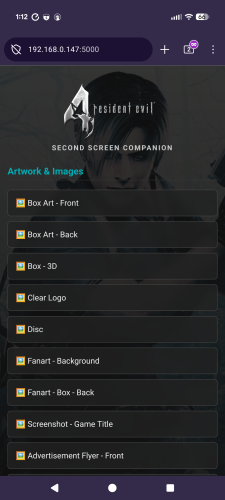
Launchbox Second Screen Companion View File Second Screen Companion - View Manuals, Guides, & Media on your Phone! Second Screen Companion is a lightweight LaunchBox plugin that instantly turns your smartphone or tablet into a dedicated companion hub for whatever game you are currently playing. Whenever you launch a game, the plugin silently starts a local web server. Just scan a QR code, and your phone will instantly load a beautiful, dark-mode hub containing all of the game's manuals, strategy guides, artwork, and media so you can browse them while you play! 🌟 Features The Companion Hub: A sleek, mobile-optimized webpage that automatically uses your game's Clear Logo and Fanart Background for a premium look. Comprehensive Media Scanner: Automatically finds and serves: 📖 Documents: Game Manuals and Strategy Guides (pulled dynamically from your Additional Apps). 🖼️ Artwork: Front/Back Box Art, Discs, Carts, Clear Logos, Fanart, Storefront Posters, and dozens of other image folders. 🎵 Media: Automatically plays your game's Theme Music or Gameplay Videos right in your mobile browser via native HTML5 players. Smart Image Viewer: Transparent PNGs (like Clear Logos or isolated box art) are displayed over a dark-mode checkerboard background so they always look perfect and never vanish into a black screen. One-Click Network Setup: Built-in tools to automatically open the required Windows Firewall ports so you don't have to mess with command prompts. 🛠️ Installation Download the latest release zip file and unpack in your LaunchBox\Plugins\ directory. You might have to right-click the dll file, go to Properties, and check the "Unblock" box at the bottom (this is required by Windows for downloaded DLLs). Extract the Second Screen Companion folder directly into your LaunchBox\Plugins\ directory. (You should have a folder path that looks like: LaunchBox\Plugins\Second Screen Companion\WirelessScreenServer.dll and QRCoder.dll) 📱 How to Set Up & Use Open LaunchBox. Go to the top menu and click Tools -> Second Screen Companion Settings. You can leave the Default Port as 8080, or change it if you have conflicts. Click Apply Network Rules (Admin). This will trigger a Windows prompt to automatically open the port in Windows Firewall for the server. (You only need to do this once!) Click Test Connection QR. Scan it with your phone's camera. If your phone and PC are on the same Wi-Fi network, you will see a green "Success!" screen. Play a game! The next time you launch a game, access the host pc ip on the port assigned. The hub will automatically populate with all the media for the active game. ⚠️ Troubleshooting / Notes Same Network Required: Your phone/tablet and your LaunchBox PC must be connected to the same local network/Wi-Fi. Missing Media? The plugin strictly reads the media you have stored in your LaunchBox folders. If LaunchBox doesn't have a manual or video for the game, the hub won't display it. Browser Caching: Mobile browsers like to cache things. If you swap games and the phone still shows the old game, just pull down to refresh the page! Submitter spiritedusual Submitted 03/01/2026 Category Third-party Apps and Plugins
-
- 2
-
-
- media
- documemtation
- (and 4 more)
-
Version 1.0.0
12 downloads
Second Screen Companion - View Manuals, Guides, & Media on your Phone! Second Screen Companion is a lightweight LaunchBox plugin that instantly turns your smartphone or tablet into a dedicated companion hub for whatever game you are currently playing. Whenever you launch a game, the plugin silently starts a local web server. Just scan a QR code, and your phone will instantly load a beautiful, dark-mode hub containing all of the game's manuals, strategy guides, artwork, and media so you can browse them while you play! 🌟 Features The Companion Hub: A sleek, mobile-optimized webpage that automatically uses your game's Clear Logo and Fanart Background for a premium look. Comprehensive Media Scanner: Automatically finds and serves: 📖 Documents: Game Manuals and Strategy Guides (pulled dynamically from your Additional Apps). 🖼️ Artwork: Front/Back Box Art, Discs, Carts, Clear Logos, Fanart, Storefront Posters, and dozens of other image folders. 🎵 Media: Automatically plays your game's Theme Music or Gameplay Videos right in your mobile browser via native HTML5 players. Smart Image Viewer: Transparent PNGs (like Clear Logos or isolated box art) are displayed over a dark-mode checkerboard background so they always look perfect and never vanish into a black screen. One-Click Network Setup: Built-in tools to automatically open the required Windows Firewall ports so you don't have to mess with command prompts. 🛠️ Installation Download the latest release zip file and unpack in your LaunchBox\Plugins\ directory. You might have to right-click the dll file, go to Properties, and check the "Unblock" box at the bottom (this is required by Windows for downloaded DLLs). Extract the Second Screen Companion folder directly into your LaunchBox\Plugins\ directory. (You should have a folder path that looks like: LaunchBox\Plugins\Second Screen Companion\WirelessScreenServer.dll and QRCoder.dll) 📱 How to Set Up & Use Open LaunchBox. Go to the top menu and click Tools -> Second Screen Companion Settings. You can leave the Default Port as 8080, or change it if you have conflicts. Click Apply Network Rules (Admin). This will trigger a Windows prompt to automatically open the port in Windows Firewall for the server. (You only need to do this once!) Click Test Connection QR. Scan it with your phone's camera. If your phone and PC are on the same Wi-Fi network, you will see a green "Success!" screen. Play a game! The next time you launch a game, access the host pc ip on the port assigned. The hub will automatically populate with all the media for the active game. ⚠️ Troubleshooting / Notes Same Network Required: Your phone/tablet and your LaunchBox PC must be connected to the same local network/Wi-Fi. Missing Media? The plugin strictly reads the media you have stored in your LaunchBox folders. If LaunchBox doesn't have a manual or video for the game, the hub won't display it. Browser Caching: Mobile browsers like to cache things. If you swap games and the phone still shows the old game, just pull down to refresh the page!- 2 comments
-
- 1
-
-
- media
- documemtation
- (and 4 more)
-
Do you have the newest version of the plugin? I had forgotten to use the correct dll on a rollback and instead had the newest beta version.
