

sirbeers
-
Posts
10 -
Joined
-
Last visited
1 Follower

sirbeers's Achievements

8-Bit Processor (3/7)
5
Reputation
-
Version 1.0.0
21 downloads
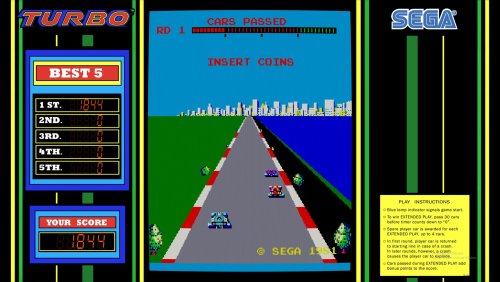
This is an upgrade to the current bezel with the scores animating with the bezel as you play. -
Ok I've been messing around with this. The first problem with doing this on Retropie is that if you use the internal MAME artwork system then your retroarch shader applies to everything - bezel, backdrop, and screen. And even if you were cool with that you're only going to get the best results with lr-mame-2015/2016, and I'm using a pi3 and those cores just tax the system too much, especially when you add artwork to load in. But the hack i've seen other people do is you load the bezel through retroarch and then the overlay/backdrop in MAME. Then your shader won't affect the bezel. Let's start with the space invaders backdrop: The .lay system in lr-mame-2008 just behaves very differently so I had to change the PAR to get it to look right, but it didn't look much better than lr-mame-2003 so I went 2003 and the old .art system for the backdrop. The only downside is the default MAME red/green overlay is visible (you can see the rectangular outlines) but I don't mind it. Oh and the backdrop is a little pixelated but again we have to bump up to mame 2015 at least to fix that - you have to enable "alternate render method" in the core options and it kills your FPS. For Asteroids Deluxe on a Pi3 the best core I've found is AdvMame. You can really dial in your vector settings and get things looking great. But then you cannot use RetroArch at all so you need to load the bezel AND backdrop the .art file way. So I made a whole new bezel for it while I was at it. Anyway - learning experience for sure. I'll organize all these files and post them to the retropie forum and link them here or something. (The backdrop on asteroids looks brighter in the picture than it is.)

-
Hey I know this is an old post but just want to make this note for people searching. It helps to define the element inside the "view name" part. So you put <overlay element="[element name]"> </overlay> <backdrop element ="[element name]"> </backdrop> same for bezel instead of just "element ref" Make the Bezel bounds to be a 16:9 aspect ratio and it will fill the screen. Your other elements in the view layer should be 3:4 or 4:3 aspect ratio and then you have to do the math to calculate how far down (y) and how far over (x) will put it in the center. For X this is would be the bezel width minus the smaller element width (backdrop or overlay) divided by 2.
-
Version 1.0.0
34 downloads
This is a refresh of something Derek Moore did. I think he accidently saved the bezel with an opacity less than 100 so it looked dim. I started over and did things a little differently, but saved his cool screen with the SEGA logo. In Mame go to video options and select "framed glass" for the full effect. -
To get this to work the way I wanted I used invaders.png from Mr. Do's arcade. You can find it in the "Old Artwork" section of that site. Put it into your artwork-->invaders folder. Bezel.png should already be there if you downloaded the bezels through LaunchBox. Edit default.lay to look like this: <!-- invaders.lay --> <mamelayout version="2"> <element name="bezel"> <image file="bezel.png" /> </element> <element name="backdrop_m"> <image file="invaders.png" /> </element> <element name="overlay_m"> <rect> <bounds left="0" top="0" right="224" bottom="260" /> <color red="1" green="1" blue="1" /> </rect> <rect> <bounds left="0" top="184" right="224" bottom="240" /> <color red="0.125" green="1" blue="0.125" /> </rect> <rect> <bounds left="16" top="240" right="134" bottom="260" /> <color red="0.125" green="1" blue="0.125" /> </rect> <rect> <bounds left="0" top="34" right="224" bottom="60" /> <color red="1" green="0.125" blue="0.125" /> </rect> </element> <group name="backdrop_only"> <element ref="backdrop_m"> <bounds left="4.625" top="0" right="11.375" bottom="9" /> </element> </group> <group name="bezel_only"> <element ref="bezel"> <bounds left="0" top="0" right="16" bottom="9" /> </element> </group> <view name="Upright_Artwork"> <screen index="0"> <bounds left="4.625" top="0" right="11.375" bottom="9" /> <color alpha="1.0" /> </screen> <element ref="overlay_m" blend="multiply"> <bounds left="4.625" top="0" right="11.375" bottom="9" /> </element> <collection name="Overlay"> <element ref="overlay_m" blend="multiply"> <bounds left="4.625" top="0" right="11.375" bottom="9" /> </element> </collection> <collection name="Backdrop"> <group ref="backdrop_only" blend="add"> <bounds left="4.625" top="0" right="11.375" bottom="9" /> <color alpha="0.5" /> <orientation rotate="270" /> </group> <group ref="bezel_only" blend="add"> <bounds left="0" top="0" right="16" bottom="9" /> <color alpha="1.0" /> </group> </collection> </view> </mamelayout> Enjoy!
-
That's on my list of things to try but I haven't yet! Will post back if I get it working.
-
Here is what you need to change default.lay to. The way the file comes from the download doesn't work. <mamelayout version="2"> <element name="bezel"> <image file="bezel.png" /> </element> <view name="Bezel Artwork"> <element ref="bezel"> <bounds x="0" y="0" width="12" height="6" /> </element> <screen index="0"> <bounds x="0" y="1.5" width="4" height="3" /> </screen> <screen index="1"> <bounds x="4" y="1.5" width="4" height="3" /> </screen> <screen index="2"> <bounds x="8" y="1.5" width="4" height="3" /> </screen> </view> </mamelayout>
-
I can't figure it out, but my idea was to make a "screen" or "view" in default.cfg that you could then reference in the "OSD PER-WINDOW VIDEO OPTIONS" for screen0. For example you would change that value from "auto" to "stretch_screen" or whataver you defined in default.cfg. Then you would only point to it in vertical.ini. Anyway, I can't find an example that helps so whataver I put in default.cfg gets stripped out.
-
oops I had a couple of things wrong in the .lay file do this instead!
-
I couldn't find info on how to do this so I'm sharing it. Download the backdrop on this site: -->Downloads-->Game Media-->Arcade-->Asteroids Deluxe & Space Invaders - MAME Background / Backdrop Assuming you already downloaded the stock bezel through the GUI, you just need to add astdelux.png to the artwork folder 'astdelux.' Edit the default.lay file to this: Probably not the cleanest way to do that...but overlay, bezel AND backdrop display at once! In case you want them, here are the mods I did to the .ini file for the game (vector upscaling, etc): I really enjoy the game SO much more like this! Hope you do too!





