

davbedwards
-
Posts
14 -
Joined
-
Last visited
davbedwards's Achievements

8-Bit Processor (3/7)
3
Reputation
-
I'm also looking to get the platform view from the 13th picture. Any idea how it's done?
-
Mini Consoles Theme - RetroSai Nostalgia - Form over Function
davbedwards replied to Saieno's topic in Big Box Custom Themes
I was stuck in the BigBox settings area which only allowed me to change the global theme. After setting a "switch theme" keyboard hotkey I see I can now mix and match these two. Thanks for the help and again, really nice work on this theme! -
Mini Consoles Theme - RetroSai Nostalgia - Form over Function
davbedwards replied to Saieno's topic in Big Box Custom Themes
Good to know! I've looked through the BigBox UI in Settings -> Manage Themes because I know I can accomplish this with the "Apply to" option, but I didn't see that for this theme. I couldn't locate it in theme-specific options either. Do I need to edit the theme files manually to accomplish something like this? -
Mini Consoles Theme - RetroSai Nostalgia - Form over Function
davbedwards replied to Saieno's topic in Big Box Custom Themes
I love this theme and see development is still active! I'm wondering if there has been any consideration to adding an alternative platform view. The horizontal scroll is really nice, but I wish I could see what the previous and next systems are without moving back and forth. For example, the Flat and Classic Mini Consoles by exodus_cl features a vertical scroll that shows other platforms on the system. -
 Love this and would love to see a 4K version.
 -
Would you be willing to post images of the final product? I also like having favorites and recents, which had me switch from COLORFUL to Coverbox 3.0
-
If anyone was wondering I ended up doing it manually for the rest of my ROMS.
-
I was looking for a simple way to scrape my emulated games for steam banners to go with my theme (Playbox 3). Currently the only way I'm aware of it manually saving images from sites like SteamDB, and the process becomes awfully tedious after the 50th game. I couldn't imagine doing it for the other 400 ROMs I have.
-
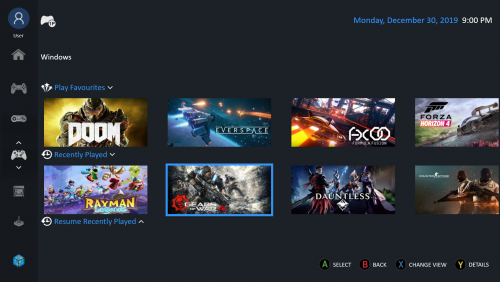 I just installed this theme and it looks really great! I was wondering exactly which views were used in the images above, as well as where to get steam banner images for emulated-non steam games. I also think it'd be cool to add a view that utilizes game videos!
 -
Update to my Multi controller set up!
davbedwards replied to Chadmando's topic in Collections and Builds
My best solution thus far has been having both the Switch Pro and Arcadestick connected to the magicns. The Switch Pro works well as far as I can tell, but the real problems lie with the arcadestick. I can't use four of the buttons, and I can't navigate the BigBox menu with the device. Luckily I was able to map what I wanted the buttons to respond as within mame. The only issue besides the loss of buttons and no BigBox navigation has been occasionally turning one of the controllers off spins the games wheel within BigBox automatically. -
Update to my Multi controller set up!
davbedwards replied to Chadmando's topic in Collections and Builds
They are both connecting to the MagicNS now, but the fightsticks controls are insane. Up on the joystick is actually left, down is right, and the ABXY buttons are also scrambled. Any software or anything I could do to fix that? I have the arcade stick in xinput mode as well as the magicns -
Update to my Multi controller set up!
davbedwards replied to Chadmando's topic in Collections and Builds
I came across this post looking for a solution to my controller nightmare. I have been fiddling with bluetooth adapters and controllers to try to come up with some seamless solution to wireless controllers working on my emulators. Currently , I have a wireless xbox one controller (connected via microsofts adapter), and a nintendo switch pro controller (connected via a mayflash magic ns). These two controllers have been working well after some initial tweaking. My issues came when I decided to add MAME to my launchbox as well as a wireless fightstick from 8Bitdo (connected via a 8Bitdo adapter). You seem like you've jumped through all the hoops and dealt with similar issues my build faces. I attempted syncing both the fightstick and switch controller to just a 8bitdo adapter, which didn't work. Connecting one would kick the other off. Then I connected both to the mayflash magic ns. Both could connect, however the 4 of the fightstick buttons were no longer useable. Any input you have I would GREATLY appreciate! -
How to use multiple controllers for BixBox?
davbedwards replied to zaerdy's topic in Troubleshooting
I've also been trying to figure this out. My Nintendo switchs A button don't match up with my Xbox ones A button. Did you find a solution? -
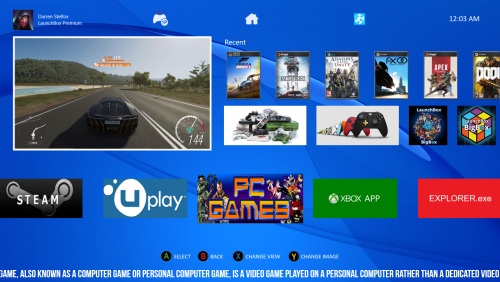 Love this theme and it looks great on my TV. How do I add custom banners to games that don't have steam banners automatically scraped?

