
Jump to content
LaunchBox Community Forums

16 Screenshots

About This File

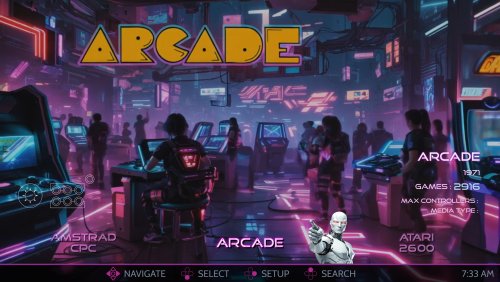
This is the AI-HyperTbox theme. It has been forked from the awesome "AI-HyperTocera" theme done by the The Mini Cake TV folks and they deserve most all the credit for the biggest part of the artwork.

Using nice animated AI generated backgrounds

The latest AI-HyperTbox (SE) version has:

  • 5-Platform Views
  • 3-Horizonal Game Wheel Views
  • 4-Vertical Game Wheel Views
  • 2-Game Wall Views
  • Fullscreen Coverflow View
  • Text Games View
  • Platform Marquee View
  • Game Marquee View
  • Settings View

Assets Used:

The AI-HyperTbox theme has two flavors. The SE version (used in the video), available to my BMAC members and the free basic version posted here on the forums

Comments, questions and suggestions are always welcome down below. Make sure to like and subscribe to the YouTube video if ya watch it to help out the channel, and do the bell thing to be notified of new videos.

Please consider supporting these projects with a "cup of coffee" or by becoming a member @ my BMAC page 

OR

A donation of any size via PayPal

   - ENJOY!!!
      • The Papaw  🙏❤️🙏

Edited by The Papaw


What's New in Version 1.0.0   See changelog

Released

No changelog available for this version.

  • Like 3
  • Thanks 3
  • Game On 1

User Feedback

Recommended Comments

lessthanzero33

Posted

Loving the theme but i am getting stuttering sounds when scrolling or before and after a game loads. Using Windows Media Player for playback as well.

The Papaw

Posted

10 hours ago, lessthanzero33 said:

Loving the theme but i am getting stuttering sounds when scrolling or before and after a game loads. Using Windows Media Player for playback as well.

Thanks for the comment. The theme is a little heavy on the resource side using video backgrounds, couple questions That might help me:

1. Have you tried changing the video player and if so, what were the results?

2. What sound pack are you using and have you tried others. How do they do?

2. Specs of PC and are you using default paths for roms, media, etc.?

3. Size of your collection 

PM me, and maybe we can figure out what going on. 


lessthanzero33

Posted

5 hours ago, The Papaw said:

Thanks for the comment. The theme is a little heavy on the resource side using video backgrounds, couple questions That might help me:

1. Have you tried changing the video player and if so, what were the results?- Not yet but i will try later today and report back.

2. What sound pack are you using and have you tried others. How do they do?-I am assuming default as i never downloaded any sound packs.

2. Specs of PC and are you using default paths for roms, media, etc.? 4090/64 gb ram/4tb for roms, media etc...

3. Size of your collection - Fairly robust as i have about 10k or more games varying from PC to Console etc...

PM me, and maybe we can figure out what going on. 


Join the conversation

You can post now and register later. If you have an account, sign in now to post with your account.

Guest
Unfortunately, your content contains terms that we do not allow. Please edit your content to remove the highlighted words below.
Add a comment...

×   Pasted as rich text.   Paste as plain text instead

  Only 75 emoji are allowed.

×   Your link has been automatically embedded.   Display as a link instead

×   Your previous content has been restored.   Clear editor

×   You cannot paste images directly. Upload or insert images from URL.

×
×
  • Create New...


