
About This File
Hello everyone,
Here's a Windows tool called Retro Game Compressor. This is a standalone program; do not place it in the plugins folder.
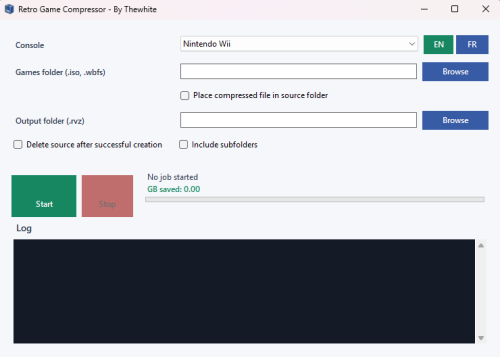
The goal of this application is to simplify the compression of retro games with an all-in-one interface. Instead of manually using multiple command-line tools, the program lets you choose a console, select the source folder, choose the output folder, and start the compression from a clean graphical interface.
Designed to be portable and standalone on Windows 11, the application doesn't require manual installation of the .NET runtime. The necessary compression tools are grouped in a "tools" folder.

Currently supported systems and formats:
- PlayStation: converting .cue / .ccd / .toc to .chd
- PlayStation 2: converting .iso / .cue / .ccd / .toc to .chd
- PlayStation Portable: converting .iso / .cso to .chd and .iso / .chd to .cso
- Sega CD / Mega-CD: conversion from .cue / .ccd / .toc to .chd
- Sega Dreamcast: converting .gdi / .cue to .chd
- Sega Saturn: converting .cue / .ccd / .toc to .chd
- TurboGrafx-CD / PC Engine CD: converting .cue / .ccd / .toc to .chd
- Panasonic 3DO: converting .cue / .iso to .chd
- Nintendo GameCube: Converts .iso / .gcm / .gcz to .chd / .rvz
- Nintendo Wii: Converts .iso / .wbfs to .rvz
- Xbox 360: Converts .iso to .zar
Additional Features:
- English and French interface
- Automatic detection of included tools
- Option to replace the compressed file in the source folder
- Option to delete the source file after compression
- Subfolder management
- Progress bar indicating the number of files remaining
- Displays the space saved in GB
- Temporary conversion workflow if needed, for example, from WBFS to ISO then RVZ, or PSP CSO/CHD conversions via temporary ISO files
**If compression methods are missing for other consoles, I will add them. Please note that consoles using the zip format will not be included.
Edited by thewhite
What's New in Version 1.0.0 See changelog
Released
No changelog available for this version.


