Jump to content
LaunchBox Community Forums

8 Screenshots

About This File

Native Launcher for MS-DOS

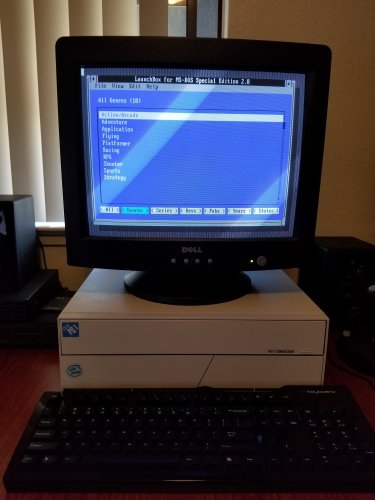
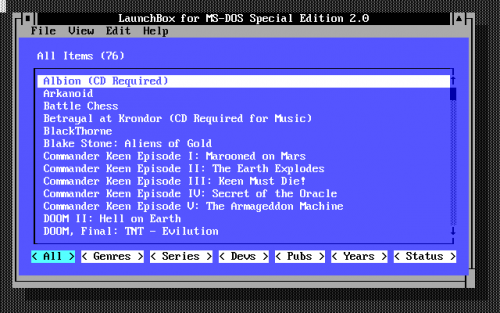
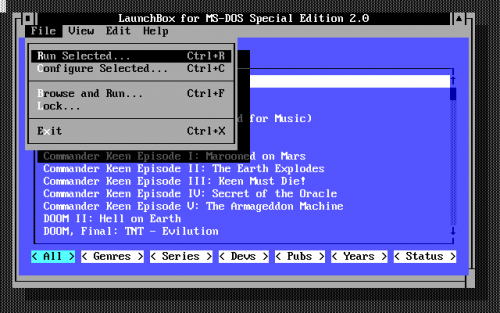
LaunchBox for MS-DOS 2.0 is here! If you run MS-DOS (or the DOS console in Windows 95/98), this should be very much enjoyed. It allows you to easily sort through and manage your games/apps within DOS, without taking any extra memory from your apps or introducing any compatibility issues at all. This is done via a simple batch file that starts up and shuts down the launcher as needed.

LaunchBox for MS-DOS also works very well with DOSBox if you'd like to use a menu system inside of DOSBox.

System Requirements

MS-DOS 3.30 or higher
286 or higher CPU (uses 286 CPU instructions)

Installation

Unzip the zip file and place the contents onto a floppy disk or other media. Copy the four files into a folder on your hard disk (or just keep it on the floppy, it runs from the floppy as well). Navigate to the folder with the files and run LAUNCH.BAT.

LAUNCH.BAT can also be called from your AUTOEXEC.BAT file if you'd like LaunchBox to start on boot. You can then add Windows 3.1 or 95/98 to LaunchBox in order to optionally start up Windows by just browsing for WIN.COM.

Change Log

Version 2.0 - Released Sunday, January 29, 2018
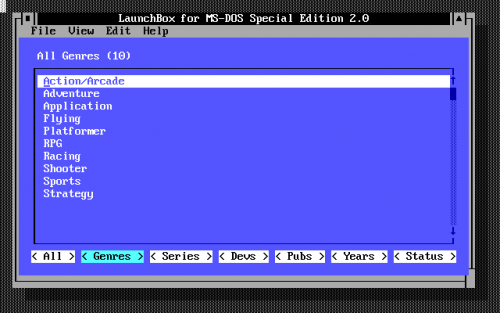
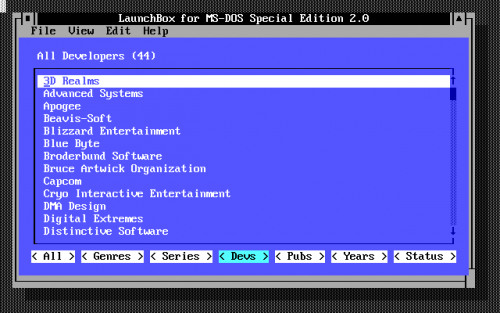
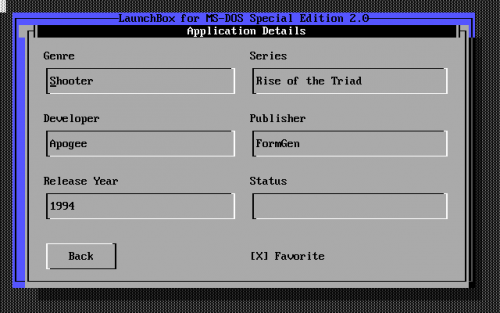
- Many new fields are available for each item: Genre, Series, Developer, Publisher, Release Year, Status, and Favorite
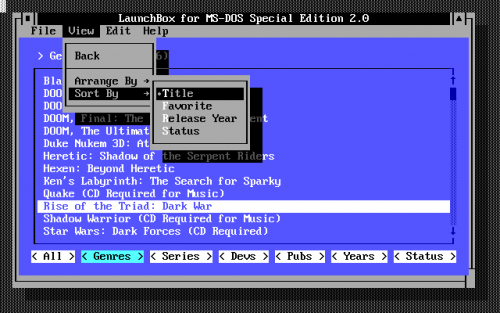
- Can now sort items by Title, Favorite, Release Date, and Status
- Can now filter items by Genre, Series, Developer, Publisher, Release Year, or Status
- LaunchBox now remembers your last selection
- List titles and counts have been added

Version 1.1 - Released Tuesday, January 17, 2017
- New "Move to Top" and "Move to Bottom" options are available under the Edit menu
- New "Insert Separator" option available under the Edit menu
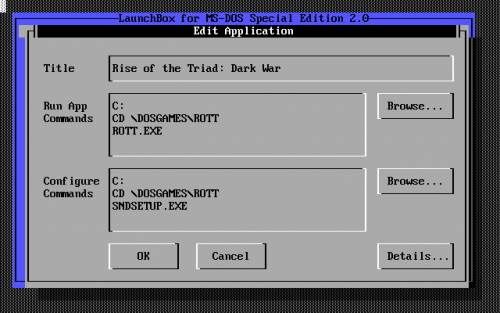
- Each application can now have a separate set of commands for configuring the application
- New explicit "Run Selected" and "Configure Selected" options are available under the File menu
- New "Browse and Run" option is available under the File menu
- New "Lock" option is available under the File menu to help prevent accidental changes
- Changed the batch file process to better support DOSBox and older versions of MS-DOS

Version 1.0 - Released Friday, January 13, 2017
- Initial Release

Easter Eggs

There are several incredibly stupid easter eggs in the program.

Hint: What is the second most popular cheat code ever?

Version 1.0 Announcement Video

Screenshots

20180128_095459.thumb.jpg.9dde844c804d98790e18e810fedf5b09.jpglaunchbx_000.thumb.png.cf9a5a4725fce30039a470e3c2a0f82c.pnglaunchbx_002.thumb.png.f3b1f5174f3024eefdcf311caf6e1802.pnglaunchbx_003.thumb.png.ab4a12e09628c127672d0e6c81ac01ae.pnglaunchbx_004.thumb.png.7b17bcdc6a05fda70ea9d4555ae51caa.pnglaunchbx_005.thumb.png.952de7632a6b3092f3deb395fe45c922.pnglaunchbx_006.thumb.png.d33ccf87d9c23363d3a7d10a68cd9c75.png

launchbx_001.png


What's New in Version 2.0   See changelog

Released

No changelog available for this version.

  • Like 14
  • Thanks 3
  • Game On 1
  • Unusual Gem 1

User Feedback

Recommended Comments


Lmagnus87

Posted

Any news on the next version?
Does the idea of an LB 3.0 for MSDOS still stand?

FeralChild64

Posted

1. Would it be possible to release 3.0 without the editor, as an Alpha version?

2. Would it be possible to add scrolling game list with a wheel? CuteMouse driver provides a simple mouse wheel API, it should work under QEMU and 86Box. DOSBox-X team has plans to add wheel support too, and for DOSBox Staging I'm developing mouse overhaul patch, and the CuteMouse wheel API already works - https://github.com/FeralChild64/dosbox-staging/tree/fc/mouse-updates-2

horchacha

Posted

 I have this running on a few PCs. Thank you for having it available. I am able to use it on a Kaypro XT clone w/ an EGA card, 386 and p2 & p3. Thanks again! 

binarygeek119

Posted

could we get a software mode. where you can ether list games or switch to software.

so games (doom, duke, etc) would show

but  switch software mode now it shows (windows 3.11, bbs software, web browsers, music stuff)

also game setting would be great too.

doom config is two different executables. being able to flip a switch to chnage the settings would be great. (new sound card, mouse support, midi, etc)

64kbiscuits

Posted

Is the source to this available (and if not, could it be?).   It would be good to try and run this under DOSEMU2, I think downloading software from inside it there could be a thing - if it was added, since networking can be used under DOSEMU2.

FBG

Posted (edited)

Hi,

A really great program! Thanks.

Would you have any inclination to release the source for Launchbox for MS-DOS v2?
It's a great tool and I'd love to be able to make some mods, or just look at how some of the routines work, just for pure personal use?

Thank you.

edit: Sorry - just seen that the previous post was asking for the same! Thanks.


edit: late 2025: Just for fun and for my personal use only (so something I will NEVER distribute), I've replicated 'Launchbox for MS-DOS v2' from scratch. I've posted an overview here only for information and for ideas for the offical v3 - again I WON'T distribute the app as it was clearly not my idea. This is only here as ideas for V3.

Additional functions I've added into the program:

Additional filter 'Buttons' on the main screen, including a Status, Source, Favourites, Readme, Comments, Completed, Rating.
For each game you can assign a TXT/ME/DOC Readme file, which will open with CTRL-R.
Two fields for the game keys - main keys and additional keys (these are just free-type text fields)
You can add your own comments against a game - these then displayed next to the game when the Comments filter is clicked
A flag for if you have completed the game.
A rating field (1 to 5 starts)
Expandable Run script / Config script fields, to see and therefore easily edit the full execution script on the screen.
On the details screen, you can press F2 to load a selectable list of pre existing Genre, Series, Developer, Publisher (this screen is also where the Comments, Completed and Rating sit)
On the main screen a shortcut (eg Mouse 2) to view the game keys (this behaviour can be changed in the options screen).
Context Help boxes.
Help: How to screen, Change log

An options screen with the following options:
Change double click behaviour (Run game, Edit game, View Keys)
Change right-click behaviour (Run game, Edit game, View Keys, Back)
File backup preferences (Auto on exit, manual backup, no backup)
No of backup histories (0 to disable rolling backups, to 7)
Search method (Go to first instance or Filter) 
Default game folder
Ask to save changes (Yes/No)
Display context help boxes (Yes/No)
Allow press Escape to Exit (No= select exit via menu only, or on run)
Undelete deleted games (only in current session)
Escape key clears filter and goes back a level through the filters, until you are back at the unfiltered main screen.

It would be great if some of these could feature in the next official Launchbox for MS-DOS, which is a fabulous product.


Edited by FBG
claudiomet

Posted

In 2026, and recently discovered !!!! Awesome !!! when 3.0 version?


Join the conversation

You can post now and register later. If you have an account, sign in now to post with your account.

Guest
Unfortunately, your content contains terms that we do not allow. Please edit your content to remove the highlighted words below.
Add a comment...

×   Pasted as rich text.   Paste as plain text instead

  Only 75 emoji are allowed.

×   Your link has been automatically embedded.   Display as a link instead

×   Your previous content has been restored.   Clear editor

×   You cannot paste images directly. Upload or insert images from URL.

×
×
  • Create New...


