

reggorf
-
Posts
4 -
Joined
-
Last visited
Content Type
Profiles
Forums
Articles
Downloads
Gallery
Blogs
Everything posted by reggorf
-
 Well yes and no. I used WinArcadia (https://amigan.1emu.net/releases/). It is a multi system emulator that has several old arcade systems. One of the things it has is a General Instruments AY-3-8500 emulator. That's the original pong chip. Its quite good and accurate. It has all of the variations of those early consoles. It even has the quirks, like when the ball goes through your paddle and certain locations, etc. The Radio Shack console was my first console and I wanted to get it on Bigbox, but I didn't find WinArcadia easy to use with Bigbox. You have to go into the Windows menu to change things frequently with the mouse and the gamepad keys are a little odd. Anyway, I used Gemini and Claude (I am not a programmer) to help me get the C code (its open-source freeware) into Visual Studio and modify the source to make changes so it has a proper controller setup and has a 1-button click to map all the existing settings to the Radio Shack console I had. I also added a pause screen with key mappings and a settings status bar that's always under the game. I got it into BigBox with some decent photos and logos. I'm happy to get it together and attach what I made here. Not sure where is the appropriate place. I'm not on Github or anything.
 -
@JoeViking245 Thanks so much. This works wonderfully!! And so quickly!
-
Thanks. I appreciate you adding it to your list. Its just one of those little things but I think it would be a cleaner and more consistent look for my system. In my case, I have added a platform for the Radio Shack TV Scoreboard (a 70s pong console), where the platform basically is the game. Technically it has multiple types of pong games but those toggle inside the emulator since it didn't have cartridges. So it actually is a game unlike other apps like a music jukebox or video streamer, etc. so it has a box, manual, gameplay screenshots... Things that could be utilized in that screen. Others might have similar uses.
-
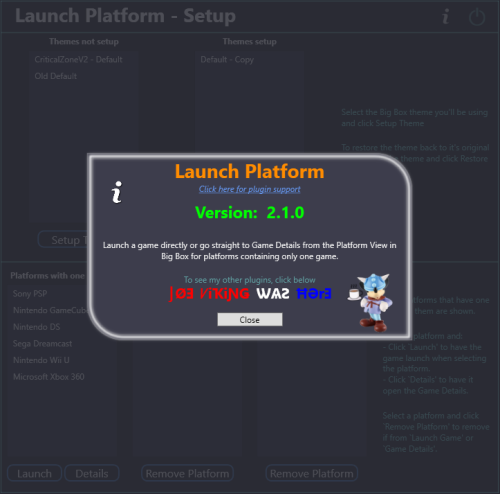
@JoeViking245 I am currently using this plugin and its working nicely. Thanks! However I've found that I have some scenarios where I have one game in a platform, where it would be nice to skip the game selection but still get the game detail where I have to the option to select play, show the manual and have the text description, etc. Is there anyway to have this go straight from the platform list to the game detail screen, while skipping the game selection? Select the platform Select the [only] "game" <--- I want to skip only this Select "Play".


