

Jason Carr
-
Posts
13,723 -
Joined
-
Last visited
-
Days Won
388
Content Type
Profiles
Forums
Articles
Downloads
Gallery
Blogs
Everything posted by Jason Carr
-
Awesome @SNAK3ATER! I haven't added any documentation yet, but this theme has examples:
-
What platform are you seeing EmuMovies errors on?
-
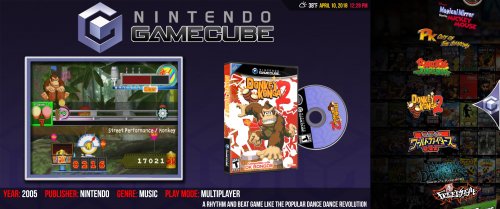 That might be tricky for this theme, since the point of this theme is to use the separate backgrounds for each platform that come with the Unified theme. You might be better off using the Default theme or something similar if you want full-screen backgrounds. It can be done but it would require some heavy modifications to the theme.
 -
@Zeaede To be honest the first two issues sound unrelated to LaunchBox, like there's something oddly conflicting on your machine or something weird like that. Nothing changed for this version in that Emulator dialog. What did you click on in LaunchBox.Next to get that error message?
-
No, you can't really delete the original images, unfortunately. You can, but if the cache is ever refreshed you'll lose the images. Yes, agreed, we could definitely use something to note that caching is going on in the background.
-
I see. Now it's starting to make more sense. Yes, Big Box uses a very large image cache in order to improve performance, largely because the original source images are often huge and can cause performance problems, so the cache is used. It may be that the disk space issue was cause for the performance problems to begin with. The only thing I can suggest is removing any image types that you won't be using to free up space for the cache. By default LaunchBox downloads tons and tons of images, so chances are there are a bunch that you don't need that you can just go and delete from LaunchBox\Images\[Platform]\[Image Type].
-
Thanks @dov_EL. I do plan to improve that with the new startup screen item from the poll.
-
For what it's worth, resource loading *is* asynchronous. Big Box is extremely well threaded and favors multiple cores as much as possible.
-
There's obviously something fishy going on, yes. Though no reason to file it as a bug as we can help you troubleshoot it here. Please try all that we've suggested above and let us know. No reason to continue discussing it until the above suggestions have been exhausted.
-
That said, the GPU should not be causing 5 second stutters. That lends itself to a storage issue; it is a known fact that slow storage can cause performance issues. I would first try force populating the cache as described above. If that doesn't fix it, let us know the make and model of your SSD @thedevilsjester.
-
Also take note that since it's a laptop, it could be doing some awful things with reducing performance to save battery life. Every laptop is different, but that is a common issue.
-
Most likely image caching is happening in the background. Try going to Options > Image Cache and running the two Force Populate items. Though to be honest that does not sound like a typical experience for that hardware, though Intel graphics could be a severe bottleneck, but I wouldn't expect that to cause stuttering like that. What version of Big Box are you running?
-
Thanks Opak, I have that update in. Planning on putting out the official release shortly.
-
Version 1.1
2,066 downloads
Unified & Ultrawide is a new theme based on @CriticalCid's amazing Unified theme. It takes some liberties in order to make the best use of an ultrawide (21x9) monitor. Please see @CriticalCid's original Unified theme for installation and troubleshooting instructions. Version 1.1 - Released March 26, 2019 (REQUIRES BIG BOX VERSION 9.6 OR LATER): Updated to include all the latest features and improvements from Unified Redux 1.7 Version 1.0 - Initial Release Huge thanks goes out to @CriticalCid for the theme, as well as the many different Hyperspin contributors who donated their time and talent to build an awesome, cohesive experience: Gibbawho @Styphelus Unknown50862 @Klopjero Neonrage @knewlife @Creloce Ghostlost https://www.youtube.com/user/GhostlostGames @ninja2bceen @THK adamg Rkh Rondar @scooter1974 Zinger19 Aloner187 @guyverjay MetalThrix SophT Ledgerewskie hoscarconh https://www.youtube.com/user/hoscarconh @viking @RetroHumanoid http://retrohumanoid.weebly.com/- 14 comments
- 2 reviews
-
- 14
-

-

-
- criticalcid
- unified
- (and 4 more)
-
Unified & Ultrawide View File Unified & Ultrawide is a new theme based on @CriticalCid's amazing Unified theme. It takes some liberties in order to make the best use of an ultrawide (21x9) monitor. Please see @CriticalCid's original Unified theme for installation and troubleshooting instructions. Version 1.1 - Released March 26, 2019 (REQUIRES BIG BOX VERSION 9.6 OR LATER): Updated to include all the latest features and improvements from Unified Redux 1.7 Version 1.0 - Initial Release Huge thanks goes out to @CriticalCid for the theme, as well as the many different Hyperspin contributors who donated their time and talent to build an awesome, cohesive experience: Gibbawho @Styphelus Unknown50862 @Klopjero Neonrage @knewlife @Creloce Ghostlost https://www.youtube.com/user/GhostlostGames @ninja2bceen @THK adamg Rkh Rondar @scooter1974 Zinger19 Aloner187 @guyverjay MetalThrix SophT Ledgerewskie hoscarconh https://www.youtube.com/user/hoscarconh @viking @RetroHumanoid http://retrohumanoid.weebly.com/ Submitter Jason Carr Submitted 04/10/2018 Category Big Box Custom Themes
- 53 replies
-
- 4
-
-

-
- criticalcid
- unified
- (and 4 more)
-
Yes. We'll drop the .Next once the current version of LaunchBox is fully replaced. It's just to help make it easier to refer to it in the mean time.
-
Not that I am aware of, though I haven't tested it with the latest beta. I would expect someone else would have mentioned it by now though. What is happening exactly? LB.Next won't use the *same* themes, but it does have the same theming engine. That means that eventually we'll probably open up LB.Next to themes. However, new themes will need to be developed using similar methods. Big Box will always be a separate product. Of course they do integrate, but they will integrate the same way that Big Box currently does with the current version of LaunchBox.
-
Don't really have to hack the XML as you can just remove the paths from the Add/Edit dialog in the video field.
-
Gotcha. Usually that happens when you manually specify a video path. So those 13 were probably manually specified. Edit: That does raise a good point though. Perhaps we should check to make sure the video file exists (though that's just another thing to slow down the process).
-
That's right. I'm guessing LaunchBox thinks you have videos somewhere, somehow; I don't know how else that could be happening. Honestly, I'm betting you do have videos that you just don't know are there; there are theme videos that are automatically downloaded from the LaunchBox Games Database for a handful of games that James Baker has created for us.
-
Thank you all. I have all four of the above translations into the latest beta that I just put out. @dukeemu Not a problem at all. Planning on putting out the official release on Wednesday.
-
Beta 11 is out now guys. The main addition in this beta is that the "Hide Games with Missing Media" features have been completed for Big Box now as well. You'll find the same options as LaunchBox in the Big Box general options. If anyone can do any testing on those, I'd appreciate it as I don't feel like we've extensively tested them (unless people have and just haven't been vocal about it). At this point I'm focusing on just making sure everything is stable; if all goes well, we're shooting for an official release on Wednesday.
-
This is still a known issue for me to fix.
-
As far as I can immediately tell, PlaneProjection is only for Silverlight, so it doesn't work in WPF.
-
That's changed now @neil9000.

