

andyco47
-
Posts
486 -
Joined
-
Last visited
-
Days Won
1
Content Type
Profiles
Forums
Articles
Downloads
Gallery
Blogs
Everything posted by andyco47
-
not
-
reset high score alot of people dont play cus of stupid hi scores like 9999999 bull shit please reset
-
just tryed the new beta 1 and it dont seem to freeze anymore but just played 4 games in mame and seems ok
-
13.27 is ur best bet till they sort it out but dont no when that will be.
-
same here got freeze so back to 13.27
-
just played mame game thro bigbox and exit it the game and bloody froze yet again
-
just played mame game thro bigbox new ver 14.0 and exit it the game and bloody froze yet again
-
just played mame game thro bigbox and exit it the game and bloody froze yet again
-
this 14.0 not good when exit a game bigbox and lunchbox freezes and u cant do owt back to 13.27 yet again this version full of bugs
-
this 14.0 not good when exit a game bigbox and lunchbox freezes and u cant do owt back to 13.27 yet again this version full of bugs
-
this 14.0 not good when exit a game bigbox and lunchbox freezes and u cant do owt back to 13.27 yet again this version full of bugs
-
 ok thanks for checking it out for me pal.
 -
yes its ok with other emus yes i have bezel plus ini file i have setup Spectaculator to not open full screen and tryed full screen aswell and the bezel not showing but ok works in test.
-
BezelLauncher
andyco47 replied to JoeViking245's topic in Third-Party Applications and Plugins (Released)
hi a cant seem to get this to work with Spectaculator any ideas thanks -
hi i cant seem to get this to work with Spectaculator any ideas thanks
-
same here freeze wont play game back to 13.28 yet again this is very p off
-
i think the new launchbox 14.0 as broken the screen 2 for marquee cus my system marquees dont show any more had to go back to 13.27 and its working ok now.
- 200 replies
-
- 1
-

-
- third screen
- platform marquee videos
- (and 3 more)
-
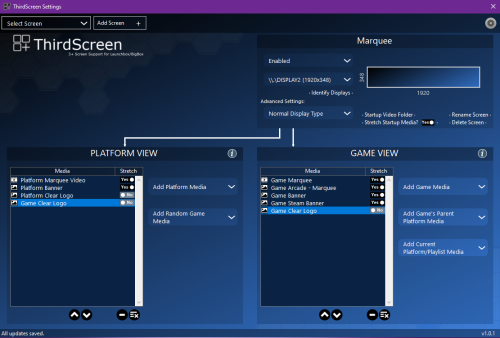 i think the new launchbox 14.0 as broken the screen 2 for marquee cus my system marquees dont show any more had to go back to 13.27 and its working ok now.
 -
the update has broken my screen2 for marqees the system marquees dont show any more in bigbox and launchbox had to go back to 13.27
-
hi all this is my build with a jukebox that i added IMG_2944.mp4

-
- 1
-

-
Ret tryed that dont work for me just puts up the ui and dont play the game.
-
still crashes ramdom never had this with VLC player
-
i dont use that i use thridscreen setup plugin works brill for me.
-
BezelLauncher
andyco47 replied to JoeViking245's topic in Third-Party Applications and Plugins (Released)
ok will try that thanks -
BezelLauncher
andyco47 replied to JoeViking245's topic in Third-Party Applications and Plugins (Released)
the 2600 is stella 7 so that ok its got its own bezels not but daphne i can never get that to work i had it working with rocketlauncher but i want to get rid of that.
