

Hazuki
-
Posts
91 -
Joined
-
Last visited
-
Days Won
1
Content Type
Profiles
Forums
Articles
Downloads
Gallery
Blogs
Everything posted by Hazuki
-
And thank, I didn't get any notifications from the previous post 😊
-
Hi all. Interesting that the text is getting cut off. I'm not home until next week, but I'll upload a fixed version if you like. 😊 By the way. Would anyone be interested in a update to this start-up theme? Add more platforms?
-
Scan for RetroAchievements not working in 13.24?
Hazuki replied to Hazuki's topic in Troubleshooting
What platform are you isn't it working on? Ive been able to scan all but Wii and GameCube after an update -
Hi, Sorry for the delayed response. My main SSD in my main PC died on me, so I've been a little busy getting it the PC up and running again. I played a little Dreamcast with my Bliss-box 4-play and a Dreamcast Controller with a Jump Pack, and yes there is rumble. I had it setup using dinput, and now and again the game stuttered a little. To me it felt like the stuttering ordered when there was rumble, but not ever time. So i can't really say if this is something to do with the Bliss-Box, Retroarch or the core. I usually have it setup to use SDL2, but for some reason my keyboard stopped working ever time a changed it, not really sure whats going on there. The config file that retroarch downloads are outdated, and therefore none of the controller mappings work out of the box. Looking in retroarch github and the files are 5 years old. The bliss-box firmware 3.xx updated all the controller buttons, making setup easier, but it looks like Retroarch never updated. When i get around to it I will update my config files again and i am more the happy to share them here, but I don't have the time to do that just yet. And you asked about connecting the controllers. You can swap from any controller mid game, no need to restart retroarch nor the game. Say you are playing track and field 2 on the nes with a nes controller, its all fun and game but you want that sweet autofire. Just unplug the nes controller and plugin you snes controller and its all set up. A is A and B is B, and the you have X and Y that are autofire Something to note is that if there isn't a controller connected to a port, the post defaults to an atari controller. While this doesn't matter most of the time, it dose confuse retroarch. Say you have 2 nes controllers connected to port 1 and 2. the port 3 and 4 will tell retroarch that they are atari controllers: bliss-box Port 1: NES (1) bliss-box Port 2: NES (2) bliss-box Port 3: Atari (1) bliss-box Port 4: Atari (2) this can make Retroarch select NES(1) ans player one and Atari(1) as player 2. I find that this removes from the console like experience. I did solve this before, but I cant remember what I did, and I formatted that PC a while back, and just haven't gotten around to setting this up yet. I hope this helped you a little. Maybe my explanations are a little unclear, just let me know and I'll try again
-
Hi all, My main SSD when and died on my, so my OS dies and well it takes time to get back 🙂 I have the theme on a different drive, so all that is safe. I have made the theme, just one view, and I am trying it out. It has terrible performance, the wheel feels very sluggish, not smooth at all. I haven't even added any fade effects or animations, so I worry how it will perform once I do. I don't really know if this is an effect of using the community theme creators. If its BixBox or if I have don something wrong I need to get my main PC up and running again before I continue.
-
Hi, I have a Bliss-box 4-play, the older version. I have it setup to use with Dolphin, and I have had it setup in the past with retroarch. Retroarch uses "Controller profiles", and last time i used it, they weren't updated, so some controllers wouldn't be mapped correctly. Not sure if this is fixed now or not Rumble has worked fine with GameCube and Dreamcast controllers (haven't tried an n64 controller, but i guess it would be the same) But PSOne/PS2 controllers use more power and require external power supply, so i just use my PS3 controllers. I'll fire up a fresh installed Retroarch tomorrow and give it a try and get back to you then if you like
-
Thank you for your kind words. I am in no way an artist, so drawing the small icons takes me a long time, but I will be recycling them for other themes in the future. My son is here today, so I have no time to work on the theme, but during this week I am hoping to get a prototype working. Once everything is working, I'll release the theme and add more icons along the way. And probably more views further down the line too. I have some more ideas for themes after this one, and they will all share the same clean/simple kind of design
-
Thank for the feedback. I was leaning towards the fanart too.
-
And an alternative view:

-
Using fanart as the background:
-
Hi all, I'm working on a theme. Actually I'm working on 3 different themes. All in different stages of planing and preparing. Anyway, i have gotten to the point were I have an early build up and running and I thought I'll add some mookups here and see what you guys think. I am going to redo all the icons used, and there may be some size adjustments. But over all, what do you think?
-
Version 13.25 still suffers from the same problems that have been present for a long time now. Scanning for Retroachievements is the rom is 7z is still broken. It worked back in 13.19 but not anymore. Importing systems if name is changes from the standers, and scrape as is being uses still sometimes makes the platform end up not under console or handheld, but under root. When this happens no info about the platform is added an auto import stops working. Starting a game to fast from BigBox, the audio from the video sometimes keeps playing even when the game starts. Closing BigBox (close or switch to launchbox) often leaves the process running, having to open task manager and End Task to be able to use Launchbox. In BigBox, often the game detail page is blank, having to leave the game and go back in to be able to select any option. This is only a handful of bug and problems that have been present for some time now. And it seams that when/if a feature breaks its gone for good. From 13.25, music playback, if a track is in a m3u and short it will get stuck and play a 1 sec bit, be quiet for 10 sec and then play in again. No mater if you back out from the game or even start it. The next version or two should maybe focus on making sure features that are in launchbox keep working instead of adding more and letting features that don't work just stay broken!! Stuff like importing Wii U games, where it will ignore disc based games to import cemu installed games. Maybe it should ask me the user. Its a great feature to import installed games, but maybe my games aren't installed. Maybe they are disc based. So maybe a simple questions when importing this types of games would make life easier for everyone? While i do like launchbox, if stuff I like about it breaks and then doesn't really get fixed, the time will come to start locking for a replacement Sorry if this sounds negative, it's not my intention. But it's moving toward being more of a headache then a pleasant experience
-
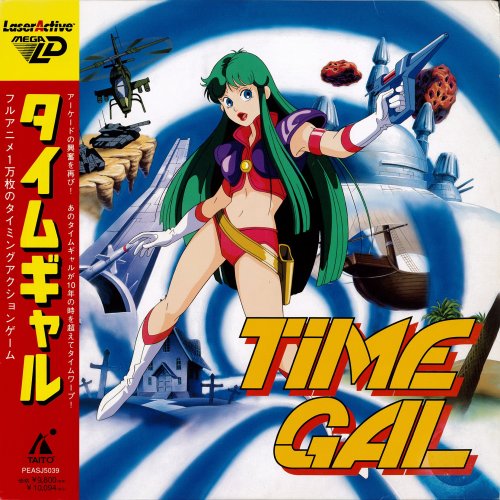
Pioneer LaserActive, NEC LD-ROM², Sega Mega LD View File Hi The Pioneer LaserActive can now be emulated using Ares. LaserActive comes in two flavors, the NEC LD-ROM² and the Sega Mega LD. As you may have guessed the games where stored on laser discs, giving them excellent video for the time. I was hopping that this would have been added to the database by now, but that hasn’t happened, so I'll upload this here for anyone wanting to add this games. There are ow files, Pioneer LaserActive and Pioneer LaserActive (OBI). Both of the contain images (Box front and back, disc) and some manuals. The OBI has the boxart with the OBI where possible, and the other one without the OBI, where possible. Every game has a Front box art, even games not yet ripped. :-) I added platform clear logos. And in the roms folder there is a _Fix.bat file. Now you should never run a bat file without knowing what it dose. So please open it in a text editor and have a look. Adding all your .mmi file in the roms folder and running the .bat will rename them and sort them into folders. Giving you 1G1R, and moving the rest to a remove folder, so you can delete them if you like. Anyway, I am going to start making some .bat files to sort MAME/FBNeo roms into platform folders. So if anyone is interested in that, let me know an I'll upload them here too Submitter Hazuki Submitted 01/14/2026 Category Platform Media
-
- 2
-

-
Version 1.0.0
194 downloads
Hi The Pioneer LaserActive can now be emulated using Ares. LaserActive comes in two flavors, the NEC LD-ROM² and the Sega Mega LD. As you may have guessed the games where stored on laser discs, giving them excellent video for the time. I was hopping that this would have been added to the database by now, but that hasn’t happened, so I'll upload this here for anyone wanting to add this games. There are ow files, Pioneer LaserActive and Pioneer LaserActive (OBI). Both of the contain images (Box front and back, disc) and some manuals. The OBI has the boxart with the OBI where possible, and the other one without the OBI, where possible. Every game has a Front box art, even games not yet ripped. :-) I added platform clear logos. And in the roms folder there is a _Fix.bat file. Now you should never run a bat file without knowing what it dose. So please open it in a text editor and have a look. Adding all your .mmi file in the roms folder and running the .bat will rename them and sort them into folders. Giving you 1G1R, and moving the rest to a remove folder, so you can delete them if you like. Anyway, I am going to start making some .bat files to sort MAME/FBNeo roms into platform folders. So if anyone is interested in that, let me know an I'll upload them here too -
Pioneer LaserActive with its two PACs, the Sega Mega LD and the NEC LD-ROM². Both can be emulated with Ares. So I for one would like to see them added to the database.
-
Scan for RetroAchievements not working in 13.24?
Hazuki replied to Hazuki's topic in Troubleshooting
Thank you for taking the time to check. Much appreciated. I get the same results. So yeah, 7z isn't working anymore. -
Scan for RetroAchievements not working in 13.24?
Hazuki replied to Hazuki's topic in Troubleshooting
Thank for the tips, I tried it all, but still the same. Lilcheeks, could you try adding a rom that is 7z? Just to see if it works for you, or if this a launchbox/7z problem -
Scan for RetroAchievements not working in 13.24?
Hazuki replied to Hazuki's topic in Troubleshooting
An update in my troubleshooting too. So I also uninstalled and install again. I tried removing and re importing platforms. I updated the RAHasher.exe and 7-Zip in the third-party folder. After that I uninstalled again and reinstalled so I'm on the same versions of everything. I run RAHasher.exe and it spits out the correct checksum, but still nothing in Lunchbox. I moved some of my roms from my folder, removed the platform and reimported it, then I added back 2 games, unzipped. Scanning now gave me cheevos on two non 7z games only. I then added back one more rom, this time .zip and it also worked. So I added back the rest in 7z and nothing. I'm guessing here, but it seams that launchbox isn't uncompressing as expected. This has actual a problem with some specific platforms long before this. GameCube in rvz if 7z will not work and FBNeo/flycast arcade roms if 7z instead of zip will not work (arcade in 7z works with RAHasher). But lilcheeks, your roms are in .zip aren't they? that's odd, because for me .zip worked just now, but not 7z I'm actually a little at a loss. Don't really know what more to try -
Scan for RetroAchievements not working in 13.24?
Hazuki replied to Hazuki's topic in Troubleshooting
I used Final Fantasy for the GBA in my example, as i'm playing it at the moment at the cheevos are working just fine in the game. Just like lilcheeks, I have all my games on a NAS. And i use 7z for all my games -
Scan for RetroAchievements not working in 13.24?
Hazuki replied to Hazuki's topic in Troubleshooting
I have launchbox on a computer in my livingroom, and then one on my main PC. The livingroom updated to 13.24 and I added the GBA games. Scanning for the Cheevos didnt work. I started launchbox on my main PC and said no to the update. Added the games and scanned for Cheevos and it workt fine. I removed the platform, updated launchbox and tryed again, but after the update it didnt work.
-
Hi, just updated to 13.24 a couple of days ago and it seams that scan can for RetroAchievements isn't working anymore? Not sure if the process has changed, but scanning a platform gives me nothing. In the xml every games get, <RetroAchievementsHash>COULDNTFILEHASH</RetroAchievementsHash> All my roms are 7z It checks the platform really fast, so I'm guess Launchbox isn't unpacking them before checking, but I'm not sure. Any ideas what to do? Thanks
-
Let me know what you think and if you want me to upload more 🙂
-
Hi all, I'm a little late to the party here, but I have just started using BannerBox. Excellent theme. So my setup is a little different. I have a platform and then within it sub platforms with hack or prototypes and so on. So i have started setting up to make Banners for what I need, and if anyone is interested I'll share theme here.
-
Hi again. So I have uninstalled Launchbox and installed it again, but it still happens. What I can du is just delete the plantorm and inort it again and it works. Its very random, and I still consider this a bug. But I now just import platforms, one at a time. Only have Clearlogos down load and iff it dosnt work, delet an do it again. Once I have a handfull of platforms I let launchbox download the art that I want. Its a little bit of a hassle, but then again, its not that will be importing new platforms al the time 🙂 Anyway faeran, thank you for taking the time to helping me.
-
Thank you for the the tips. I hade to travel to a family member, so I won't be back home for a couple of days. The launchbox on a new drive is installed from the launchbox setup. So I haven't just moved it so to say. The file names on the files are all run through clrmame with the no-intro, redumo dats. All using 7zip, so the game always get moved to the computer when playing it. I don't use any OneDrive dopebox. But I'll have a look at the file permissions once I'm back home. i have been moving a big number of files from the nas to the computer, just to see that the network speed doesn't drop. And as far as I can tell, the network is working just fine. The folder is mapped to z: and its always available when Windows starts. the hdd vill spin down. Disabled this so the HDDs never spin down, doesn't make any differences








.png.37ac8ab2276bd499ac9e39f510d40613.png)
.png.a5660994aaf3b0ec151ff524936a0e12.png)
Alt.png.7af5af7f1b1a0b36a9eac9ed16ed7830.png)
.png.7d3aa70ebef66bc71521acac397be46f.png)
.png.9532a2170e6b0b4509bf4085e9bd3a24.png)

