

sw1fty808
-
Posts
42 -
Joined
-
Last visited
sw1fty808's Achievements

8-Bit Processor (3/7)
13
Reputation
-
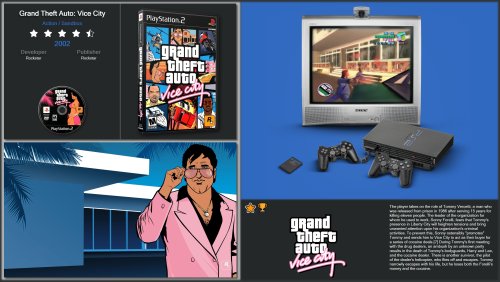 This is quite confusing. I can't seem to replicate this issue on my end but I have a feeling it might have something to do with how the platform and folders are setup for pc engine and grafx-16. It looks like possibly the video is aligning with the grafx16 platform even though the pcengine hardware image is loaded. Did you edit/rename any of the image files in the theme folder?
-
hmm it's displaying fine on this end. What exactly are you seeing? too small? totally out of place?
-
Colorful Game View Remix View File I absolutely love Viking's amazing colorful theme but I wanted a game view which showcases more art and also places the game videos within the incredible hardware images of the colorful theme. I usually play on a large tv screen so it's really suited for that. This really benefits from having a well curated build of good artwork, especially background images which are very prominent here. There are a couple of folders to place generic fallback images for background and cart art to help avoid large empty space when those are missing from games. I've added a handful in there but far from complete. I've never made/edited a theme before or done anything remotely similar so it's quite possible I've done some dumb stuff somewhere. I've included 4 game views. Views 1-3 use an arcade cab layout which require theme videos and marquee images. - 3d boxes - 2d box front - no cart view. more ideal for platforms like steam and arcade - no cart and alternate arcade cab for non-themed videos and no custom marquee image I also included the original colorful theme platform wheel view and only increased the wheel scale. A couple of unresolved things.. Among the included badges is one for completed games but I can't figure out how to get that to show. It shows for games which were marked as completed before the newer progress system was added but not for newly marked games. I don't know if this is an issue of the theme creator, bigbox or just my stupidity. Also I wasn't quite sure what to do about the 3ds game videos. I couldn't get the dual screen videos to scale properly so I ended up just blanking out the bottom screen and just using the top. Obviously only useful for single screen video snaps. Platforms done so far Recommendations Vikings videos obviously and then I set gameplay screenshots as a secondary priority for backgrounds in launchbox. I also try to avoid fanart backgrounds which just mimic the box art so I'm not just getting duplicated images on screen. Not always an option but I find often the screenshots will work just fine in place. I've not posted anything before so it's all a bit new to me and I don't want to overstep any boundries in terms of posting themes with other peoples work. I'm not claiming any sort of credit for Vikings amazing work on the colorful theme. I've only made an alternative game view here using the existing assets. Submitter sw1fty808 Submitted 11/01/26 Category Custom Themes
-
- 1
-

-
Version 1.0.3
53 downloads
I absolutely love Viking's amazing colorful theme but I wanted a game view which showcases more art and also places the game videos within the incredible hardware images of the colorful theme. I usually play on a large tv screen so it's really suited for that. This really benefits from having a well curated build of good artwork, especially background images which are very prominent here. There are a couple of folders to place generic fallback images for background and cart art to help avoid large empty space when those are missing from games. I've added a handful in there but far from complete. I've never made/edited a theme before or done anything remotely similar so it's quite possible I've done some dumb stuff somewhere. I've included 4 game views. Views 1-3 use an arcade cab layout which require theme videos and marquee images. - 3d boxes - 2d box front - no cart view. more ideal for platforms like steam and arcade - no cart and alternate arcade cab for non-themed videos and no custom marquee image I also included the original colorful theme platform wheel view and only increased the wheel scale. A couple of unresolved things.. Among the included badges is one for completed games but I can't figure out how to get that to show. It shows for games which were marked as completed before the newer progress system was added but not for newly marked games. I don't know if this is an issue of the theme creator, bigbox or just my stupidity. Also I wasn't quite sure what to do about the 3ds game videos. I couldn't get the dual screen videos to scale properly so I ended up just blanking out the bottom screen and just using the top. Obviously only useful for single screen video snaps. Platforms done so far Recommendations Vikings videos obviously and then I set gameplay screenshots as a secondary priority for backgrounds in launchbox. I also try to avoid fanart backgrounds which just mimic the box art so I'm not just getting duplicated images on screen. Not always an option but I find often the screenshots will work just fine in place. I've not posted anything before so it's all a bit new to me and I don't want to overstep any boundries in terms of posting themes with other peoples work. I'm not claiming any sort of credit for Vikings amazing work on the colorful theme. I've only made an alternative game view here using the existing assets. -
3d boxes Sony PlayStation 3 Disc Games 3D Box Pack (770)
sw1fty808 commented on Robin55's file in Sony Playstation 3
 Thanks so much for all of these. They are perfect. My collection is now just missing anarchy reigns, f1 2014, gow chains of olympus, splatterhouse and xcom enemy unknown. If you would make those I would be eternally thankful. Thanks again.
-
 Thanks a lot for these. This system was a real eye sore in my collection with the previous 3d boxes.
-
Jason thanks so much for fixing the controller bug so incredibly quickly. This is why I will never hesitate to pull out the wallet for Launchbox software. Top notch customer care standards and the absolute guarantee that the software will consistently improve, in big ways. I seriously refresh the play store almost hourly throughout the day, excited at the prospect of an update.
-
Excellent beginnings for this app. Working great with Galaxy S10. The only issue I've run into is using the Ipega 9087S controller. When you exit a game back to Launchbox, the d-pad stops working. Switching the box/list view brings it back to life. Weird but no biggy. Really looking forward to some type of search or sort function. Scrolling full game sets is a bit tedious. Really impressed overall though. Launching games is very fast and I've experienced no crashes. Thank you very much.
-
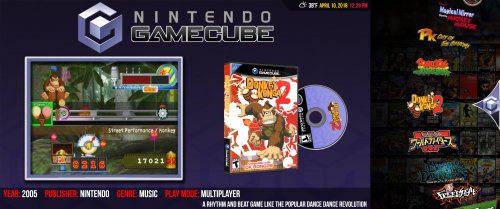 Can 4:3 mame theme videos be stretched to fit the fullscreen game view?
-
Happy with this now
-
Absolutely perfect. I really appreciate this. My setup is now complete. That has been bugging me for the longest time. I should have asked sooner. I look forward to seeing what you create next because this theme is perfection. Clean, elegant and defined with a perfectly arranged and balanced presentation of details and artwork. Bravo.
-
Thank you! I am using detailed.
-
Would I be able to do it if I didn't use background images? I keep mine as just the simple black and charcoal colours.

-
This is awesome. Thank you so much! Any chance of getting the same stretched videos in the game view? Even if you just put the bit of code for that here, I would be happy to paste that in myself. Thanks again.
-
I would love that. Thank you. I wonder if another option could be to shrink the video and text border widths to match that of the video. Then widen the wheel to close the gap.