

The Papaw
-
Posts
1,155 -
Joined
-
Last visited
-
Days Won
1
Content Type
Profiles
Forums
Articles
Downloads
Gallery
Blogs
Everything posted by The Papaw
-
Ok, signed up for premium account with EmuMovies and decided to delete all media in LB and start fresh. I also downloaded the sync app from EM. Here is what is going on: I have a blank canvas as far as images, music, videos, etc. using LB Next. in LB. I pick a platform, select all the games in the platform, select "download meta data and media" from the tools menu, select all video types, choose the replace all option. Every thing appears to work fine. I have one platform that has 34 games in it, LB will find 16 videos of various qualities. Okay, when finished, I can run their sync app on the same folder and it will find 28 videos. What is even stranger, only about 12 of them are the same videos, in other words, LB is finding videos that the sync app isn't and the sync app is find videos that LB is not finding????
-
The first app, it is a neat little thing and could be useful to some. However, that defeats the purpose of having the software application itself handling it for you, thus called "a feature." The app on github really doesn't work at all with many of the emulators, and you would also have to run back and forth to the PC to change it every time you change games. It would be much simpler to simply change it in windows ONE time, then change it back when finished. Of course you would lose your sound on the PC by doing that while someone else is playing the games. So back to where I started. Thanks for taking the time to look, maybe someone else has some ideas. I have found a small app that allows me to switch my audio default device with configurable hotkeys, which is working pretty well. It's FREE as well and can be found here: Audio Switcher
-
I have a Desktop PC with a Nvidea Geforce 1050TI video card in it, running Windows 7. The video card has a DVI and a HDMI port on it. I use a 20" desktop monitor on the DVI port (set up as monitor 2 in Win7) set as primary. I have a 50 foot HDMI cable in the HDMI port of the video card running under house to living room and plugged into a 55" Samsung TV that is not 3D (set up as monitor 1 in Win7). I use PowerDVD 18 to play SBS 3D movies on the non-3D TV in 3D, by opening it on the extended monitor (the 55" TV). The PowerDVD program defaults the audio output to the PC speakers, but it has an option in the software to allow you to choose the audio output on the graphics card (via the HDMI cable) . Of course I use the HDMI option since the video is being sent to another room, you want the sound there as well. This works great since you can leave windows default audio output stay as the PC speakers. Wife can watch 3D movies in living room while I can plug away in the LB forums and still listen to music on the PC I have been using GF Experience to stream Bigbox via an android TV box to the same TV, but there is a bit of lag with the controllers doing this and it ties up the PC, so if someone want to play games, the PC isn't usable. So, since I have the cables (also have 50' usb extension cable for controllers), I want to do the same with Launchbox/Bigbox. But I can't find a way to send the audio to the other room via the HDMI, other than choosing the HDMI in the sound card as default in windows 7. Is there any option in LB/BB to output the sound. I have looked through all the settings as well as in the forums. If it isn't possible, sure would be a great feature for the next release...hint, hint. Any help would be much appreciated.
-
@Zombeaver: Well, that would do it and sure did. Took right off in LB with RA. Thanks my friend. I can't believe I missed that, I feel a bit on the foolish side now. Thanks again.
-
@Zombeaver: As I previously stated, it works fine for me too, both in standalone DosBox, Built-in DosBox and RA. It doesn't work when I try launching it in LB using RA as the emulator, it simply hides LB, (then fails to launch), then un-hides LB Here are the settings: It is the same for any Dos game I try to use RA as the emulator.

-
@DOS76, yes have added the associated platform MS-DOS and using "-L "cores\dosbox_libretro" in the Default Command Line Parameters in the emulator settings
-
@Zombeaver: Thanks for the in-depth reply. I have everything installed on a RAID drive on a PC, but I never play on the PC, I have 20,000+ games installed (almost 6tb). and I use Moonlight on my Android TV boxes to stream everything to 3 different TV's/big screens. When streaming, RetroArch is a life saver as far as exiting games, configuring options & game pad settings, etc.. Of course a few systems, I prefer to use a different emulator instead of Reteoarch, but I can still use a hotkey script to exit a game with a game pad and return to LB. I was hoping to use Retroarch for a couple reasons, some as being mentioned above, but another is when you launch DOS games in Retorarch, the gamepad will work as a mouse without anything extra, So even if I launch a game that does not have joystick support, it can be playable with a game pad. And with a mini keyboard, I can jump into the RA settings and map or change a couple buttons to my likings, save that game profile in RA and not have to worry about it and it is good to go on all the streaming devices. I have tried the last thing you listed" "If you were to only use RA, you'd need to uncheck the "Use DOSBox" box in the DOSBox tab, then select the .conf (or .exe, though this won't always work) in the Launcher tab, and select Retroarch in the Emulation tab." Here is an example using King's Quest I: Quest for the Crown - This game does not require any installation. Okay if using the built-in DosBox, LaunchBox is executing the file "Sierra.com" with nothing else added, no config files, etc. - it works as expected (keyboard only). If I go to Retroarch and load the same file "Sierra.com" with nothing else added, no config files, etc., - it works as expected with keyboard and game pad acting as mouse. If I go into LaunchBox, uncheck the "Use DOSBox and choose Retroarch as the emulator it fails to start. Since the same loading file (Sierra.com) works both ways, I suppose that is what is confusing me. Why when LB is simply calling Retroarch, it fails? Neither of them are using any special Command Lines or config files I know DOS & MAME games are a pain as far as configuration, and individual game settings. (I have been working on my MAME collection for weeks using Retorarch, but is working great when each game is configured in RA) I thought about using the built in DosBox in Launchbox and maybe something like joytokey to map the controller, but if I remember correctly, this will not work when your streaming, I can't remember??
-
I am not sure if this is even related to being the beta version. (I'm runnning Beta v8.2.6) I did not have any MS-DOS games in my library. Today I added some. I took a couple and tested them using the built-in DosBox and they run fine. I then tested the same games in RetroArch v1.71 (using the DosBox core) and they run fine. But if I try running them from Launchbox, using RetroArch as the emulator, they fail. I have set up the Associated Platform as MS-DOS > Default Command as: -L "cores\dosbox_libretro" and check as default emulator. I don't think I am missing anything. I also make sure LB is executing the same file as RA is. Any ideas or is it a beta bug?
-
@Jason: That updated for me as normal, will let ya know if anything else creeps up. Thank you sir.
-
@Jason: Not sure if it matters, but I am also running LB in portable version
-
I just tried the update via BB with the same crashing results.
-
I tested beta-8 with a couple different themes, box art is working ok for me.
-
I've been running the beta versions with little to few issues until this version. When I was prompted about the v 8.0-beta--9 update, I allowed it, it appears to download and install correctly. When it self-starts, it simply crashes. If I try to run it from the exe it crashes Went back to the LB Update folder and the download is there, so I reverted back to v 8.0-beta-8, and all is fine. I checked all AV software and found nothing. Disabled all AV software and tried to update again with same results. I removed all plugins, that didn't help. Looked in the LB Logs directory, it is empty. Not sure what to check, any ideas??? System Specs: i5-3470 GTX-1050 ti 32GB Ram Win 7 Ult. (with the win update for the cpu issue) I atached dxdiag in case it might help. DxDiag.txt
-
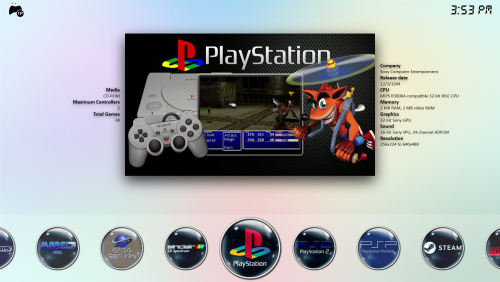 I really like this theme, it looks clean and works great when streaming to big screen via moonlight or steamlink. Thanks much y2guru.
 -
Thanks, I tried searching the forums for the answer, you should have shared this knowledge much sooner...hahaha.
-
@Aerilith : I figured it out. Place the videos in the same location as you would for background videos, then go into options>settings>videos and turn off "Use background videos", so simple.
-
@Aerilith "How do I make the video show underneath the box art in the vertical view instead a screenshot? right now the video is playing in the background over the fanart" I am trying to figure this out as well, have you found a solution? I have the videos and tried moving them around to various folders. but nothing has worked so far. Does anyone know how to do this?
-
Always glad to help, been beta testing since DOS and windows 3.1
-
I had this issue with previous beta version, waited for next release to see if it was corrected. Still having same issue. When I run Sync Collection from LB, it appears to actually be syncing everthing, appears to reach the end in about 5-6 minutes, then the process just hangs there. I have tested it a few times, even letting it sit for 2+hours. I have to cancel it.
-
Hi All: I am new to BB and never used AHK. I am using a Steam Link and BB in the living room on the big screen, and of course the PC is another room. I am wanting to do a ahk script to press a combo of 360 buttons while in the Cemu emulator that will send a <CTRL><ALT><F>. I have tried attaching a Rii mini keyboard to the Steam Link, but for some reason, it will not send the <CTRL><ALT><F> to the pc (I think it has to do with the steam overlays???) . Certain games in Cemu you need to trigger the <CTRL><ALT><F> for better performance, so for now, I have to start the game, go to the other room and hit <CTRL><ALT><F> on the keyboard, then back to the game. Any ideas, suggestions or guidance would be greatly appreciated. Also, can you combine 2 functions in a single script, for example, do the above and yet also add the closing portion to it? Thanks
-
@spectral & lordmonkus Thanks, that is what I needed.
-
Hi, running the beta version. I had imported a collection for SNES (Super Nintendo Entertainment System) using RetroArch emulator. Everything worked fine, games played correct. Then I thought the platform name might look better by shortening "Super Nintendo Entertainment System" to "Super Nintendo (SNES)". So I right clicked on it >Edit and changed it, all appeared fine. Done the same for "Nintendo Entertainment System" to Nintendo. However, when I clicked on a game, they do not start, then the artwork disappears like a broken game. I tried to put the original names back, but same issue. I also noticed that the "Launch with.." in the context menu was grayed out. I had to delete both platforms and import them fresh again to the games to work again.