

Krako13
-
Posts
30 -
Joined
-
Last visited
Recent Profile Visitors
1,610 profile views




Krako13's Achievements

8-Bit Processor (3/7)
6
Reputation
-
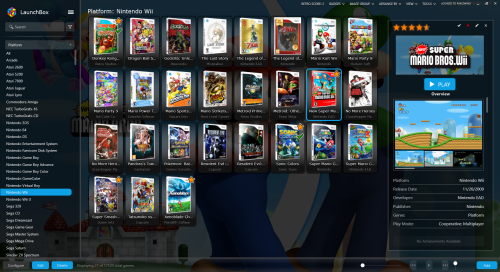
 Hey ! Great job ! I really like this theme ! Probably switch to it. Some suggestions : - In this view, i would prefer to display the video if available on the right part of the screen rather than box (which could be on the left part, as this space seems unused/ i really like the slider effect when the box appears, gj !) - The clear logo, seems to take too much space, especially on the platform view. It makes information bottom barely lisible on this "home" view. I think i'd prefer to see the "most/last/random played games" much clearer and reduce the size of the logo. the proportion of each item should be review. - the "recomended/similar... games" section doesn't seem to work with this theme (whereas it works with other themes) - On the bottom part of the screen, the badges take too much space, i think i'd prefer to see them directly on the box image (like in image below). And maybe add the possibility to remove the developer below the title of the game. With these two changes, we should gain enough space to display two lines of games wich is better in my opinion. - There is no possibilities to pop-out the game or i didn't find it. (I mean the function wich open the game details in a new window) Again, great job, i really like this theme ! I apologize if my english is not so good, doing my best as it's not my maternal langage :). Keep going !
 -
 Hey i got an error with steam importing media from steam games (and steam scrapper) that i'm not sure is really the same that already noted before : this error cause launchbox crash, has anyone got the same and pass through ? 2026-01-18 01:38:01 AM DataManager.SaveInternal started. 2026-01-18 01:38:01 AM Saving InputBindings.xml... 2026-01-18 01:38:01 AM Saving GameControllers.xml... 2026-01-18 01:38:01 AM Saving ListCache.xml... 2026-01-18 01:38:01 AM Saving Settings.xml... 2026-01-18 01:38:01 AM Saving ImportBlacklist.xml... 2026-01-18 01:38:01 AM Saving D:\LaunchBox\Data\Platforms\Windows.xml... 2026-01-18 01:38:01 AM DataManager.SaveInternal completed successfully. 2026-01-18 01:38:10 AM Setting Security Protocol Type to TLS 1.2... 2026-01-18 01:38:12 AM FIRST CHANCE EXCEPTION: Object reference not set to an instance of an object. at Unbroken.LaunchBox.Windows.SteamGame.GetTrailerVideoUrl(SteamGame game) 2026-01-18 01:38:12 AM FIRST CHANCE EXCEPTION: Object reference not set to an instance of an object. at Unbroken.LaunchBox.Windows.SteamGame.GetTrailerVideoUrl(SteamGame game) at Unbroken.LaunchBox.Windows.Desktop.ViewModels.DownloadImagesViewModel.MaintainVisualWrapper() at Unbroken.LaunchBox.Windows.Desktop.ViewModels.DownloadImagesViewModel.<>c.OptimizeGlobalSorter(Action action) at Unbroken.LaunchBox.Windows.Threading.<>c__DisplayClass13_1`1.TrackDetailedFactoryNotifier() at System.Threading.ExecutionContext.RunInternal(ExecutionContext executionContext, ContextCallback callback, Object state) --- End of stack trace from previous location --- at System.Runtime.ExceptionServices.ExceptionDispatchInfo.Throw() 2026-01-18 01:38:12 AM DISPLAYED EXCEPTION: Object reference not set to an instance of an object. at Unbroken.LaunchBox.Windows.SteamGame.GetTrailerVideoUrl(SteamGame game) at Unbroken.LaunchBox.Windows.Desktop.ViewModels.DownloadImagesViewModel.MaintainVisualWrapper() at Unbroken.LaunchBox.Windows.Desktop.ViewModels.DownloadImagesViewModel.<>c.OptimizeGlobalSorter(Action action) at Unbroken.LaunchBox.Windows.Threading.<>c__DisplayClass13_1`1.TrackDetailedFactoryNotifier() at System.Threading.ExecutionContext.RunInternal(ExecutionContext executionContext, ContextCallback callback, Object state) --- End of stack trace from previous location --- at System.Threading.ExecutionContext.RunInternal(ExecutionContext executionContext, ContextCallback callback, Object state) 2026-01-18 01:38:12 AM Resolving assembly Unbroken.LaunchBox.Windows.resources, Version=0.0.0.0, Culture=fr-FR, PublicKeyToken=null... 2026-01-18 01:38:12 AM Resolving assembly Unbroken.LaunchBox.Windows.resources, Version=0.0.0.0, Culture=fr, PublicKeyToken=null...
 -
 Thx! i was just looking for it , I need one for VR games and Amazon Games now.
 -
 Yep, it seems to be ok now :), i probably share the code about the maxplayers after few tests. About the ESRB, i like the idea to have the 2 ratings as now, just adding a not rated icon would complete it (the must would be to mix the news logo with the old ones :))
 -
@The Papaw I agree I've done this too about maxplayer in game; not sure if it can interest someone, i've taken the images in the AeonNox bigbox theme but I am not so satisfied about them. Maybe with some other images...
-
Hey, about point 2. I assume too, if you respect the naming of files and sizes. about the point 1. Could you have a test replace in gamedetailsview from line 1687 to 1741 by this :
-
Hey, I've done a little enhancement to allow a pdf icon in game details to open manual if available. Feel free to insert this after line 1685 after the </textblock> about wikipedia url in gamedetailsview.xaml
-
Hey, I'm sorry to come back on this question, but after two years, there is a good solution for skipping the win10 confirmation box in LB or BB without break launchbox or change the uac settings ?
-
 Hi, just a thank you for the last DS theme that is really nice just the fontsize of the game list maybe too small on a high resolution, but easy to change it by myself. I hope a really similar one for the 3ds next ? Keep doing good job, appreciate
 -
Hey i'm trying to custom the GameDetailsView to add Genre and multiplayers icons near ESRB/Favortite... I'm not a hard developer and everything I try, failed... I think it is beacause in this file the property "ActiveGame." doesn't work for some reason... Could someone help me ? GameDetailsView.xaml
-
Hey could someone help me with this error on nec turbografx 16 ? This is the line in question : <y2guru:Element1Text x:Key="Element1Text"/>
-
Hey, i still have'nt the answer about series, also someone know if there is a command to avoid the user control account on pc games ?
-
hey i make some changes in my own theme too, and your idea about the background is pretty nice, could you tell me where and how make the background image fill the whole space pls ?
-
Nice, i didn't notice that thanx, for who are seeking to do the same thing, you have to edit the GameDetailsView.xaml in LBThemes\Default\Views and just cut/paste what you need in order you need. Any idea about series location ?
-
 Hey, just a message even if i dont particularry like this video, i support you and I objectively say your work IS NOT crap ! thanx to share all these !




