

ChunkyLoverMark
-
Posts
70 -
Joined
-
Last visited
Content Type
Profiles
Forums
Articles
Downloads
Gallery
Blogs
Everything posted by ChunkyLoverMark
-
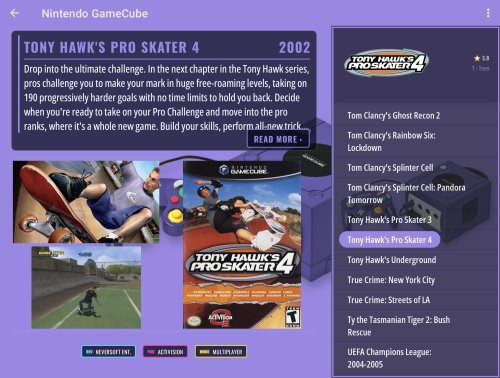
View File Chunkys Theme ChunkysTheme DETAILS Developer: ChunkyLoverMark Version: 1.0 DESCRIPTION ChunkysTheme is a LaunchBox for Android custom theme with a retro-arcade look. Every platform has its own accent colour, and a picture of the console sits behind the games list so you can always see which system you’re in. It works in landscape and portrait. On the Platforms screen, the platform video plays in the background. An info panel shows the number of games, the manufacturer and the release year, then fades away after a few seconds. A logo strip along the bottom lets you scroll between platforms. On the Games screen, you get a description card with a Read More button, a title screenshot, a gameplay screenshot and the box art. Developer, publisher and game mode appear as chips. The star rating sits above the age rating next to the game logo, and the games list has the platform picture behind it. Notes: Videos only play on the Platforms screen. Download them first from the three-dot menu → Download Theme Videos. 4:3 videos (for example Genesis) have black bars at the sides, because the video area is a fixed 16:9. All 143 platforms in the pack have their own colour. 46 have a new console picture on a solid colour, and the rest use an older, smaller console picture. Tested on a Samsung Galaxy Fold, in portrait and landscape, folded and unfolded. What’s Included Text List Filters View Text List Games View Launching View CREDITS Based on Alisia by Faeran Thanks to Juketsu for the inspiration behind Alisia CHANGES (from Alisia) New retro-arcade look, with a colour for each of the 143 platforms New console pictures on solid colour backgrounds for 46 platforms Platform video on the Platforms screen, with an info panel that fades out Logo strip for scrolling between platforms New Games screen layout: description card with Read More, title and gameplay screenshots, box art, and developer, publisher and mode chips Star rating above age rating next to the game logo Platform picture behind the games list Pictures fade in together as you move through the list, so the layout doesn’t jump around Launching view: dark overlay and header bar removed, condensed bold font and stronger text shadow for the title and details Submitter ChunkyLoverMark Submitted 10/26/26 Category Custom Themes
-
Version 1.0.0
1 download
ChunkysTheme DETAILS Developer: ChunkyLoverMark Version: 1.0 DESCRIPTION ChunkysTheme is a LaunchBox for Android custom theme with a retro-arcade look. Every platform has its own accent colour, and a picture of the console sits behind the games list so you can always see which system you’re in. It works in landscape and portrait. On the Platforms screen, the platform video plays in the background. An info panel shows the number of games, the manufacturer and the release year, then fades away after a few seconds. A logo strip along the bottom lets you scroll between platforms. On the Games screen, you get a description card with a Read More button, a title screenshot, a gameplay screenshot and the box art. Developer, publisher and game mode appear as chips. The star rating sits above the age rating next to the game logo, and the games list has the platform picture behind it. Notes: Videos only play on the Platforms screen. Download them first from the three-dot menu → Download Theme Videos. 4:3 videos (for example Genesis) have black bars at the sides, because the video area is a fixed 16:9. All 143 platforms in the pack have their own colour. 46 have a new console picture on a solid colour, and the rest use an older, smaller console picture. Tested on a Samsung Galaxy Fold, in portrait and landscape, folded and unfolded. What’s Included Text List Filters View Text List Games View Launching View CREDITS Based on Alisia by Faeran Thanks to Juketsu for the inspiration behind Alisia CHANGES (from Alisia) New retro-arcade look, with a colour for each of the 143 platforms New console pictures on solid colour backgrounds for 46 platforms Platform video on the Platforms screen, with an info panel that fades out Logo strip for scrolling between platforms New Games screen layout: description card with Read More, title and gameplay screenshots, box art, and developer, publisher and mode chips Star rating above age rating next to the game logo Platform picture behind the games list Pictures fade in together as you move through the list, so the layout doesn’t jump around Launching view: dark overlay and header bar removed, condensed bold font and stronger text shadow for the title and details -
I've noticed this happening on the last few releases including the latest Beta. It shows that I've signed into my Launchbox account with a popup but then shows that the login is out of sync. I then try signing out and back in and I get the popup to say that I'm successfully signed in but again it shows the sign-in has expired. I've also tried to sign into the Launchbox database but that doesn't activate anything.

-
Not tried another theme, I am on the latest version of the theme.
-
I've got a bug on this beta where it really wanted me to play Contra. Closing the view and re-entering fixed it https://photos.app.goo.gl/xHkTbNfy9v42grFS7 I had just downloaded Contra and played it before this video.
-

BannerBox Bordered Clear logo Banners
ChunkyLoverMark replied to damageinc86's topic in Platform Media
Okay, no worries. Thanks anyways -
BannerBox Bordered Clear logo Banners
ChunkyLoverMark replied to damageinc86's topic in Platform Media
Hi, I'm trying to create my own banners for my Android phone but I'm getting an error when installing the program on my Windows machine. Did I do something wrong. I didn't install the fonts? Any help would be appreciated.
-
The Grid-Instant Redux
ChunkyLoverMark replied to JAKAMY's topic in LaunchBox for Android Custom Themes
Hi Jakamy really liking the theme. I've found that there is a cloud icon on all my games even if I've downloaded the game from my Nas onto my device. Faeren has asked me to reach out to you to see if you could produce an update please?
-
No, version 1.1. Everything is updated.
-
I think this is a bug, on The Grid-Instant Redux Boxes Grid it shows the cloud button on games that I've downloaded:
-
Yes you are right, updated the themes and it's perfect again. Thank you. I didn't know all my themes were out of date. Maybe this could be made more obvious in the future?
-
Hi, thanks for responding. I've tried a few different themes now and found that the slow themes seems to only be related to the Text list based themes. I've added another video to the Google Photos link I posted earlier.
-
Your device specs: Pixel 8 Pro The version of Android and API version - Android 16 QPR Beta Description of the issue: Slow loading into games Can it be reliably reproduced on your end? Yes Reproduction steps: Just loading Launchbox The main issue I've seen from my limited testing is the slow performance. In this link is two videos showing how long it took to load into my SNES games. One out of the two videos my app crashes. https://photos.app.goo.gl/XujNFc6azR4ewQMX8
-
Does New Dex still have this requirement or not? I know I can install apps that have the Launcher ability on the new Google Pixel Desktop and I think it's built on the foundations of the new Dex.
-
Looking forward to seeing what you lot have been working on.
-
NAS non WIFI? Wake NAS from Launchbox?
ChunkyLoverMark replied to ChunkyLoverMark's topic in Android
Since this post I've upgraded my NAS system to the NASync DXP2800 . I don't need to use the third party file manager to wake it up. I still need to configure the VPN to try that. -
What's the easiest way to create a playlist for missing artwork?
ChunkyLoverMark replied to ChunkyLoverMark's topic in Noobs
That's perfect, thank you very much. -
Hi everyone, I'm trying to filter out my Rom collection so that I can separate out any games without either Front box art, or front cart art. My Roms are stored on my NAS drive and I want to organise them from Windows Launchbox to use on Android Launchbox. I want to create a playlist, then delete them so it goes into my recycle bin so I can put them in a new folder. What's the best way to go about this? Thanks.
-
I'm not seeing Nintendo 64DD in the list of platforms in beta 4:
-
Sorry if this is a stupid question, but what does this part mean? Additional Apps on a Network Share should once again download and play Are apps different from Roms? Is there something other than roms we can store on our NAS?
-
The latest beta release includes an orientation lock, so this thread is definitely a win 👍
-
So I installed the beta and it works great ❤️ The portrait lock seems to work great too, the loading screen will start loading in the system orientation and switch after a few seconds: https://photos.app.goo.gl/kuorQa6sCdcSBs8X9
-
Yeah app doesn't open for me anymore, I'm hoping for an APK link when the next beta releases so I can upgrade with that.
-
Wow what an update ❤️ From having so many crashes to having none. I love all the little tweaks and changes with this update. I'll report if I find anything else but so far it's great. Appreciate the LaunchBox team and Community so much.
-
Whats the best way to see all the platform theme videos?
ChunkyLoverMark replied to ChunkyLoverMark's topic in Android
Thank you




