

prophecy0
-
Posts
20 -
Joined
-
Last visited
prophecy0's Achievements

8-Bit Processor (3/7)
6
Reputation
-
Hello all. I am putting the final touches on my multicade and I've been working on setting up all of my playlists. I would like to display a single "Playlist" platform alongside all of my hardware platforms. Then, once the user selects the Playlist icon, they are shown the full list of playlists. Is this something that can be done natively? I know there is a checkbox on playlists to have them appear on the Platform screen, but I feel like having all of my playlists show up alongside the platforms clutters that screen too much. Thanks!
-
-
DemulShooter Auto-Launcher
prophecy0 replied to JoeViking245's topic in Third-Party Applications and Plugins (Released)
I'm using Hook of the Reaper. It is not running as admin. It looks like TeknoParrot DOES install itself with admin rights. I'm going to disable that and see if I run into any issues. This is all on a dedicated PC I've built for an arcade cabinet, so I'm not as worried about security on it. That said, I'd rather TP not be running as admin. edit: I disabled admin on TeknoParrot. It still seems to be working fine. This also allowed me to disable admin on DemulShooter. Your plugin works as expected now. Thanks again for the plugin + help. -
DemulShooter Auto-Launcher
prophecy0 replied to JoeViking245's topic in Third-Party Applications and Plugins (Released)
I got a reply from the DemulShooter dev. It turns out I was not running DemulShooter as admin. As soon as I set it to run as Admin it started hooking correctly. However, that led to your plugin no longer working. The following error was in the log file: "An error occurred trying to start process '"C:\LaunchBox\ThirdParty\DemulShooter_v17.5\DemulShooter.exe"' with working directory 'C:\LaunchBox\ThirdParty\DemulShooter_v17.5'. The requested operation requires elevation." I thought maybe if I made LaunchBox + BigBox run as admin as well that I could get past this error, but that didn't work. I have UAC completely disabled in Windows. -
DemulShooter Auto-Launcher
prophecy0 replied to JoeViking245's topic in Third-Party Applications and Plugins (Released)
Thanks for the detailed response. The beta plugin worked - I was able to access the menu within LB without any issues. The game I was noticing the weird sequencing issue on (Launch game via TP, then launch DemulShooter) was Aliens: Extermination. That process was working consistently the other night, but now I can't get that method to work either. I also tried Aliens: Armageddon without success. Like I posted in the edit above, I've tried using the -pname argument to pass the process name of the corresponding TeknoParrot loader for each game, but that hasn't seemed to work. I am also hopeful that my post in the DemulShooter thread will get some replies. Thanks again! -
DemulShooter Auto-Launcher
prophecy0 replied to JoeViking245's topic in Third-Party Applications and Plugins (Released)
I created the settings.txt file after extracting and pointed it to DemulShooter. The plugin is working according to the log files. I simply can't access the plugin menu in Launchbox. I just tried closing and re-opening LB and got the same error that I pasted above. I was trying to access the plugin menu in LB so I could pass the argument to turn off crosshairs. The need to launch DemulShooter after the TP game is running IS weird, I know. It works that way on my machine whether or not I am using your plugin. I know it seems backwards, but if DemulShooter is running first it never hooks into the game properly. I'm not sure why. edit: I've posted in the BYOC DemulShooter thread about the TP hooking issue. I'm sure there is something simple I am overlooking on that front. I tried using the -pname argument to pass the Teknoparrot loader as the process name, but that didn't work for me either. -
DemulShooter Auto-Launcher
prophecy0 replied to JoeViking245's topic in Third-Party Applications and Plugins (Released)
First off, thank you for this plugin. It saves SO much time with configuring DemulShooter in LB. I received the attached error when I tried to launch the plugin's settings via LaunchBox. Also, games launched via TeknoParrot don't seem to hook properly with DemulShooter unless DemulShooter is launhed after TP has launched the game EXE. Is there any way to automate this via the plugin? Thanks!
-
DemulShooter Auto-Launcher
prophecy0 commented on JoeViking245's file in Third-party Apps and Plugins
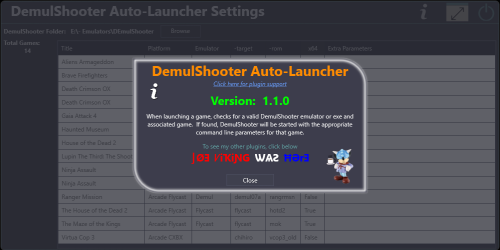 What a fantastic plugin! I wish I had found it a week ago as it would have saved me a lot of headache. With Teknoparrot games, I find that DemulShooter only hooks properly when launched AFTER the game's exe has been launced by TeknoParrot. Is there any way to automate this via the plugin?
 -
Trouble with Importing Games, MetaData, & EmuMovies
prophecy0 replied to vahn65's topic in Troubleshooting
I can confirm - I reset my EmuMovies password today and now my imports are moving along MUCH more quickly. This was an issue with EmuMovies, not Launchbox. -
Trouble with Importing Games, MetaData, & EmuMovies
prophecy0 replied to vahn65's topic in Troubleshooting
@C-Beats I have been having similar issues as well. This is with a clean install of Launchbox. I am running a small import now and will send you the logs as soon as it is complete. Thanks! -
I just wanted to make sure to comment on this theme. It is by far my favorite Big Box theme at the moment. I'd love to have more of the platform videos because the 4 that have already been created are fantastic. I may just have to work on some myself... edit: It looks like there are a ton of the platform videos that I haven't downloaded. Thanks again for this amazing theme!
-
I was messing around with my mednafen configuration for my PS1 games and now I can no longer launch PS1 games from LaunchBox. I get the attached error. The odd thing is, if I load Retroarch manually and load the mednafen core I am able to launch PS1 games without any issue. Any help is appreciated! EDIT: Nevermind. I am not a smart man. It turns out there is an issue with one of my PS1 games that is causing the crash.
-
BigBox Performance and How to Make it Better
prophecy0 replied to Lordmonkus's topic in Troubleshooting
Thanks for the tip. Completely disabling backgrounds seems to have fixed everything, but only after I scrolled through all of the games in the wheel in order to let Big Box cache all of the boxart and screenshots. Voted. I think this would be fantastic. -
BigBox Performance and How to Make it Better
prophecy0 replied to Lordmonkus's topic in Troubleshooting
Yeah, I tried scrolling through multiple times and the stuttering was still occuring.




