Jump to content
LaunchBox Community Forums

2 Screenshots

About This File

This is a Big Box plugin that allows you to launch a game/application directly from the Platform Wheel View level.  For use with platforms that only have one game/application.

New in v2.0, now works in Hybrid views (if available).  Hybrid Views are available in the Default theme in LaunchBox v13.22-beta-1 and newer.

New in v2.1.0,  (option) Set platform to go straight to the Game Details View (instead of directly launching the game).

Example Use Case:
You have a platform called "Music Box Alpha" which contains only one "game", the Music Box Alpha application.
To launch it:

  • Select the platform
  • Select the [only] "game" 
  • Select "Play" (or press A on your controller to go to the games Details view).

Using this plugin (once you've setup the Theme and added the platform via Launch Platform Setup in the Tools menu), to launch the application or go straight to the Game Details:

  • Select the platform
  • (That's it)


Installing:

Open the zip file and copy the contents into your ../LaunchBox/Plugins/  folder
    e.g.  D:\LaunchBox\Plugins\LaunchPlatform\LaunchPlatform.dll

If updating from a previous version, remove any existing .dll files first from the /LaunchPlatform/ subfolder.


Setup:

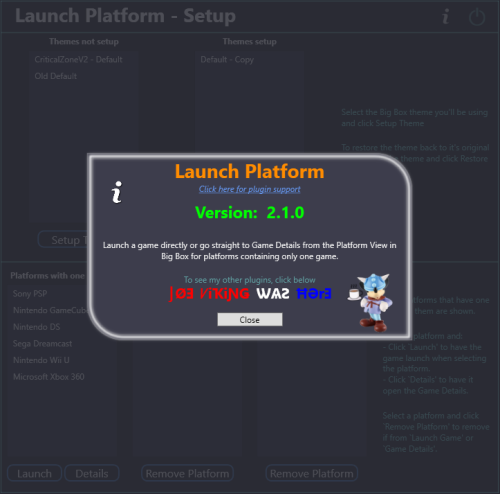
Click Tools and select Launch Platform Setup

(You may first want to create a backup of the themes' folder you will be using for Big Box.  You shouldn't need it, but never a bad idea.)

Note: The Default theme is excluded. To use it, make a copy of the Default folder.  e.g. /LaunchBox/Themes/Default - Copy/

image.thumb.png.79d52c8c30f2df6a018bcf2101eb2296.png

In the Themes Not Setup list will be all your Big Box themes. (Excluding Default)  Select the one you will be using use then click Setup Theme.  This will now be listed in Themes Setup.  At any time you can undo the changes made by selecting the setup Theme and click Restore Theme.


Selecting platform(s) to Launch "the game":

Select a Platform in the Platforms with one game List and click Launch .  This will move it to the Platforms - Launch Game list. 

Selecting platform(s) to go directly to the Game Details View:

Select a Platform in the Platforms with one game List and click Details .  This will move it to the Platforms - Game Details list. 


Using:

Start Big Box.  If you just finished setting it up in LaunchBox, you can press Ctrl+B to switch to Big Box.

Set the theme to the one you setup earlier (if it's not the current theme already).

Scroll through your Platforms wheel until you find a platform you've added and select it.


What's actually happening when you "Setup" a theme: (a behind the scenes look)

Spoiler

In your selected themes' Views folder, a new folder is created called WheelBackup.  8 files in the Views folder get copied into the new folder.

PlatformWheel1FiltersView.xaml            PlatformHybrid1View.xaml
PlatformWheel2FiltersView.xaml            PlatformHybrid2View.xaml
PlatformWheel3FiltersView.xaml            PlatformHybrid3View.xaml
PlatformWheel4FiltersView.xaml            PlatformHybrid4View.xaml

The 8 (original) files in the Views folder get modified to allow the plugin to work.

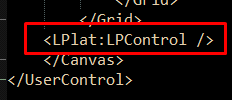
One line is added in the declarations and one at the bottom.

Screenshot_1.thumb.png.a303ec2120908d035390115dd76b130f.png

Screenshot_2.png.a1d7de7544eb8de5591067d2eae8d18c.png


When Restoring a theme, the backed-up files are moved back into the themes' Views folder (overwriting the modified views) and WheelBackup is deleted. Putting the theme back to its original state.


@jayjay is the brains behind getting this to work, and I'm the one that threw it all together.  So credit goes to where credit is due.  (you decide :D)  If something's not working right, go ahead and post here and it'll get looked at.  And possibly even get resolved.


What's New in Version 2.1.0   See changelog

Released

New Feature:    (option) Go straight to the Game Details View from the platform wheel for platforms having only one game.
exist Feature:    (option) Launch games directly from the platform wheel for platforms having only one game.

  • Like 4
  • Thanks 1
  • Game On 2

User Feedback

Recommended Comments


JoeViking245

Posted

36 minutes ago, arcademode said:

Odd error: "Lplat is an undeclared prefix" on the Colorful theme. Seems to be ok with Default but Colorful and a few others result in this LPlat error.

This is saying the Theme you're using didn't get setup or setup "correctly".

Try to Restore the Theme(s) and then Setup Theme again [via Launch Platform Setup] and see if that fixes it.

arcademode

Posted

17 minutes ago, JoeViking245 said:

This is saying the Theme you're using didn't get setup or setup "correctly".

Try to Restore the Theme(s) and then Setup Theme again [via Launch Platform Setup] and see if that fixes it.

Tried that a few times, same result. Anything else I can try?

JoeViking245

Posted

1 minute ago, arcademode said:

Tried that a few times, same result. Anything else I can try?

You could try setting them the old way by manually doing what's shown in the [Reveal Hidden ContentsWhat's actually happening when you "Setup" a theme: (a behind the scenes look) section in the description.


What view are you using?  Can you copy that file (the file, not its contents) here.  e.g.  /LaunchBox/Themes/Colorful /Views/PlatformWheel4FiltersView.xaml 

With how the theme was written, how the plugin inserts the 2 lines may not find "the spot" to insert them.  Based on the error, my guess is the 1st line (near the top) didn't get inserted.  Were there any other errors that show when you start BB or load the particular theme?  Like a big, long error message with a bunch of garbley-gook of the issue (aka, more than what you mentioned)?

arcademode

Posted

I already see where it's in the wrong spot! Manually changing it seems to work ;)

  • Game On 1
JoeViking245

Posted

52 minutes ago, arcademode said:

I already see where it's in the wrong spot! Manually changing it seems to work ;)

Glad to hear it works.  I'll take a look and see if I can do something to get it in the right spot. 😎

JoeViking245

Posted

New Release:  v2.0.1

Fixed:  The plugin declaration wasn't properly getting added on certain themes


Thanks @arcademode for bringing this to my attention!

  • Like 1
reggorf

Posted

@JoeViking245 I am currently using this plugin and its working nicely. Thanks! However I've found that I have some scenarios where I have one game in a platform, where it would be nice to skip the game selection but still get the game detail where I have to the option to select play, show the manual and have the text description, etc. Is there anyway to have this go straight from the platform list to the game detail screen, while skipping the game selection?

Select the platform

Select the [only] "game"  <--- I want to skip only this

Select "Play".

  • Like 1
JoeViking245

Posted

5 minutes ago, reggorf said:

I am currently using this plugin and its working nicely. Thanks!

Thanks! Good to hear it's still working well. :) 

9 minutes ago, reggorf said:

scenarios where I have one game in a platform, where it would be nice to skip the game selection but still get the game detail where I have to the option to select play, show the manual and have the text description, etc. Is there anyway to have this go straight from the platform list to the game detail screen, while skipping the game selection?

Interesting idea. I'm not sure if the LaunchBox API has a call to "push" you into a specific View. 

e.g. Platform View > Games View > Game Details View


Code-wise, it [appears it] would be just a matter of changing Launch_The_One_Game to Go_To_The_One_Games_DetailsView.  Then a matter  of changing the plugins UI to ask which option you want for each platform while still keeping it "pretty".  Then do I rename the plugin or just create a new one.  For the 2 or 3 people that might use it. ;) 

I'd be curious to hear how many users actually have a platform with just one game in it.  Seems odd. But probable.

I'll add this to my "Hey Joe, are you bored?" to-do list and see if it's even possible.  No promises. No timeline.

reggorf

Posted

3 hours ago, JoeViking245 said:

I'd be curious to hear how many users actually have a platform with just one game in it.  Seems odd. But probable.

I'll add this to my "Hey Joe, are you bored?" to-do list and see if it's even possible.  No promises. No timeline.

Thanks. I appreciate you adding it to your list.

Its just one of those little things but I think it would be a cleaner and more consistent look for my system. In my case, I have added a platform for the Radio Shack TV Scoreboard (a 70s pong console), where the platform basically is the game. Technically it has multiple types of pong games but those toggle inside the emulator since it didn't have cartridges. So it actually is a game unlike other apps like a music jukebox or video streamer, etc. so it has a box, manual, gameplay screenshots... Things that could be utilized in that screen. Others might have similar uses. 

  • Like 1
Johnny T

Posted

37 minutes ago, reggorf said:

Thanks. I appreciate you adding it to your list.

Its just one of those little things but I think it would be a cleaner and more consistent look for my system. In my case, I have added a platform for the Radio Shack TV Scoreboard (a 70s pong console), where the platform basically is the game. Technically it has multiple types of pong games but those toggle inside the emulator since it didn't have cartridges. So it actually is a game unlike other apps like a music jukebox or video streamer, etc. so it has a box, manual, gameplay screenshots... Things that could be utilized in that screen. Others might have similar uses. 

Just reading this - would love to have a look at that Radio Shack TV Scoreboard emulator? Is that downloadable anywhere? Or do you have the name of the emulator? I'm unfortunately old enough to remember those pong games and would love to fire it up and have a game with my grand-kids. Thanks :)

JoeViking245

Posted

1 hour ago, reggorf said:

Thanks. I appreciate you adding it to your list.

New Release v2.1.0

New Feature:    (option) Go straight to the Game Details View from the platform wheel for platforms having only one game.
exist Feature:    (option) Launch games directly from the platform wheel for platforms having only one game.

  • Like 1
Johnny T

Posted

13 hours ago, JoeViking245 said:

New Release v2.1.0

New Feature:    (option) Go straight to the Game Details View from the platform wheel for platforms having only one game.
exist Feature:    (option) Launch games directly from the platform wheel for platforms having only one game.

Wow @JoeViking245 lightning fast!!!!

That's a very impressive turnaround - great work as always :) 

  • Thanks 1
reggorf

Posted

20 hours ago, Johnny T said:

Just reading this - would love to have a look at that Radio Shack TV Scoreboard emulator? Is that downloadable anywhere? Or do you have the name of the emulator? I'm unfortunately old enough to remember those pong games and would love to fire it up and have a game with my grand-kids. Thanks :)

Well yes and no. I used WinArcadia (https://amigan.1emu.net/releases/). It is a multi system emulator that has several old arcade systems. One of the things it has is a General Instruments AY-3-8500 emulator. That's the original pong chip. Its quite good and accurate. It has all of the variations of those early consoles. It even has the quirks, like when the ball goes through your paddle and certain locations, etc. The Radio Shack console was my first console and I wanted to get it on Bigbox, but I didn't find WinArcadia easy to use with Bigbox. You have to go into the Windows menu to change things frequently with the mouse and the gamepad keys are a little odd. Anyway, I used Gemini and Claude (I am not a programmer) to help me get the C code (its open-source freeware) into Visual Studio and modify the source to make changes so it has a proper controller setup and has a 1-button click to map all the existing settings to the Radio Shack console I had.  I also added a pause screen with key mappings and a settings status bar that's always under the game. I got it into BigBox with some decent photos and logos. I'm happy to get it together and attach what I made here.  Not sure where is the appropriate place. I'm not on Github or anything.

  • Thanks 1
Johnny T

Posted

2 minutes ago, reggorf said:

Well yes and no. I used WinArcadia (https://amigan.1emu.net/releases/). It is a multi system emulator that has several old arcade systems. One of the things it has is a General Instruments AY-3-8500 emulator. That's the original pong chip. Its quite good and accurate. It has all of the variations of those early consoles. It even has the quirks, like when the ball goes through your paddle and certain locations, etc. The Radio Shack console was my first console and I wanted to get it on Bigbox, but I didn't find WinArcadia easy to use with Bigbox. You have to go into the Windows menu to change things frequently with the mouse and the gamepad keys are a little odd. Anyway, I used Gemini and Claude (I am not a programmer) to help me get the C code (its open-source freeware) into Visual Studio and modify the source to make changes so it has a proper controller setup and has a 1-button click to map all the existing settings to the Radio Shack console I had.  I also added a pause screen with key mappings and a settings status bar that's always under the game. I got it into BigBox with some decent photos and logos. I'm happy to get it together and attach what I made here.  Not sure where is the appropriate place. I'm not on Github or anything.

That's brilliant @reggorf thank you! It would be amazing if you could share it on here? I think the Downloads section would be appropriate - https://forums.launchbox-app.com/files/ 

But, if not, I'll drop you a PM if you don't mind and then we can arrange something. I have a Google Drive that we could use. It would certainly really help me to replicate what you've done.

It's really nice of you to offer to share all your hard work - thanks mate :) :) :) 


Join the conversation

You can post now and register later. If you have an account, sign in now to post with your account.

Guest
Unfortunately, your content contains terms that we do not allow. Please edit your content to remove the highlighted words below.
Add a comment...

×   Pasted as rich text.   Paste as plain text instead

  Only 75 emoji are allowed.

×   Your link has been automatically embedded.   Display as a link instead

×   Your previous content has been restored.   Clear editor

×   You cannot paste images directly. Upload or insert images from URL.

×
×
  • Create New...