Jump to content
LaunchBox Community Forums

5 Screenshots

About This File

# AchievementHUD_V6.6.1 Display Plugin

### Core Features

**Live Achievement Tracking**
- Shows all achievements for the current game with unlock status
- Displays achievement icons, descriptions, and point values
- Shows how rare each achievement is (percentage of players who've unlocked it)
- Instant detection when you unlock achievements (<100ms via RetroArch log monitoring)

**Dynamic Achievement Celebrations**
- Full-screen gold celebrations when you unlock achievements
- Text-to-speech announcements (optional, fully configurable)
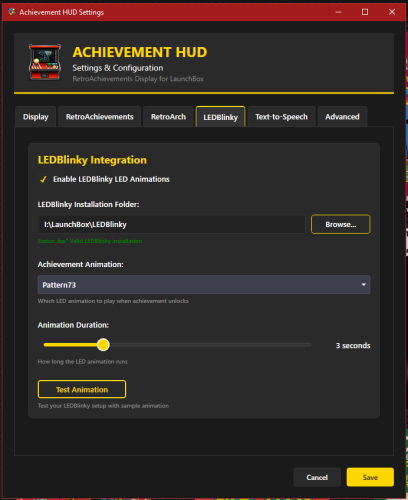
- LEDBlinky integration for RGB button/joystick animations (optional)
- Audio ducking - game audio drops during announcements so you don't miss anything

**Profile Display**
- Your RetroAchievements profile with avatar, username, and rank
- Total points and "true points" (weighted by difficulty)
- Currently playing status
- Recently played games with completion percentages

**Smart Features**
- Configurable sort modes - sort achievements by popularity, points, or alphabetically
- Auto-scroll - smoothly scrolls through long achievement lists during gameplay
- "Next achievement" suggestion - shows you the most common locked achievement
- Multi-monitor support with DPI awareness
- Home screen when no game is running

---

## Why a Second Monitor?

Checking achievements mid-game means pausing, opening menus, breaking immersion. With a second screen, you always know:
- What you just unlocked
- What achievements are available
- How close you are to completion
- Which achievement to go for next

It's like having the RetroAchievements website open next to you, but live-updated and game-aware.

---

## Technical Highlights

**Instant Detection**
- Monitors RetroArch logs for achievement unlocks in real-time
- No polling delays - detections happen the moment RetroArch records them
- Falls back to API polling for non-RetroArch emulators

**LaunchBox Integration**
- Fully integrated with LaunchBox's game launch/exit lifecycle
- Uses LaunchBox's RetroAchievements configuration (no duplicate setup)
- Pulls game metadata directly from LaunchBox's database
- Supports Clear Logos via LaunchBox's image system (handles MAME ROM name mismatches automatically)

**Customizable Display**
- Choose your target monitor
- Adjust celebration duration
- Configure TTS voice, speed, and volume
- Enable/disable individual features (LEDBlinky, TTS, audio ducking)
- Sort achievements your way
- Auto-scroll for hands-free browsing

---

## Requirements

- LaunchBox (tested with latest versions)
- RetroAchievements account configured in LaunchBox (Tools > Options > RetroAchievements)
- RetroArch for instant achievement detection (optional - API polling works with any emulator)
- .NET 9.0 runtime
- Second monitor recommended (works on single monitor but best experience is dual-screen)

**Optional Integrations:**
- LEDBlinky for RGB lighting effects
- Text-to-Speech (built into Windows)

---

## How It Works

1. **Launch a game** through LaunchBox
2. **Display appears** on your configured second monitor showing:
   - Game's Clear Logo or title
   - Your achievement progress
   - Full achievement list with icons and descriptions
3. **Unlock achievements** - instant celebration on screen
4. **Track your progress** without ever pausing the game
5. **Game exits** - display returns to home screen showing your profile and recent games

---

## Installation

1. Download the plugin
2. Extract to `LaunchBox\Plugins\AchievementHUD\`
3. Restart LaunchBox
4. Configure in Tools > Options > Achievement HUD
5. Set your target monitor and preferences
6. Launch a game and enjoy!

---

## Credits
by: TrailerVert
Built with love for the LaunchBox and RetroAchievements communities. 
Special thanks to the LaunchBox plugin API and RetroAchievements for making this possible.

---

**Current Version:** 6.6.1  
**Status:** Beta
**License:** Free to use

---

Edited by TrailerVert
version number update


What's New in Version 6.6   See changelog

Released

In the v6.6 the plugin was creating a plugin folder named "Trailervert.display.plugin" to store cache and setting. I changed it to "AchievementHUD" in the plugin folder.


  • Like 1
  • Thanks 1

User Feedback

Recommended Comments

rexryan

Posted

Loving the clear logo for the games..


AzgoRAth

Posted

I've tested this for about an hour now and it's mostly great. There are 2 problems I've found so far though.


1 - The plugin seems to be quite unstable. LB/BB has crashed a few times while using it or when exiting LB/BB. I have changed the DPI settings as instructed but still crashes sometimes.

2 - Plugin doesn't work with multiset (yet, hopefully).


There was a 3rd problem which is the mouse cursor is hidden if using the plugin with BB but I managed to fix that by enabling "Enable Mouse" and disabling "Hide Mouse Cursor when Not in Use" in BB->Options->Mouse settings.

Awesome work otherwise.

  • Like 1
TrailerVert

Posted

Thanks. I honestly have not used it much with BB so any feedback on that is appreciated. I am not sure I know what Multiset is. You are correct with the mouse settings, Those have to set in BB. I will look to see if I can make it show when moved to that screen, 


  • Like 1
AzgoRAth

Posted (edited)

3 hours ago, TrailerVert said:

Thanks. I honestly have not used it much with BB so any feedback on that is appreciated. I am not sure I know what Multiset is. You are correct with the mouse settings, Those have to set in BB. I will look to see if I can make it show when moved to that screen, 


So, multiset is a new feature on RA where you can unlock base sets and subsets at the same time by using only the base rom (or subset-patched rom for Specialty Subsets) instead of playing a different rom per set. Oh another problem I found is the plugin in it's current state can't tell if the unlocked achievements are hardcore or softcore unlocked. So as you can see in the picture, I have unlocked all the achievements in Hardcore except for "THE MAN" which I have unlocked in Softcore.image.thumb.png.cbe98cc921ef9d37d387abdd16f4687b.png

Edited by AzgoRAth
  • Thanks 1
TrailerVert

Posted

AzgoRAth. I am looking into the multiset now. I have not used that feature but it looks really cool. I will see how that might be added.

I believe we will be able to see if it is a softcore or hardcore and add a way to tell which it is. This is great feedback and this is my first plugin. I am not a programmer, I mow grass for a living. LOL

I do love playing Achievements so I would like to make this a cool tool. I got tired of having RA always open. I will post back as soon as get this multiset working in Retroarch. Then we can see about adding it.


  • Like 1
Maul83

Posted

I really like this, but is there a way to minimize it? When I'm playing a game its not a big deal, but it starts with LB sometimes there might be a window on that monitor I need to get to, and I need to just close LB to do it. 

  • Like 1
TrailerVert

Posted

Sorry Im just seeing this. You can click on the HUD screen and hit 5 and 1 keys at the same time and it will close the screen. It will come back when you launch a game or restart LB. 


Carterino

Posted

I am Downloading right now, If i can remember I will write a review, the fact that It seems to be a second monitor plugin sounds fucking amazing and peak, cheers mate. 

CaptainGreenhat

Posted

I have a very display dense environment and cant get this to work reliably, its always only ever partially on screen no matter my dpi settings are and the monitor indexing doesn't line up either.

image.png.4e125e0e015d20cdef7ef5c9c4ec7a61.png

and that isn't even the correct display whatsoever. With indexing being wildly wrong I'm going by resolution to pick my display which narrows it down to two 1080 displays with 150% scaling but I get the same results regardless.

rexryan

Posted

Are you running multiple monitors?


CaptainGreenhat

Posted

20 hours ago, rexryan said:

Are you running multiple monitors?


Only 17 😅

skizzosjt

Posted

3 hours ago, CaptainGreenhat said:

Only 17 😅

lulz what?! 🤣


is this what your "workstation" looks like? pic taken from survival horror game 'Post Trauma'  


1746292214298.jpeg

  • Unusual Gem 1
CaptainGreenhat

Posted

39 minutes ago, skizzosjt said:

lulz what?! 🤣


is this what your "workstation" looks like? pic taken from survival horror game 'Post Trauma'  


1746292214298.jpeg

Sorta yea.... here is a picture from before I moved homes. Now I have a banner display above the center 85" (Banners), I upgraded the L/R 32"s to 75"s (Watching videos and compute [split four ways]), moved the 32"s up and wall mounted them (Spinning clear logos), replaced the sub monitor with an ultrawide (control maps, I wish they showed the buttons im pressing), The case display is still the same (Box Art), the two 10" tablets are still the same (Clear logos), the 2 desk phones are still the same (Title Screen/Fan Art), The speaker bar area is hard to see in this picture and only shows the kinect but to the left and right of that are now a 6.5" phone (marquees), behind me is a vertical monitor (Box Art), To my right on the wall is supposed to my a map display but I am still setting it up so it is mostly fan art, to my left is a round android display showing clear logos that I eventually want to be custom watch faces, also to my left on a table is a crt but it isn't hooked up, I want it to display game trailers or gameplay videos.

I also have all the divoom stuff (pixoo64, tivvoo, dittoo, times gate (5 displays [Heart rate, pc monitor, digital clock, follower counts, and weather]), and a times frame (which is beautiful in person but horrrrrrrrendous on camera)) I don't count any of these displays though since it isn't tied to launchbox selections.... yet.

I also want to add analouge led backed gauges on my desk for hp, mp, and stamina in games that have them.

I have the full icue ecosystem including an icue nexus, I might eventually swap my k100 for the new galleon steamdeck keyboard but my current keyboard is a beast so why bother.

This picture doesn't do it justice but I have vastly expanded my lighting, You can see the govee T2 which controls a single light strip and 5 extra govee devices, I still have that but now i also have an  ai syncbox2 which controlls 10+1 lights. I can also bottom mount the T2 and add the new T3. I don't have room for them but I also realllllly like floura plant shapped lights. I also have the dining, sink, and kitchen nook themed too. I have an xmas tree in the nook I keep up, its govee to, thats a winter themed area, the kitchen is green/jungle themed, the dining is under the water themed, and the hallway, dining closet, and laundry room i have multicolored cave aurora themed. Most of the time I have everything in regular lighting mode (as pictured) or fireplace mode. There is also a govee curtain light and bird cage to my right for my parrot, havent been able to integrate it. I only work on this stuff when and as I can. As you can imagine I probally spend more time troubleshooting that anything else.

I want to add an audio radar bc I have a toddler and dont want to wake her up at night (the little tv side lights that show where noises come from)

I will eventually add reactive sound leds

I need to eventually buy a full pixelcade system, expensive and I have to build infrastructure to mount it all especially the doflinx enabled pixelcade pulse

which brings me to this, I want to have the achievement hud on one of the 32"s and discord on the other, the two tablets look just fine for clear logos.

I guessssss you can count my kobo color too since I use the second screen plugin on that which gives me all the media gribbles (manuals, pictures, music, strat guides, etc). The second screen plugin isn't on the downloads page anymore though.

I can still also integrate home assistant and LEDblinkly but I have no friggin idea what and where to add led blinkly devices

Apologies for the long reply and bad grammar/spelling. 😅😅😅

yep.jpg

  • Game On 1
skizzosjt

Posted

16 hours ago, CaptainGreenhat said:

Sorta yea.... here is a picture from before I moved homes. Now I have a banner display above the center 85" (Banners), I upgraded the L/R 32"s to 75"s (Watching videos and compute [split four ways]), moved the 32"s up and wall mounted them (Spinning clear logos), replaced the sub monitor with an ultrawide (control maps, I wish they showed the buttons im pressing), The case display is still the same (Box Art), the two 10" tablets are still the same (Clear logos), the 2 desk phones are still the same (Title Screen/Fan Art), The speaker bar area is hard to see in this picture and only shows the kinect but to the left and right of that are now a 6.5" phone (marquees), behind me is a vertical monitor (Box Art), To my right on the wall is supposed to my a map display but I am still setting it up so it is mostly fan art, to my left is a round android display showing clear logos that I eventually want to be custom watch faces, also to my left on a table is a crt but it isn't hooked up, I want it to display game trailers or gameplay videos.

I also have all the divoom stuff (pixoo64, tivvoo, dittoo, times gate (5 displays [Heart rate, pc monitor, digital clock, follower counts, and weather]), and a times frame (which is beautiful in person but horrrrrrrrendous on camera)) I don't count any of these displays though since it isn't tied to launchbox selections.... yet.

I also want to add analouge led backed gauges on my desk for hp, mp, and stamina in games that have them.

I have the full icue ecosystem including an icue nexus, I might eventually swap my k100 for the new galleon steamdeck keyboard but my current keyboard is a beast so why bother.

This picture doesn't do it justice but I have vastly expanded my lighting, You can see the govee T2 which controls a single light strip and 5 extra govee devices, I still have that but now i also have an  ai syncbox2 which controlls 10+1 lights. I can also bottom mount the T2 and add the new T3. I don't have room for them but I also realllllly like floura plant shapped lights. I also have the dining, sink, and kitchen nook themed too. I have an xmas tree in the nook I keep up, its govee to, thats a winter themed area, the kitchen is green/jungle themed, the dining is under the water themed, and the hallway, dining closet, and laundry room i have multicolored cave aurora themed. Most of the time I have everything in regular lighting mode (as pictured) or fireplace mode. There is also a govee curtain light and bird cage to my right for my parrot, havent been able to integrate it. I only work on this stuff when and as I can. As you can imagine I probally spend more time troubleshooting that anything else.

I want to add an audio radar bc I have a toddler and dont want to wake her up at night (the little tv side lights that show where noises come from)

I will eventually add reactive sound leds

I need to eventually buy a full pixelcade system, expensive and I have to build infrastructure to mount it all especially the doflinx enabled pixelcade pulse

which brings me to this, I want to have the achievement hud on one of the 32"s and discord on the other, the two tablets look just fine for clear logos.

I guessssss you can count my kobo color too since I use the second screen plugin on that which gives me all the media gribbles (manuals, pictures, music, strat guides, etc). The second screen plugin isn't on the downloads page anymore though.

I can still also integrate home assistant and LEDblinkly but I have no friggin idea what and where to add led blinkly devices

Apologies for the long reply and bad grammar/spelling. 😅😅😅

yep.jpg

wowza! definitely not what I expected.  thanks for sharing. tech home gamer edition to the max lol! 

Join the conversation

You can post now and register later. If you have an account, sign in now to post with your account.

Guest
Unfortunately, your content contains terms that we do not allow. Please edit your content to remove the highlighted words below.
Add a comment...

×   Pasted as rich text.   Paste as plain text instead

  Only 75 emoji are allowed.

×   Your link has been automatically embedded.   Display as a link instead

×   Your previous content has been restored.   Clear editor

×   You cannot paste images directly. Upload or insert images from URL.

×
×
  • Create New...